cancel
Showing results forย 
Search instead forย 
Did you mean:ย 

View all the Fabric Data Days sessions on demand. View schedule

Reply
pbi3823
Regular Visitor

๐Ÿ“ˆ Filtering Made Easy: Single Value Selection

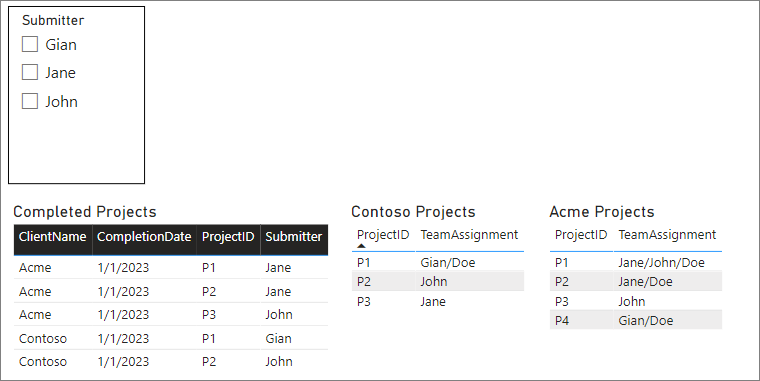
Sample file included. I need assistance with cross-filtering tables.


I have data for 'Finished Projects' and additional data for 'Client-Specific Projects.'

'Finished Projects' has a column for the project submitter's name; this is my single-value selection.

(Example: "Jane")

The 'Client-Specific Projects' lists the team assignment names - who was tasked with a given project.

(Example: Names separated by a forward slash "Jane/John/Gian")

I cannot figure out a way to filter client-specific project data based on this single-value selection. I attempted to filter on SelectedValue, counting if the row ContainsString, but nothing worked out as I had hoped. 
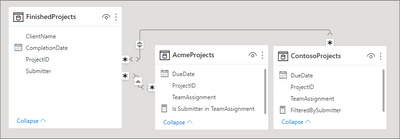
  Tables.PNG


Screenshot1.PNG


FilteredBySubmitter = CALCULATE(
    COUNTROWS('AcmeProjects'),
    FILTER(
        'AcmeProjects',
        CONTAINS(
            'AcmeProjects',
            'AcmeProjects'[TeamAssignment],
            SELECTEDVALUE(FinishedProjects[Submitter])
        )
    )
)


โ€ƒ


Is Submitter in TeamAssignment = 
IF (
    ISFILTERED( FinishedProjects[Submitter] ), 
    IF (
        COUNTROWS (
            FILTER (
                AcmeProjects,
                AcmeProjects[TeamAssignment] = SELECTEDVALUE ( FinishedProjects[Submitter] )
            )
        ) > 0,
        TRUE (),
        FALSE ()
    ),
    BLANK ()
)
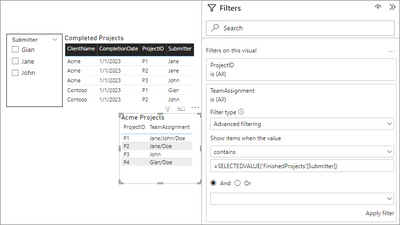


HailMary.PNG


And for grins: TeamAssignment - Advanced filtering for "=SELECTEDVALUE('FinishedProjects'[Submitter])"


Any help would be GREATLY appreciated!

Sample file + data: https://drive.google.com/drive/folders/17AaUfZ7U_sxWS33Y8UFtaMPKch4Fn-g_?usp=share_link

1 ACCEPTED SOLUTION
Anonymous
Not applicable

One of the problems could be that your data model contains only many-to-many relationships. 

From what I understand, all your tables are FACT tables,. In order to link them, you should have a separate list of UNIQUE submitter names, and use this as a Dimension table, which links only to your FACT tables. Dont link your fact tables together with each other.  Its a bit long to explain in this thread, so I really recommend watching some videos on data modelling and getting rid of many-to-many relationships

View solution in original post

1 REPLY 1
Anonymous
Not applicable

One of the problems could be that your data model contains only many-to-many relationships. 

From what I understand, all your tables are FACT tables,. In order to link them, you should have a separate list of UNIQUE submitter names, and use this as a Dimension table, which links only to your FACT tables. Dont link your fact tables together with each other.  Its a bit long to explain in this thread, so I really recommend watching some videos on data modelling and getting rid of many-to-many relationships

Helpful resources

Announcements
November Power BI Update Carousel

Power BI Monthly Update - November 2025

Check out the November 2025 Power BI update to learn about new features.

Fabric Data Days Carousel

Fabric Data Days

Advance your Data & AI career with 50 days of live learning, contests, hands-on challenges, study groups & certifications and more!

FabCon Atlanta 2026 carousel

FabCon Atlanta 2026

Join us at FabCon Atlanta, March 16-20, for the ultimate Fabric, Power BI, AI and SQL community-led event. Save $200 with code FABCOMM.

Top Solution Authors
Top Kudoed Authors