Join us at FabCon Atlanta from March 16 - 20, 2026, for the ultimate Fabric, Power BI, AI and SQL community-led event. Save $200 with code FABCOMM.
Register now!The Power BI Data Visualization World Championships is back! Get ahead of the game and start preparing now! Learn more
Hello!
I have simple columns
1) Date
2) Value
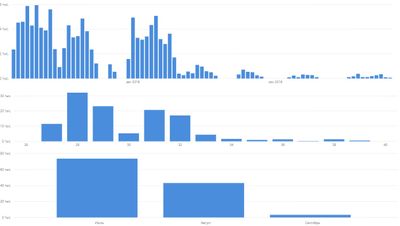
I also made a column with weeknumber, so i have 3 different charts.
I need to get 1 chart with filter 'day-week-month' and so when i will click 'day' it will show 1st chart, 'week' second, 'month' - third.
Is it possible?
Solved! Go to Solution.
Hi @rolfstar,
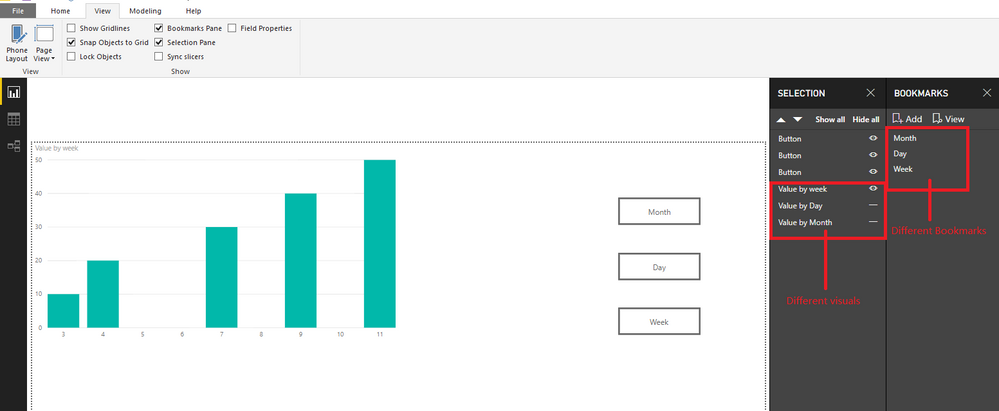
You could use the Button and Bookmark function to change different visuals:
Create three visuals by differnet data and open the Bookmark pane and Selection pane to choose the visual to hide to show with different bookmarks.
Create three buttons to link the different bookmarks:
Reference:http://radacad.com/bookmarks-and-buttons-making-power-bi-charts-even-more-interactive
You could also download the pbix file to have a view.
Regards,
Daniel He
Hi @rolfstar,
You could use the Button and Bookmark function to change different visuals:
Create three visuals by differnet data and open the Bookmark pane and Selection pane to choose the visual to hide to show with different bookmarks.
Create three buttons to link the different bookmarks:
Reference:http://radacad.com/bookmarks-and-buttons-making-power-bi-charts-even-more-interactive
You could also download the pbix file to have a view.
Regards,
Daniel He
Thank you again for big help!
I also wanted to ask,
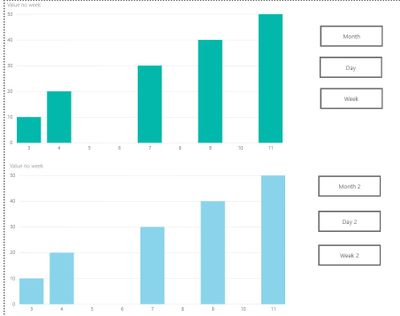
I'm trying to get 2 charts on page, so is it possible to click on upper charts buttons and lower chart will not be changed?
Because when i click "week1" i have weeks on upper and days on lower
then i click "month2" and i still have weeks on upper and now weeks on lower
then i finally click "days1" and on upper i have days and on lower i have days (because of bookmark)
Thank you!
The Power BI Data Visualization World Championships is back! Get ahead of the game and start preparing now!
| User | Count |
|---|---|
| 41 | |
| 38 | |
| 36 | |
| 30 | |
| 28 |
| User | Count |
|---|---|
| 128 | |
| 88 | |
| 79 | |
| 67 | |
| 62 |