Join us at FabCon Atlanta from March 16 - 20, 2026, for the ultimate Fabric, Power BI, AI and SQL community-led event. Save $200 with code FABCOMM.
Register now!Get Fabric Certified for FREE during Fabric Data Days. Don't miss your chance! Request now
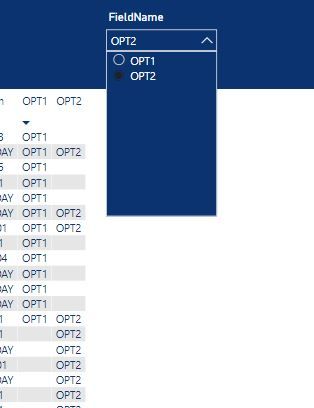
First post as a new user here. I have a table with a large number of flag fields (OPT1 -->OPTn) that contain a string or an empty string (see photo, I've limited it to two fields for now) I've also created a table named FlagFields with a single field named [FieldName] and populated it with the names of the two fields in the report's table.
What I'd like to have happen is when I select a value in the slice (ex. OPT2),I'd like the report table to only display records that have a value in the OPT2 field (9 records).
Thanks in advance
All/one measure need to like this
calculate([measure], not(isblank(Table[OPT2])))
Two have slicer like this you have to create multiple such measures and use measure slicer
https://radacad.com/change-the-column-or-measure-value-in-a-power-bi-visual-by-selection-of-the-slic...
https://community.powerbi.com/t5/Desktop/Slicer-MTD-QTD-YTD-to-filter-dates-using-the-slicer/td-p/50...
.
Thanks for the reply and I looked at the links but couldn't make the jump to how to apply their examples to what I want to do. It seems like what I'm trying to do ought to be very simple.
If I select (OPT1) in the slicer, I want to filter the table to only those records that have a value in the OPT1 field
If I select (OPT2) in the slicer, I want to filter the table to only those records that have a value in the OPT2 field
... etc
I understand that there isn't a simple OnChange event like there would be with a C# dropdown and unfortunately I don't understand how creating a measure(s) can help me solve this.
Thanks
Check out the November 2025 Power BI update to learn about new features.
Advance your Data & AI career with 50 days of live learning, contests, hands-on challenges, study groups & certifications and more!