Forum Discussion

Leo8542's avatar
Leo8542
Frequent Visitor
9 years ago
Solved

Filter Report by Max Date and Select First Entry for Multiple Matches

I have a data set that looks like the following:


ID    |  Status         | Date

A-1  |  In Progress  |   7/29/2017

A-1  |  Not Started |   7/29/2017

A-2  |  In Progress  |   7/25/2017

A-2  |  Not Started |   7/23/2017

A-3  |  In Progress  |   7/27/2017

A-3  |  Not Started |   7/4/2017

A-4  |  Completed  |   7/1/2017

A-4  |  In Progress  |   6/25/2017

A-4  |  Not Started |   6/20/2017

A-5  |  Completed  |   7/5/2017

A-5  |  In Progress  |   7/1/2017

A-5  |  Not Started |   6/30/2017


I want to be able to filter this data to only get the latest record for each ID for a given week (in this example: 7/23/2017-7/29/2017). I have created a calculated table to get just those records we want for the given week to get the following:


ID    |  Status         | Date

A-1  |  In Progress  |   7/29/2017

A-1  |  Not Started |   7/29/2017

A-2  |  In Progress  |   7/25/2017

A-2  |  Not Started |   7/23/2017

A-3  |  In Progress  |   7/27/2017

A-3  |  Not Started |   7/4/2017


However, I come into an issue where there would be multiple records for the same ID for the same Date (for example ID A-1), so ultimately I would want to choose the first record shown, so that my dataset will look like this:


ID    |  Status         | Date

A-1  |  In Progress  |   7/29/2017

A-2  |  In Progress  |   7/25/2017

A-3  |  In Progress  |   7/27/2017


We have tried to use SUMMARIZE, FILTER, and LATESTDATE functions, however I am at a loss as to how it should be utilized. Any help is appreciated. Thanks.


  • Hi Leo8542,


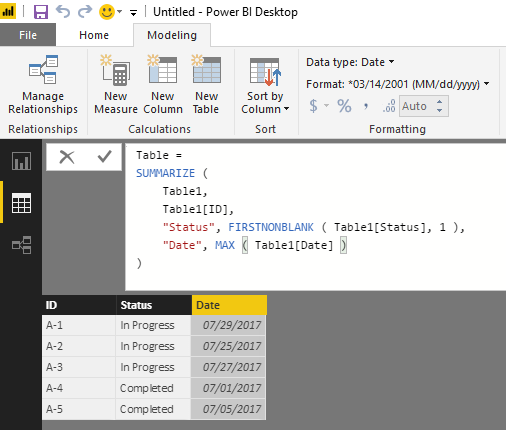
    Based on my test, you should be able to use the formula below to create a new calculate table in your scenario. :smileyhappy:

    Table = 
    SUMMARIZE (
        Table1,
        Table1[ID],
        "Status", FIRSTNONBLANK ( Table1[Status], 1 ),
        "Date", MAX ( Table1[Date] )
    )


    Regards

4 Replies

  • v-ljerr-msft's avatar
    v-ljerr-msft
    Icon for Microsoft Employee rankMicrosoft Employee

    Hi Leo8542,


    Based on my test, you should be able to use the formula below to create a new calculate table in your scenario. :smileyhappy:

    Table = 
    SUMMARIZE (
        Table1,
        Table1[ID],
        "Status", FIRSTNONBLANK ( Table1[Status], 1 ),
        "Date", MAX ( Table1[Date] )
    )


    Regards

    • Leo8542's avatar
      Leo8542
      Frequent Visitor

      Thanks, this is the solution I needed. Works perfectly and is easy to understand.

  • Anonymous's avatar
    Anonymous
    Not applicable

    You could create a separate table that has your Status with an ID and create a relationship between the two tables. The StatusID could be something like 1,2,3 (1=Not Started, 2=In Progress, 3=Completed). Then you could get the Max(StatusID) for a given ID and Date.

    Table (Status)

    ID    Name 

    1      Not Started
    2      In Progress
    3      Completed

    • Leo8542's avatar
      Leo8542
      Frequent Visitor

      Thanks for the suggestion, but I also think that it might be the case where an entry can go from "Completed" back to "In Progress" so pulling the max may not necessarily give me the most recent status per ID.