Join us at FabCon Atlanta from March 16 - 20, 2026, for the ultimate Fabric, Power BI, AI and SQL community-led event. Save $200 with code FABCOMM.
Register now!The Power BI Data Visualization World Championships is back! Get ahead of the game and start preparing now! Learn more
Hello everyone,
I have a client who's wanting a Filled Map to show a color gradient comparing sales by state. What he wants also is Push Pins in the map for his top X clients. I explored around with map options and really couldn't find what I was looking for. The closest thing I could get to was the ARCGIS map that allowed me to add push pins, but the process was manually entering addresses. I want something where I drag and drop a field, because depending on the slicer selection, his top X clients will change. Does anyone have any recommendations?
@Anonymous m I doubt what you say is correct.
refer if these can help
https://community.powerbi.com/t5/Desktop/Pin-the-Location-in-Heat-Map/td-p/723332
https://doc.arcgis.com/en/maps-for-powerbi/design/pin-locations.htm
Hello @amitchandak ,
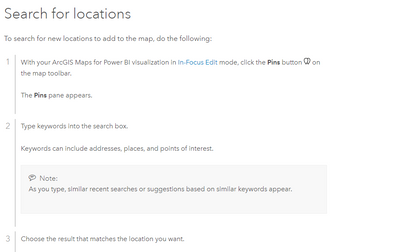
Thank you for responding. I'm not refuting the ability on Arc GIS to add pin, but I cannot drop a field into a well, so that it updates automatically. Like I said, I have to add the pins manually, which is where it says to type in the keywords. Depending on my slicer selections, the top companies may change. I attached a screenshot from the Arc GIS documentation you sent.
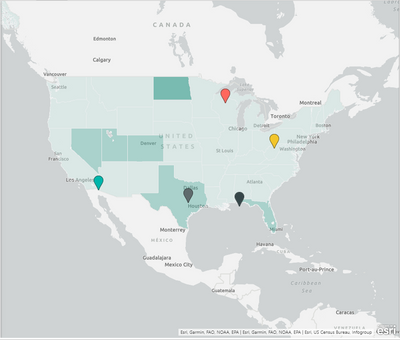
Here's a screenshot of roughly what I'm looking for:
I used a reference layer, but I want the states to be a color gradient based upon sales, and the push pins (which I added manually in the example) to be dynamically based on the customer's address field. So if I change the the slicer to, for example sales of product A, my top 5 customers who use product A will adjust accordingly. That's the feature that I can't seem to find in Power BI map options.
The Power BI Data Visualization World Championships is back! Get ahead of the game and start preparing now!
| User | Count |
|---|---|
| 38 | |
| 38 | |
| 36 | |
| 28 | |
| 28 |
| User | Count |
|---|---|
| 124 | |
| 88 | |
| 74 | |
| 66 | |
| 65 |