Share feedback directly with Fabric product managers, participate in targeted research studies and influence the Fabric roadmap.
Sign up nowGet Fabric certified for FREE! Don't miss your chance! Learn more
Hello Power BI Community,
I could solve the problem by entering the code:
let
Source = Facebook.Graph("https://graph.facebook.com/v2.8/microsoftbi/posts?limit=100"),
#"Expanded object_link" = Table.ExpandRecordColumn(Source, "object_link", {"connections"}, {"object_link.connections"}),
#"Expanded object_link.connections" = Table.ExpandRecordColumn(#"Expanded object_link", "object_link.connections", {"comments"}, {"object_link.connections.comments"}),
#"Expanded object_link.connections.comments" = Table.ExpandTableColumn(#"Expanded object_link.connections", "object_link.connections.comments", {"created_time", "from", "message", "id", "object_link"}, {"object_link.connections.comments.created_time", "object_link.connections.comments.from", "object_link.connections.comments.message", "object_link.connections.comments.id", "object_link.connections.comments.object_link"})
in
#"Expanded object_link.connections.comments"
But now my question is, if I can also see the replies of the comments? Is there another code?
So my desired order would look like this:
Post -> Comment -> Replies to the comments
Kind of like this:
But I would also like to see all replies, so not only one single reply.
Regards
Solved! Go to Solution.
Hi @Drawyiana,
After getting all Posts, please expand corresponding items following below sequence:
object_link
-> object_link.connections
-> object_link.connections.comments
-> object_link.connections.comments.object_link
-> object_link.connections.comments.object_link.connections
-> object_link.connections.comments.object_link.connections.comments
-> object_link.connections.comments.object_link.connections.comments.message
let
Source = Facebook.Graph("xxxxxxxx"),
#"Expanded object_link" = Table.ExpandRecordColumn(Source, "object_link", {"connections"}, {"object_link.connections"}),
#"Expanded object_link.connections" = Table.ExpandRecordColumn(#"Expanded object_link", "object_link.connections", {"comments"}, {"object_link.connections.comments"}),
#"Expanded object_link.connections.comments" = Table.ExpandTableColumn(#"Expanded object_link.connections", "object_link.connections.comments", {"object_link"}, {"object_link.connections.comments.object_link"}),
#"Expanded object_link.connections.comments.object_link" = Table.ExpandRecordColumn(#"Expanded object_link.connections.comments", "object_link.connections.comments.object_link", {"connections"}, {"object_link.connections.comments.object_link.connections"}),
#"Expanded object_link.connections.comments.object_link.connections" = Table.ExpandRecordColumn(#"Expanded object_link.connections.comments.object_link", "object_link.connections.comments.object_link.connections", {"comments"}, {"object_link.connections.comments.object_link.connections.comments"}),
#"Expanded object_link.connections.comments.object_link.connections.comments" = Table.ExpandTableColumn(#"Expanded object_link.connections.comments.object_link.connections", "object_link.connections.comments.object_link.connections.comments", {"message"}, {"object_link.connections.comments.object_link.connections.comments.message"})
in
#"Expanded object_link.connections.comments.object_link.connections.comments"
Best regards,
Yuliana Gu
Hi @Drawyiana,
After getting all Posts, please expand corresponding items following below sequence:
object_link
-> object_link.connections
-> object_link.connections.comments
-> object_link.connections.comments.object_link
-> object_link.connections.comments.object_link.connections
-> object_link.connections.comments.object_link.connections.comments
-> object_link.connections.comments.object_link.connections.comments.message
let
Source = Facebook.Graph("xxxxxxxx"),
#"Expanded object_link" = Table.ExpandRecordColumn(Source, "object_link", {"connections"}, {"object_link.connections"}),
#"Expanded object_link.connections" = Table.ExpandRecordColumn(#"Expanded object_link", "object_link.connections", {"comments"}, {"object_link.connections.comments"}),
#"Expanded object_link.connections.comments" = Table.ExpandTableColumn(#"Expanded object_link.connections", "object_link.connections.comments", {"object_link"}, {"object_link.connections.comments.object_link"}),
#"Expanded object_link.connections.comments.object_link" = Table.ExpandRecordColumn(#"Expanded object_link.connections.comments", "object_link.connections.comments.object_link", {"connections"}, {"object_link.connections.comments.object_link.connections"}),
#"Expanded object_link.connections.comments.object_link.connections" = Table.ExpandRecordColumn(#"Expanded object_link.connections.comments.object_link", "object_link.connections.comments.object_link.connections", {"comments"}, {"object_link.connections.comments.object_link.connections.comments"}),
#"Expanded object_link.connections.comments.object_link.connections.comments" = Table.ExpandTableColumn(#"Expanded object_link.connections.comments.object_link.connections", "object_link.connections.comments.object_link.connections.comments", {"message"}, {"object_link.connections.comments.object_link.connections.comments.message"})
in
#"Expanded object_link.connections.comments.object_link.connections.comments"
Best regards,
Yuliana Gu
Thank you so much! I finally can see all replies to one post.
Is there also the possibility to see the user names / id´s of the repliers?
Regards,
Sebastian
Hi @Drawyiana,
object_link
-> object_link.connections
-> object_link.connections.comments
-> object_link.connections.comments.object_link
-> object_link.connections.comments.object_link.connections
-> object_link.connections.comments.object_link.connections.comments
-> object_link.connections.comments.object_link.connections.comments.from
-> object_link.connections.comments.object_link.connections.comments.from.name
Best regards,
Yuliana Gu
Hi @v-yulgu-msft,
Thanks for replying. Your answer also helped me on one of my dashboards.
Would you mind helping me aswell? I would like to get information on the users who comments on my page's posts, such as: gender, hometown, age, etc.
Any ideas?
Hello Power BI Community,
I could solve the problem by entering the code:
let
Source = Facebook.Graph("https://graph.facebook.com/v2.8/microsoftbi/posts?limit=100"),
#"Expanded object_link" = Table.ExpandRecordColumn(Source, "object_link", {"connections"}, {"object_link.connections"}),
#"Expanded object_link.connections" = Table.ExpandRecordColumn(#"Expanded object_link", "object_link.connections", {"comments"}, {"object_link.connections.comments"}),
#"Expanded object_link.connections.comments" = Table.ExpandTableColumn(#"Expanded object_link.connections", "object_link.connections.comments", {"created_time", "from", "message", "id", "object_link"}, {"object_link.connections.comments.created_time", "object_link.connections.comments.from", "object_link.connections.comments.message", "object_link.connections.comments.id", "object_link.connections.comments.object_link"})
in
#"Expanded object_link.connections.comments"
But now my question is, if I can also see the replies of the comments? Is there another code?
So my desired order would look like this:
Post -> Comment -> Replies to the comments
Kind of like this:
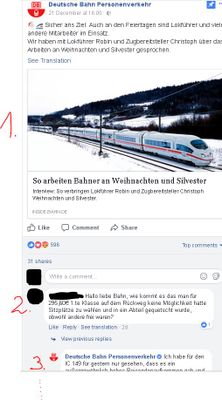
But I would also like to see all replies, so not only one single reply.
Regards
If you love stickers, then you will definitely want to check out our Community Sticker Challenge!
Check out the January 2026 Power BI update to learn about new features.
| User | Count |
|---|---|
| 64 | |
| 63 | |
| 48 | |
| 21 | |
| 18 |
| User | Count |
|---|---|
| 118 | |
| 117 | |
| 38 | |
| 36 | |
| 27 |