Huge last-minute discounts for FabCon Vienna from September 15-18, 2025
Supplies are limited. Contact info@espc.tech right away to save your spot before the conference sells out.
Get your discount- Power BI forums
- Get Help with Power BI
- Desktop
- Service
- Report Server
- Power Query
- Mobile Apps
- Developer
- DAX Commands and Tips
- Custom Visuals Development Discussion
- Health and Life Sciences
- Power BI Spanish forums
- Translated Spanish Desktop
- Training and Consulting
- Instructor Led Training
- Dashboard in a Day for Women, by Women
- Galleries
- Data Stories Gallery
- Themes Gallery
- Contests Gallery
- Quick Measures Gallery
- Notebook Gallery
- Translytical Task Flow Gallery
- TMDL Gallery
- R Script Showcase
- Webinars and Video Gallery
- Ideas
- Custom Visuals Ideas (read-only)
- Issues
- Issues
- Events
- Upcoming Events
Score big with last-minute savings on the final tickets to FabCon Vienna. Secure your discount
- Power BI forums
- Forums
- Get Help with Power BI
- Desktop
- Re: Extract specific numbers from a group
- Subscribe to RSS Feed
- Mark Topic as New
- Mark Topic as Read
- Float this Topic for Current User
- Bookmark
- Subscribe
- Printer Friendly Page


- Mark as New
- Bookmark
- Subscribe
- Mute
- Subscribe to RSS Feed
- Permalink
- Report Inappropriate Content
Extract specific numbers from a group
Hello,
Hope you can help with this.
I have a table that looks like this:
| Transaction ID | Extracts |
| 1 | 021, 003, 022, 603, 415 |
| 2 | 002, 001, 408, 510 |
| 3 | 005, 004, 006, 510, 415, 408 |
From the Extracts column, I care about the last number (to the right) if its one of the following: 001, 002, 003, 004, 005, 006. All the other ones are irrelevant.
So at the end, for Transcation ID 1, the number I would need is 003.
For Transcation ID 2, 001.
For Transcation ID 3, 006.
The order of the number is very important and need to be mantained. And as you can see, there is no easy way to predict how many each Transaction ID will have. It could be 5, 1 or even up to 10.
Thanks you!
Solved! Go to Solution.


- Mark as New
- Bookmark
- Subscribe
- Mute
- Subscribe to RSS Feed
- Permalink
- Report Inappropriate Content
Hi @NPC,
You can extract these specific numbers from a group by using list functions.
Create a custom column using this M Code:
Extract = List.Last(List.Select(Text.Split([Extracts],","), each _ <= "006"))
This code will:
- Convert your group into a list.
- Filter out everything except {001..006}.
- Return the right most element from that list.
In case you don't have any number from 001 to 006 in your group, you'll get a null value.
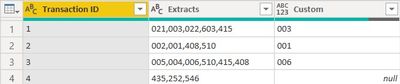
Works for you? Mark this post as a solution if it does!
- Mark as New
- Bookmark
- Subscribe
- Mute
- Subscribe to RSS Feed
- Permalink
- Report Inappropriate Content
I'll remove the square brackets and see what happens. Thanks!
- Mark as New
- Bookmark
- Subscribe
- Mute
- Subscribe to RSS Feed
- Permalink
- Report Inappropriate Content
Let me know if that works or not...
- Mark as New
- Bookmark
- Subscribe
- Mute
- Subscribe to RSS Feed
- Permalink
- Report Inappropriate Content
The square brackets were causing issues. Thank you so much!
- Mark as New
- Bookmark
- Subscribe
- Mute
- Subscribe to RSS Feed
- Permalink
- Report Inappropriate Content
Hi @NPC,
You can extract these specific numbers from a group by using list functions.
Create a custom column using this M Code:
Extract = List.Last(List.Select(Text.Split([Extracts],","), each _ <= "006"))
This code will:
- Convert your group into a list.
- Filter out everything except {001..006}.
- Return the right most element from that list.
In case you don't have any number from 001 to 006 in your group, you'll get a null value.
Works for you? Mark this post as a solution if it does!
- Mark as New
- Bookmark
- Subscribe
- Mute
- Subscribe to RSS Feed
- Permalink
- Report Inappropriate Content
@Shaurya Thank you! It works it some cases but not in all for some reason. As you can see below, instead of pulling 004, it pulled 209. Any thoughts as to why that's happening? The new column I created is " Exracted Latest Scenarion". Ignore the date column.

Thanks!
- Mark as New
- Bookmark
- Subscribe
- Mute
- Subscribe to RSS Feed
- Permalink
- Report Inappropriate Content
Hi @NPC,
I think this is because of the square brackets. The original column in your post had only comma separated values. However in the second case where you got the wrong output, the values are separated by comma but also enclosed in brackets. Can you check if you get any wrong values at all in the first case?
As far as the second case is concerned, if you can specify the different ways in which the Extract column may have values, we can work out a solution that gives the right values in all cases.

Helpful resources

Power BI Monthly Update - August 2025
Check out the August 2025 Power BI update to learn about new features.

Fabric Community Update - August 2025
Find out what's new and trending in the Fabric community.


| User | Count |
|---|---|
| 84 | |
| 73 | |
| 52 | |
| 48 | |
| 43 |


