Fabric Data Days starts November 4th!
Advance your Data & AI career with 50 days of live learning, dataviz contests, hands-on challenges, study groups & certifications and more!
Get registered- Power BI forums
- Get Help with Power BI
- Desktop
- Service
- Report Server
- Power Query
- Mobile Apps
- Developer
- DAX Commands and Tips
- Custom Visuals Development Discussion
- Health and Life Sciences
- Power BI Spanish forums
- Translated Spanish Desktop
- Training and Consulting
- Instructor Led Training
- Dashboard in a Day for Women, by Women
- Galleries
- Data Stories Gallery
- Themes Gallery
- Contests Gallery
- Quick Measures Gallery
- Visual Calculations Gallery
- Notebook Gallery
- Translytical Task Flow Gallery
- TMDL Gallery
- R Script Showcase
- Webinars and Video Gallery
- Ideas
- Custom Visuals Ideas (read-only)
- Issues
- Issues
- Events
- Upcoming Events
Get Fabric Certified for FREE during Fabric Data Days. Don't miss your chance! Learn more
- Power BI forums
- Forums
- Get Help with Power BI
- Desktop
- Re: Exclude 0 values from a subtotal in a Matrix
- Subscribe to RSS Feed
- Mark Topic as New
- Mark Topic as Read
- Float this Topic for Current User
- Bookmark
- Subscribe
- Printer Friendly Page


- Mark as New
- Bookmark
- Subscribe
- Mute
- Subscribe to RSS Feed
- Permalink
- Report Inappropriate Content
Exclude 0 values from a subtotal in a Matrix
Hi everyone,
I am trying to exclude 0 values from a column subtotal in a Matrix. Using a Report Level Filters does not seem to work in this scenario.
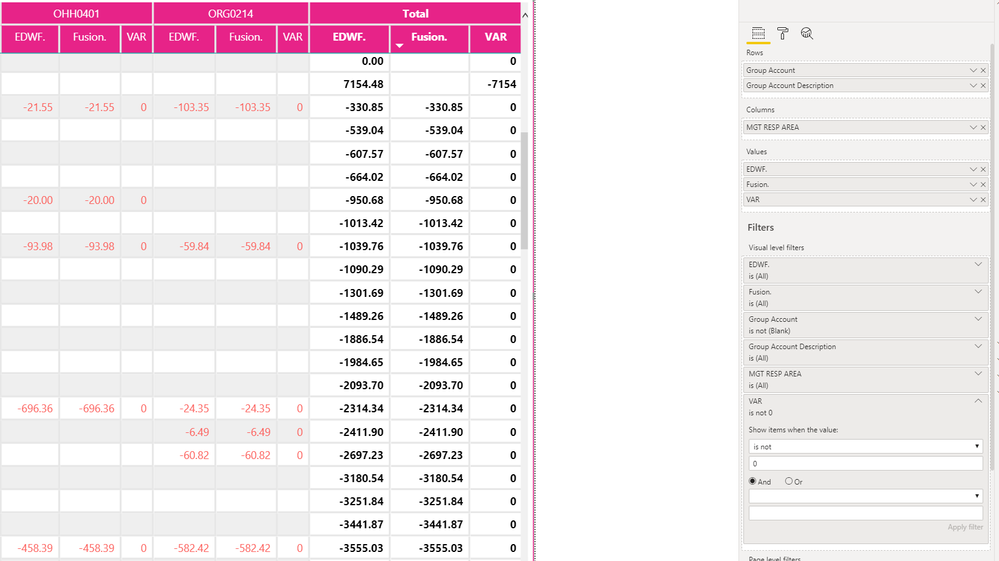
I have three measures:
- The first measure is summing a column based on a condition:
EDWF. = CALCULATE(SUM('FPI & Accounts Fusion & EDWF Data'[POSTED VALUE]),'FPI & Accounts Fusion & EDWF Data'[Data Source]="EDWF")) - The second measure is summing a column based on a different condition:
Fusion. = CALCULATE(SUM('FPI & Accounts Fusion & EDWF Data'[POSTED VALUE]),'FPI & Accounts Fusion & EDWF Data'[Data Source]="Fusion")) - The third measure is a simple variance calculation - it subtracts the first measure from the second:
VAR = 'FPI & Accounts Fusion & EDWF Data'[Fusion.]-'FPI & Accounts Fusion & EDWF Data'[EDWF.])
How can I filter the matrix to only display rows where the 3rd measure does not equal 0?
Solved! Go to Solution.


- Mark as New
- Bookmark
- Subscribe
- Mute
- Subscribe to RSS Feed
- Permalink
- Report Inappropriate Content
It's becuase the VAR amounts are smaller than .01, in the grid they show 0 because of the format but if you change the VAR format to something with say 5 decimal places you can see it:
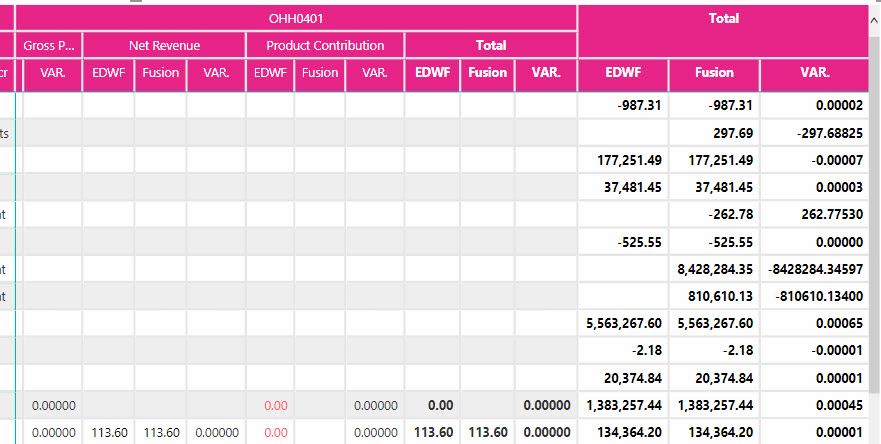
If you change your Var. measure to the following it should work better for you:
VAR. = ROUND([EDWF]-[Fusion],2)
Also, you don't have to (and shouldn't) put the table name in your formula when referencing a measure. That way, when you are looking at a formula you know 'Brand Fusion & EDWF Data'[Value] is a column in a table and [EDWF] is a measure.
- Mark as New
- Bookmark
- Subscribe
- Mute
- Subscribe to RSS Feed
- Permalink
- Report Inappropriate Content
What if you add into the filter
AND
is not
BLANK()
?
- Mark as New
- Bookmark
- Subscribe
- Mute
- Subscribe to RSS Feed
- Permalink
- Report Inappropriate Content
Thanks for the quick response. No change unfortunately.
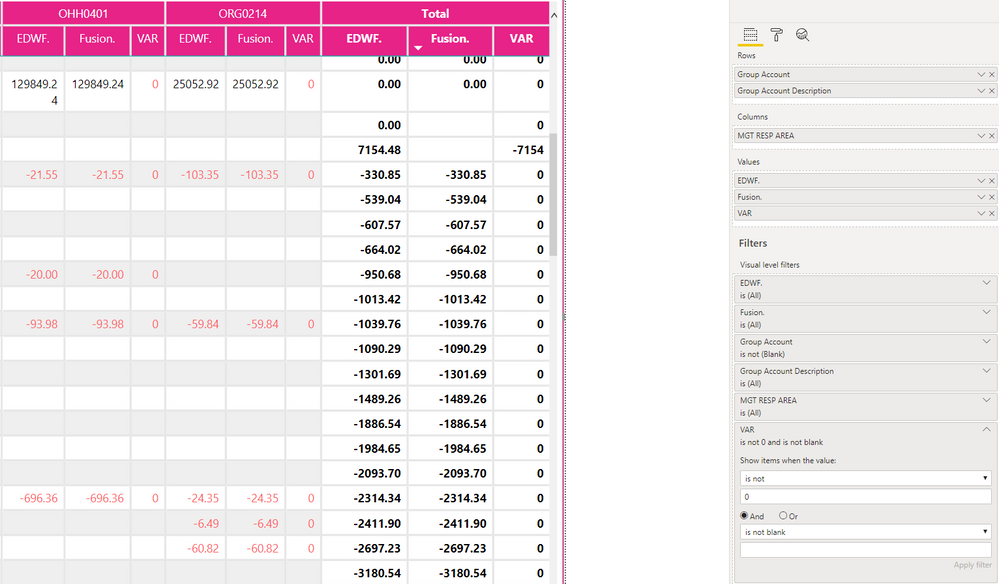
- Mark as New
- Bookmark
- Subscribe
- Mute
- Subscribe to RSS Feed
- Permalink
- Report Inappropriate Content
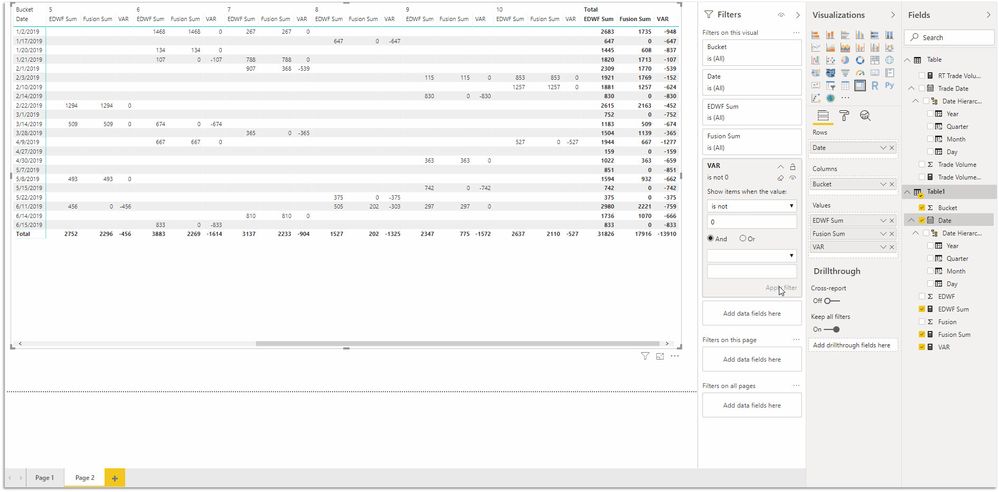
Is it maybe that the visual just isn't refreshing? I made a sample model to test and am getting the behavior you are looking for. First image is unfiltered, second is filtered on VAR measure only.

- Mark as New
- Bookmark
- Subscribe
- Mute
- Subscribe to RSS Feed
- Permalink
- Report Inappropriate Content
I have run a full refresh but unfortunately that has not resolved the issue either. May I send you my working file?
- Mark as New
- Bookmark
- Subscribe
- Mute
- Subscribe to RSS Feed
- Permalink
- Report Inappropriate Content
Certainly, if you post it to a dropbox or onedrive I can look at it.
- Mark as New
- Bookmark
- Subscribe
- Mute
- Subscribe to RSS Feed
- Permalink
- Report Inappropriate Content
Thank you. I have just shared a link via private message
- Mark as New
- Bookmark
- Subscribe
- Mute
- Subscribe to RSS Feed
- Permalink
- Report Inappropriate Content
It's becuase the VAR amounts are smaller than .01, in the grid they show 0 because of the format but if you change the VAR format to something with say 5 decimal places you can see it:
If you change your Var. measure to the following it should work better for you:
VAR. = ROUND([EDWF]-[Fusion],2)
Also, you don't have to (and shouldn't) put the table name in your formula when referencing a measure. That way, when you are looking at a formula you know 'Brand Fusion & EDWF Data'[Value] is a column in a table and [EDWF] is a measure.
- Mark as New
- Bookmark
- Subscribe
- Mute
- Subscribe to RSS Feed
- Permalink
- Report Inappropriate Content
Thank you so much for solving what now looks so obvious. Appreciate your patience and support

Helpful resources

Fabric Data Days
Advance your Data & AI career with 50 days of live learning, contests, hands-on challenges, study groups & certifications and more!

Power BI Monthly Update - October 2025
Check out the October 2025 Power BI update to learn about new features.

FabCon Atlanta 2026
Join us at FabCon Atlanta, March 16-20, for the ultimate Fabric, Power BI, AI and SQL community-led event. Save $200 with code FABCOMM.


| User | Count |
|---|---|
| 84 | |
| 49 | |
| 38 | |
| 31 | |
| 30 |


