
Join us at FabCon Atlanta from March 16 - 20, 2026, for the ultimate Fabric, Power BI, AI and SQL community-led event. Save $200 with code FABCOMM.
Register now!The Power BI Data Visualization World Championships is back! Get ahead of the game and start preparing now! Learn more
Solved! Go to Solution.
Hi @Anonymous ,
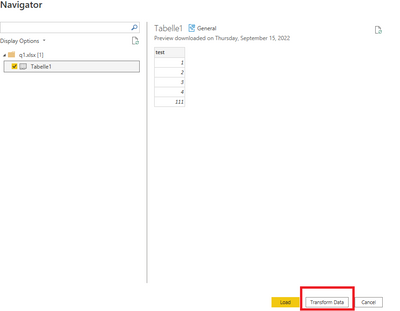
When you load data:click transform data:
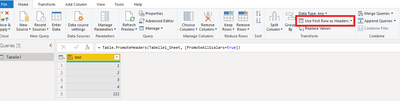
Then click the below ,then apply and close :
Best Regards
Lucien
Or even better;
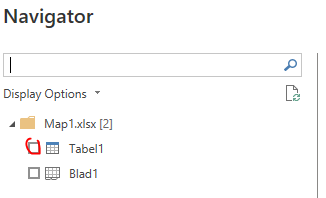
Make sure you have a table in Excel instead of flat data.
Then you make sure you are importing the table instead of the sheet. Flat data sheets might give you all kinds of problems.
Or in PQ
Hi @Anonymous ,
When you load data:click transform data:
Then click the below ,then apply and close :
Best Regards
Lucien
Check out the November 2025 Power BI update to learn about new features.
Advance your Data & AI career with 50 days of live learning, contests, hands-on challenges, study groups & certifications and more!
| User | Count |
|---|---|
| 57 | |
| 43 | |
| 41 | |
| 21 | |
| 17 |
| User | Count |
|---|---|
| 183 | |
| 114 | |
| 93 | |
| 62 | |
| 45 |