cancel
Showing results for 
Search instead for 
Did you mean: 

The Power BI Data Visualization World Championships is back! Get ahead of the game and start preparing now! Learn more

Reply
Anonymous
Not applicable

Evaluating dates in the past

Dear all,

I have a set of data that has to be evaluated taking in account the previous month.

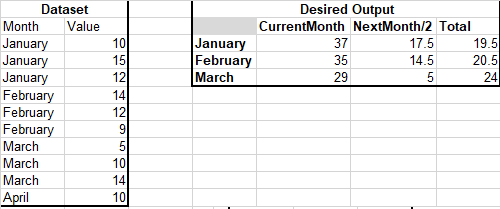
I am presenting a mock dataset (normal month/value columns) and the desired output.
I need a measure that for each month it evaluates itself PLUS a function of the previous month.

DesiredFAC.png

I can't manage this situation as the filters block me to evaluate the previous months.

I appreciate your help,
V

1 ACCEPTED SOLUTION
v-frfei-msft
Community Support
Community Support

Hi @Anonymous ,


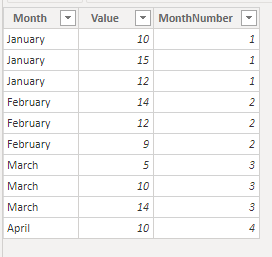
As the screenshot you shared, we should convert the month column from text to number by creating a calculated column.


MonthNumber = 
SWITCH (
    'Dataset'[Month],
    "January", 1,
    "February", 2,
    "March", 3,
    "April", 4,
    "May", 5,
    "June", 6,
    "July", 7,
    "August", 8,
    "September", 9,
    "October", 10,
    "November", 11,
    "December", 12
)

1.png

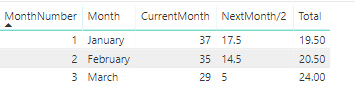
Then we can create the following measure to meet what you need.

CurrentMonth =
SUM ( 'Dataset'[Value] )

NextMonth/2 =
FORMAT (
    CALCULATE (
        SUM ( 'Dataset'[Value] ),
        FILTER (
            ALL ( 'Dataset' ),
            'Dataset'[MonthNumber]
                = SELECTEDVALUE ( 'Dataset'[MonthNumber] ) + 1
        )
    ) / 2,
    "General Number"
)

Total =
IFERROR ( [CurrentMonth] - [NextMonth/2], BLANK () )


2.png

BTW, pbix as attached.


Community Support Team _ Frank
If this post helps, then please consider Accept it as the solution to help the others find it more quickly.

View solution in original post

1 REPLY 1
v-frfei-msft
Community Support
Community Support

Hi @Anonymous ,


As the screenshot you shared, we should convert the month column from text to number by creating a calculated column.


MonthNumber = 
SWITCH (
    'Dataset'[Month],
    "January", 1,
    "February", 2,
    "March", 3,
    "April", 4,
    "May", 5,
    "June", 6,
    "July", 7,
    "August", 8,
    "September", 9,
    "October", 10,
    "November", 11,
    "December", 12
)

1.png

Then we can create the following measure to meet what you need.

CurrentMonth =
SUM ( 'Dataset'[Value] )

NextMonth/2 =
FORMAT (
    CALCULATE (
        SUM ( 'Dataset'[Value] ),
        FILTER (
            ALL ( 'Dataset' ),
            'Dataset'[MonthNumber]
                = SELECTEDVALUE ( 'Dataset'[MonthNumber] ) + 1
        )
    ) / 2,
    "General Number"
)

Total =
IFERROR ( [CurrentMonth] - [NextMonth/2], BLANK () )


2.png

BTW, pbix as attached.


Community Support Team _ Frank
If this post helps, then please consider Accept it as the solution to help the others find it more quickly.

Helpful resources

Announcements
November Power BI Update Carousel

Power BI Monthly Update - November 2025

Check out the November 2025 Power BI update to learn about new features.

Fabric Data Days Carousel

Fabric Data Days

Advance your Data & AI career with 50 days of live learning, contests, hands-on challenges, study groups & certifications and more!

FabCon Atlanta 2026 carousel

FabCon Atlanta 2026

Join us at FabCon Atlanta, March 16-20, for the ultimate Fabric, Power BI, AI and SQL community-led event. Save $200 with code FABCOMM.

Top Solution Authors
Top Kudoed Authors