cancel
Showing results for 
Search instead for 
Did you mean: 

The Power BI Data Visualization World Championships is back! Get ahead of the game and start preparing now! Learn more

Reply
abrouwer
New Member

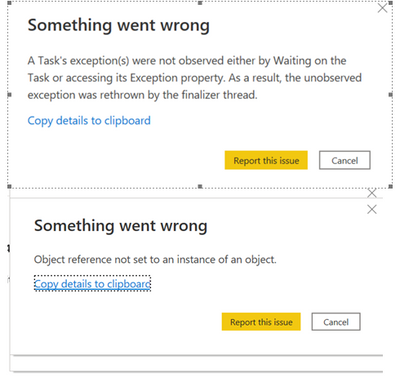
Error 'object reference not set to an instance of an object' when refreshing data in powerBI desktop

I am getting the below errors when I click "refresh" on my power BI desktop dashboard. The data is linked to one excel file. I updated the data in the excel file the same way I do every week and did not make any changes to the dashboard. I have never had an issue refreshing the data before.  Not sure how to solve. Thanks! 


abrouwer_1-1655326961702.png


1 ACCEPTED SOLUTION
v-luwang-msft
Community Support
Community Support


Hi @abrouwer ,

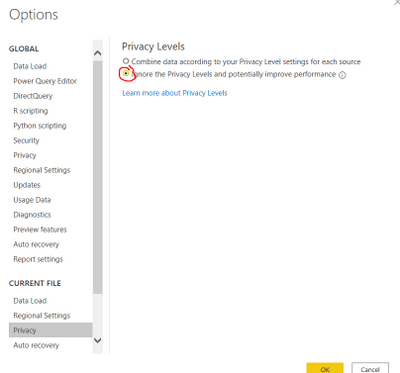
Some user feedback.If you use this setting it goes through the error:


vluwangmsft_0-1655801924226.png


And you could try to use previous monthly version to have a test.

https://docs.microsoft.com/en-us/power-bi/fundamentals/desktop-latest-update-archive


simiar question refer:

https://community.powerbi.com/t5/Issues/Task-s-exception-error-thrown-when-setting-up-incremental/id... 

https://community.powerbi.com/t5/Desktop/Object-reference-not-set-to-an-instance-of-an-object/td-p/2... 


Did I answer your question? Mark my post as a solution!


Best Regards

Lucien

View solution in original post

3 REPLIES 3
JulianNoarmenn
New Member

Short answer
For anyone having the same problem with Excel files, check the following items:

- Latest version of Power BI Desktop

- Use the beginning of the URL with https

- Update WebView2 to latest version

- Resave spreadsheets that may be corrupted


Long answer
Read here: https://powerbipoint.com/2024/01/02/power-bi-fix-the-error-object-reference-not-set-to-an-instance-o...

v-luwang-msft
Community Support
Community Support


Hi @abrouwer ,

Some user feedback.If you use this setting it goes through the error:


vluwangmsft_0-1655801924226.png


And you could try to use previous monthly version to have a test.

https://docs.microsoft.com/en-us/power-bi/fundamentals/desktop-latest-update-archive


simiar question refer:

https://community.powerbi.com/t5/Issues/Task-s-exception-error-thrown-when-setting-up-incremental/id... 

https://community.powerbi.com/t5/Desktop/Object-reference-not-set-to-an-instance-of-an-object/td-p/2... 


Did I answer your question? Mark my post as a solution!


Best Regards

Lucien

lbendlin
Super User
Super User

You can raise an issue at https://issues.powerbi.com . If you have a Pro license you can consider raising a Pro ticket at https://powerbi.microsoft.com/en-us/support/pro/

Helpful resources

Announcements
Power BI DataViz World Championships

Power BI Dataviz World Championships

The Power BI Data Visualization World Championships is back! Get ahead of the game and start preparing now!

December 2025 Power BI Update Carousel

Power BI Monthly Update - December 2025

Check out the December 2025 Power BI Holiday Recap!

FabCon Atlanta 2026 carousel

FabCon Atlanta 2026

Join us at FabCon Atlanta, March 16-20, for the ultimate Fabric, Power BI, AI and SQL community-led event. Save $200 with code FABCOMM.