Forum Discussion

Error in calculating Duration in direct query
Hello Everyone,
I have a requirement where I have direct connection from SAP HANA for Cube views. In one of the view, I have start date, end date, start time and end time. As this is direct query, all fields are getting detected as text fields.
When I go to edit query mode, I can see date and time for each field as shown below,
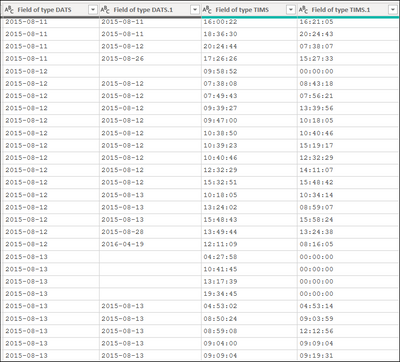
As this is direct query, I can not change the data type.
If I try to see those data in report, I see some fields got trimmed as shown below,
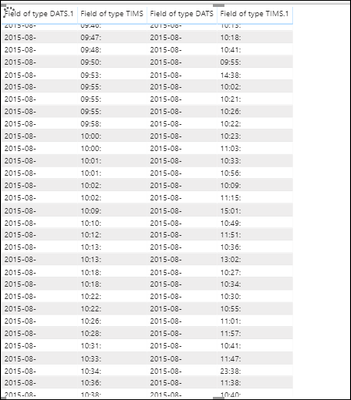
Can someone help me why this is happening.
My end goal is to find duration by formula, [Field of type DATS.1][Field of type TIMS.1] - [Field of type DATS][Field of type TIMS]
I can change type of date fields from modelling in menu bar but this is not working for time field.
Can anyone help me how to calculate the duration with this setup.
After so many trials I have found out the solution for this.
created new column =
1. Approval sent date = DATEVALUE([Field of date])
2. Approval sent time = TIMEVALUE([Field of time])3. Approved Date = DATEVALUE([Field of date.1])4. Approved Time = TIMEVALUE([Field of time.1])5. Duration in dates = DATEDIFF(FIRSTDATE('CA_ZSAF_APPROVALS'[Approval sent date]),FIRSTDATE('CA_ZSAF_APPROVALS'[Approved Date]),HOUR)6. Duration in Time = DATEDIFF(FIRSTNONBLANK('CA_ZSAF_APPROVALS'[Approval sent time],('CA_ZSAF_APPROVALS'[Approval sent time] == 'CA_ZSAF_APPROVALS'[Approval sent time])),FIRSTNONBLANK('CA_ZSAF_APPROVALS'[Approved Time],('CA_ZSAF_APPROVALS'[Approved Time] == 'CA_ZSAF_APPROVALS'[Approved Time])),HOUR)7. Final Duration in Hours = IF('CA_ZSAF_APPROVALS'[Duration in dates] >= 0, [Duration in dates] + [Duration in Time], [Duration in dates] - [Duration in Time] )Still it has many modifications to do but at least it is showing me duration in hours and some changes will show correct values.
2 Replies
- v-eachen-msft
Community Support
Hi pawand23 ,
You could create two new columns(keep original columns format as text type):
Date1 =
'Table'[Field of type DATS.1]&" "&'Table'[Field of type TIMS.1]
Date2 =
'Table'[Field of type DATS]&" "&'Table'[Field of type TIMS]
Change these two columns type to be Date/Time.
Then calculate by DATEDIFF() function. You could use hour,minute,second,day etc.
Diff =
DATEDIFF('Table'[Date1],'Table'[Date2],SECOND)
Here is the result.
 pawand23Frequent Visitor
After so many trials I have found out the solution for this.
created new column =
1. Approval sent date = DATEVALUE([Field of date])
2. Approval sent time = TIMEVALUE([Field of time])3. Approved Date = DATEVALUE([Field of date.1])4. Approved Time = TIMEVALUE([Field of time.1])5. Duration in dates = DATEDIFF(FIRSTDATE('CA_ZSAF_APPROVALS'[Approval sent date]),FIRSTDATE('CA_ZSAF_APPROVALS'[Approved Date]),HOUR)6. Duration in Time = DATEDIFF(FIRSTNONBLANK('CA_ZSAF_APPROVALS'[Approval sent time],('CA_ZSAF_APPROVALS'[Approval sent time] == 'CA_ZSAF_APPROVALS'[Approval sent time])),FIRSTNONBLANK('CA_ZSAF_APPROVALS'[Approved Time],('CA_ZSAF_APPROVALS'[Approved Time] == 'CA_ZSAF_APPROVALS'[Approved Time])),HOUR)7. Final Duration in Hours = IF('CA_ZSAF_APPROVALS'[Duration in dates] >= 0, [Duration in dates] + [Duration in Time], [Duration in dates] - [Duration in Time] )Still it has many modifications to do but at least it is showing me duration in hours and some changes will show correct values.
