Join us at FabCon Atlanta from March 16 - 20, 2026, for the ultimate Fabric, Power BI, AI and SQL community-led event. Save $200 with code FABCOMM.
Register now!View all the Fabric Data Days sessions on demand. View schedule
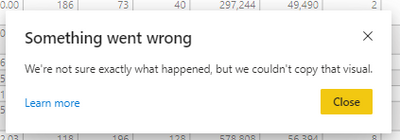
Today I am unable to copy any of my visuals whether they are simple card or a table on app.powerbi.com. I've tried on several different reports and they all fail. The error reads 'Something went wrong. We're not sure exactly what happened, but we couldn't copy that visual.'
My network is good and I've refreshed and republished a few times but still receiving the same error.
Any ideas what I can do?
Solved! Go to Solution.
Seems to be working now 🙂
Same issue here since last week.
Here is what it does whether on a dashboard or a report.
@Anonymous , If you want to copy in reading mode, then you have the option of copy the image as visual on visual. In edit mode, you should be able to copy that
If needed log an issue - https://community.powerbi.com/t5/Issues/idb-p/Issues
I saw this issue was already logged last weekend as a bug. Many users aren't able to copy any visuals either. I tried going into edit mode on the published report but no option is present to copy a visual there. No matter if it's a small visual, no matter which report, they all fail on app.powerbi.com and I can't find a way to copy any visuals on the desktop app. Do you know if there is a way to copy them on the desktop app?
Has there been any notification of when this will be resolved?
Check out the November 2025 Power BI update to learn about new features.
Advance your Data & AI career with 50 days of live learning, contests, hands-on challenges, study groups & certifications and more!