Join us at FabCon Atlanta from March 16 - 20, 2026, for the ultimate Fabric, Power BI, AI and SQL community-led event. Save $200 with code FABCOMM.
Register now!The Power BI Data Visualization World Championships is back! Get ahead of the game and start preparing now! Learn more
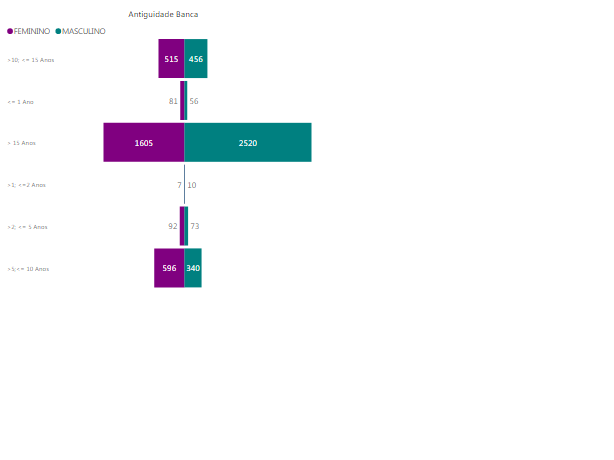
How can i arrange this chart with biggest data at the top and smallest at the bottom?
Thanks 🙂
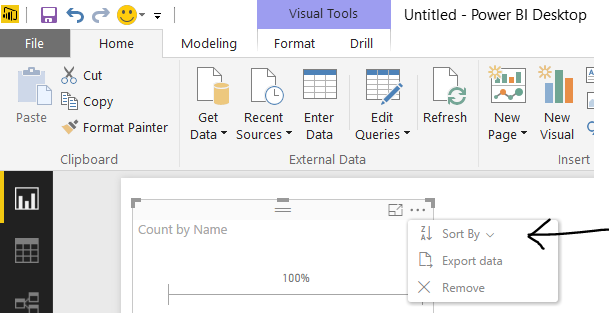
@gonrodrigues can you do without using tornado chart? Unfortunately it doesn't have sorting option which when using standard powerbi visual you will get by clicking three dots on the top right hand corner.
I solved this by changing the name directly in DB, adding a number before 0.xxx, 1.yyy, 2.zzz, so i can sort as i want
The Power BI Data Visualization World Championships is back! Get ahead of the game and start preparing now!
| User | Count |
|---|---|
| 41 | |
| 39 | |
| 37 | |
| 29 | |
| 24 |
| User | Count |
|---|---|
| 118 | |
| 98 | |
| 70 | |
| 69 | |
| 65 |