cancel
Showing results for 
Search instead for 
Did you mean: 

The Power BI Data Visualization World Championships is back! Get ahead of the game and start preparing now! Learn more

Reply
Anonymous
Not applicable

ETL in Power BI Desktop

I am currently facing a problem in finding a suitable DAX formula for resolving an issue. 


ERP report provides information in the format below. It lists all GL first and then cost centre as a sub-total row. 


GL Amount
9000 10000
9001 20000
1010 30000
9002 1000
9005 2000
1011 3000


I want to transform my table in the format below


GL Cost Centre Amount
9000 1010 10000
9001 1010 20000
1010 1010 30000
9002 1011 1000
9005 1011 2000
1011 1011 3000


Appreciate if anyone can help

1 ACCEPTED SOLUTION

3 REPLIES 3
Zubair_Muhammad
Community Champion
Community Champion

@Anonymous


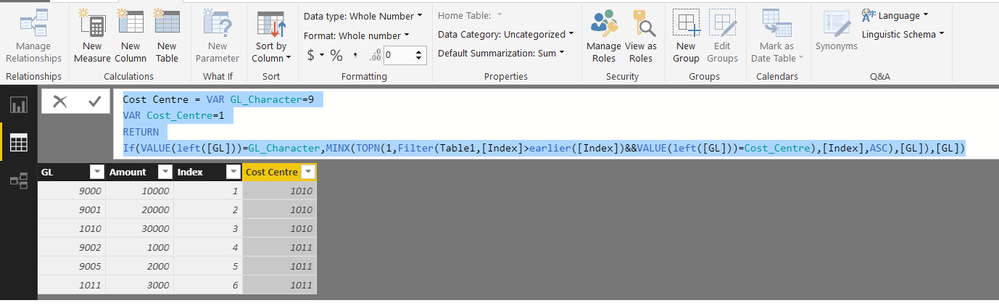
Give this a shot.


First Add an Index Column from Query Editor


Then add this calculated column


Cost Centre =
VAR GL_Character = 9
VAR Cost_Centre = 1
RETURN
    IF (
        VALUE ( LEFT ( [GL] ) ) = GL_Character,
        MINX (
            TOPN (
                1,
                FILTER (
                    Table1,
                    [Index] > EARLIER ( [Index] )
                        && VALUE ( LEFT ( [GL] ) ) = Cost_Centre
                ),
                [Index], ASC
            ),
            [GL]
        ),
        [GL]
    )

@Anonymous


File attached as well


ETL.png

Anonymous
Not applicable

Thank you @Zubair_Muhammad It worked

Helpful resources

Announcements
Power BI DataViz World Championships

Power BI Dataviz World Championships

The Power BI Data Visualization World Championships is back! Get ahead of the game and start preparing now!

December 2025 Power BI Update Carousel

Power BI Monthly Update - December 2025

Check out the December 2025 Power BI Holiday Recap!

FabCon Atlanta 2026 carousel

FabCon Atlanta 2026

Join us at FabCon Atlanta, March 16-20, for the ultimate Fabric, Power BI, AI and SQL community-led event. Save $200 with code FABCOMM.