This time we’re going bigger than ever. Fabric, Power BI, SQL, AI and more. We're covering it all. You won't want to miss it.
Learn moreLevel up your Power BI skills this month - build one visual each week and tell better stories with data! Get started
Hello Experts,
I have a requirement as when my manager logs into the Power BI report then he would like to see only the direct people reporting to him.
How can we achieve this scenario?
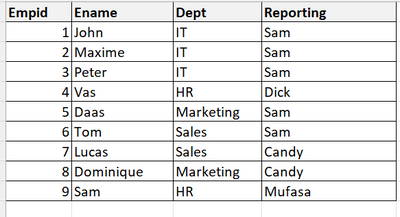
Below is the list of employees in the group.
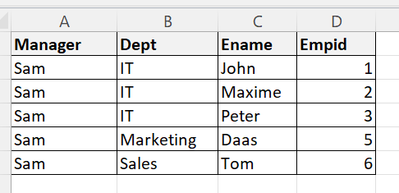
If Sam logs in then he would like to see all the resources reporting to him as given below for reference.
Could you please share me link/youtube videos for reference?
Thank you in advance!
Regards,
Prakash
Solved! Go to Solution.
Hey @Prakash04 ,
First of all, you need create a new table with the data of the managers (name, id, email). After that, you should related the Manager with the table Emp (that have the data about employees). I use the name of the manager on the Manager table and related with the Reporting in the Emp table.
Then you create your dinamic RLS. Check the images. 😃
*If this post helps, then please consider Accept it as the solution to help the other members find it more quickly.
Kind Regards,
Marcel Magalhães
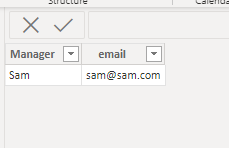
Content of Manager table (the email field will be the key to the dinamic RLS)
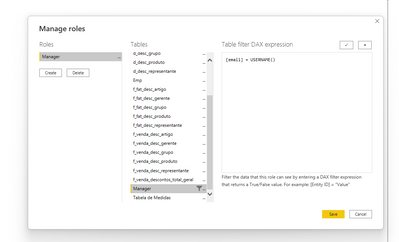
Create the RLS on tab Manager on field 'email'
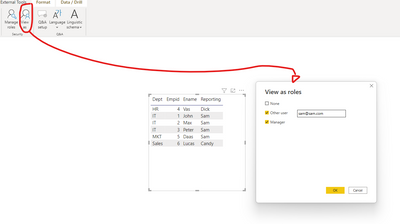
Applying the test (pay attention in the visual. All people are list)
Just viewing the SAM team
Regards,
Marcel Magalhães
Microsoft Power BI Official Partner
MCT | Certified PL-300 Power BI
Hey @Prakash04 ,
First of all, you need create a new table with the data of the managers (name, id, email). After that, you should related the Manager with the table Emp (that have the data about employees). I use the name of the manager on the Manager table and related with the Reporting in the Emp table.
Then you create your dinamic RLS. Check the images. 😃
*If this post helps, then please consider Accept it as the solution to help the other members find it more quickly.
Kind Regards,
Marcel Magalhães
Content of Manager table (the email field will be the key to the dinamic RLS)
Create the RLS on tab Manager on field 'email'
Applying the test (pay attention in the visual. All people are list)
Just viewing the SAM team
Regards,
Marcel Magalhães
Microsoft Power BI Official Partner
MCT | Certified PL-300 Power BI
Hi,
You can do this by preparing data which supports your need. You should have table with Employee Name and their direct reporting employees (1st level managers) and use this table for RLS .
I have done similar to this 2020. So data preparation is key here.
Appreciate a Kudos!
If this helps and resolves the issue, please mark it as a Solution!
Regards,
N V Durga Prasad
Check out the April 2026 Power BI update to learn about new features.
Sign up to receive a private message when registration opens and key events begin.
If you have recently started exploring Fabric, we'd love to hear how it's going. Your feedback can help with product improvements.
| User | Count |
|---|---|
| 36 | |
| 28 | |
| 28 | |
| 21 | |
| 18 |
| User | Count |
|---|---|
| 68 | |
| 39 | |
| 33 | |
| 24 | |
| 23 |