Join us at FabCon Atlanta from March 16 - 20, 2026, for the ultimate Fabric, Power BI, AI and SQL community-led event. Save $200 with code FABCOMM.
Register now!Get Fabric Certified for FREE during Fabric Data Days. Don't miss your chance! Request now
Hi Experts,
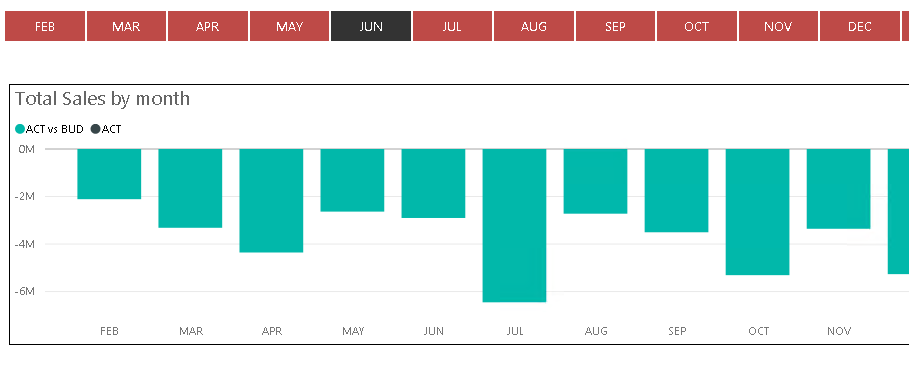
is there a way to show only January - selected month figures? E.g. I would like to see January - June figures only if June is the selected month (selecting all month January through June is not an option).
Kind regards,
Georg
Solved! Go to Solution.
Hi,
you could look at creating new measure that specifically looks at the selected filter and takes that as the max date but overrides the filter on the calculate
This is assuming that you have a Dates table for filtering. (if no dates table let me know what you have got)
ActualToSelectedMonth:=
var MaxDate = MaxDates([DateKey])
return
CALCULATE (
[Actual], ALL('Dates')
DATESYTD ( Dates[Datekey], "01/31" ),
Dates[DateKey] < MaxDate
)
-------
(the DATESYTD will need your month end day and month in there to know when to start from....) have edited to January for now.
in theory this should replace the current context filter on Month (again assuming it's in the dates table) for [actual] but still using it as a Max filter.
I've not got the same data as you so I'm hoping the above makes sense and assists.
Hi,
you could look at creating new measure that specifically looks at the selected filter and takes that as the max date but overrides the filter on the calculate
This is assuming that you have a Dates table for filtering. (if no dates table let me know what you have got)
ActualToSelectedMonth:=
var MaxDate = MaxDates([DateKey])
return
CALCULATE (
[Actual], ALL('Dates')
DATESYTD ( Dates[Datekey], "01/31" ),
Dates[DateKey] < MaxDate
)
-------
(the DATESYTD will need your month end day and month in there to know when to start from....) have edited to January for now.
in theory this should replace the current context filter on Month (again assuming it's in the dates table) for [actual] but still using it as a Max filter.
I've not got the same data as you so I'm hoping the above makes sense and assists.
Hi @Georg,
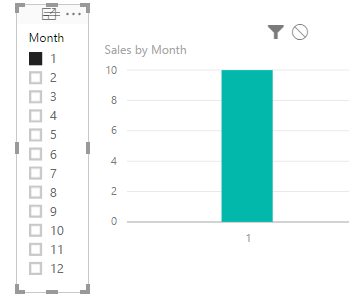
You can create a slicer including Month field, when you select one month, it will shows
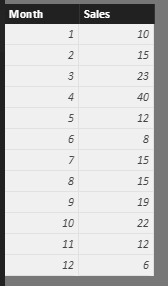
I have the sample data table.
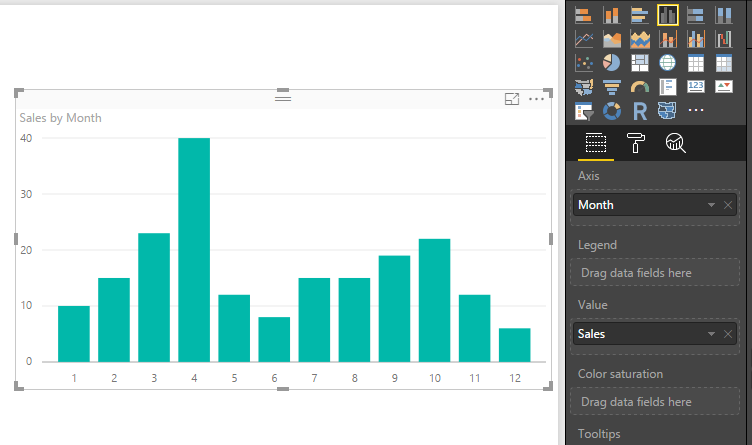
Create a chart, please see the following screenshot.
Finally, you can create a slicer including Month field, when you select Jan, it will show only Jan and corresponding Sales.
If you have other issues, don't hesitate to let me know.
Best Regards,
Angelia
Hi Angelia,
thanks for your answer. I do have already a slicer, the month above the chart. And if I click on Jun, the June value is shown as expected. But this is not what I cant to achieve. In case of selecting Jun, figures from Jan - Jun shall be shown in the chart.
kind regards,
Georg
Hi @Georg,
Got it. As I tested, we are unable to achieve by slicer, When you select Jun, we can ontain the sum of Jan-Jun. But we can't display Jan-Jun in the chart.
Best Regards,
Angelia
Check out the November 2025 Power BI update to learn about new features.
Advance your Data & AI career with 50 days of live learning, contests, hands-on challenges, study groups & certifications and more!