This is best Fabric, Power BI, SQL and AI community event. How do we know? The last event sold out! Save €200 with code FABCMTY200.
Register nowA new Data Days event is coming soon! This time we’re going bigger than ever. Fabric, Power BI, SQL, AI and more. Don't miss out.
Hi all & Happy weekend
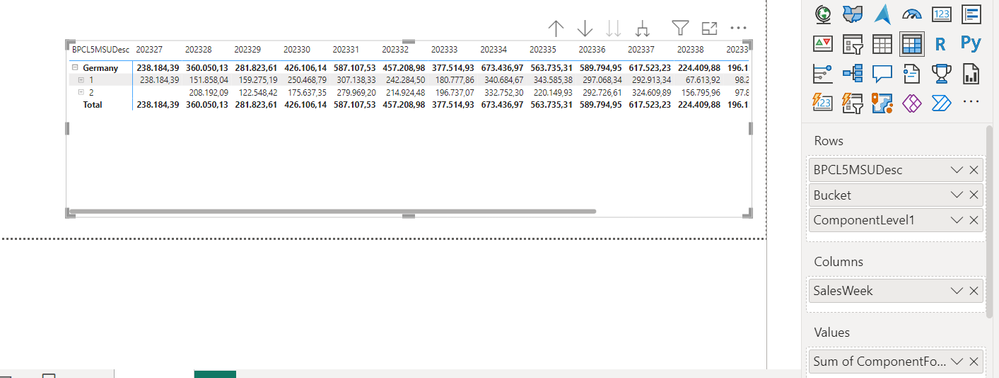
I am looking for the correct way in DAX to have a measure written, which substracts the displayed values based on multiple filters. I posted the picture below and essentially I can have various filters (e.g. material, date, bucket, country,..) which are influencing the displayed value of my measure.
Now I would like to create a measure which substracts the displayed values in the buckets.
For Example; Salesweek 202328, MSU Germany, I would like to know the result of substracting Bucket "1" - Bucket "2"; in numbers
151,858,04 - 208,192,09
Many Thanks!
Hi !
I do understand the point around the sample data, yet currently it is not possible for me to provide a sample dataset at this point. I was thinking to get a more generic idea on how to approach this (e.g. with summarize?)
So I put the tables below, does that help ?
Ingoing position
| BPCL5MSUDesc | Bucket | ComponentLevel1 | Sum of ComponentForecast | SalesWeek |
| Germany | 1 | Promo | 151.858 | 202328 |
| Germany | 1 | Promo | 159.275 | 202329 |
| Germany | 1 | Promo | 250.468 | 202330 |
| Germany | 1 | Promo | 307.138 | 202331 |
| Germany | 1 | Promo | 242.284 | 202332 |
| Germany | 2 | Promo | 208.192 | 202328 |
| Germany | 2 | Promo | 122.548 | 202329 |
| Germany | 2 | Promo | 175.637 | 202330 |
| Germany | 2 | Promo | 279.969 | 202331 |
| Germany | 2 | Promo | 214.924 | 202332 |
The desired outcome as below as addition
| BPCL5MSUDesc | Bucket | ComponentLevel1 | Sum of ComponentForecast | SalesWeek |
| Germany | 1 | Promo | 151.858 | 202328 |
| Germany | 1 | Promo | 159.275 | 202329 |
| Germany | 1 | Promo | 250.468 | 202330 |
| Germany | 1 | Promo | 307.138 | 202331 |
| Germany | 1 | Promo | 242.284 | 202332 |
| Germany | 2 | Promo | 208.192 | 202328 |
| Germany | 2 | Promo | 122.548 | 202329 |
| Germany | 2 | Promo | 175.637 | 202330 |
| Germany | 2 | Promo | 279.969 | 202331 |
| Germany | 2 | Promo | 214.924 | 202332 |
| Germany | Diff 1-2 | Promo | -56.334 | 202328 |
| Germany | Diff 1-2 | Promo | 36.727 | 202329 |
| Germany | Diff 1-2 | Promo | 74.831 | 202330 |
| Germany | Diff 1-2 | Promo | 27.169 | 202331 |
| Germany | Diff 1-2 | Promo | 27.360 | 202332 |
Hi @Wichi
Please provide sample data that covers your issue or question completely, in a usable format (not as a screenshot).
https://community.powerbi.com/t5/Community-Blog/How-to-provide-sample-data-in-the-Power-BI-Forum/ba-...
Please show the expected outcome based on the sample data you provided.
https://community.powerbi.com/t5/Desktop/How-to-Get-Your-Question-Answered-Quickly/m-p/1447523
Check out the May 2026 Power BI update to learn about new features.
Sign up to receive a private message when registration opens and key events begin.
If you have recently started exploring Fabric, we'd love to hear how it's going. Your feedback can help with product improvements.
| User | Count |
|---|---|
| 27 | |
| 26 | |
| 22 | |
| 19 | |
| 17 |
| User | Count |
|---|---|
| 45 | |
| 42 | |
| 41 | |
| 21 | |
| 18 |