cancel
Showing results for 
Search instead for 
Did you mean: 

View all the Fabric Data Days sessions on demand. View schedule

Reply
Anonymous
Not applicable

Dynamic slicer

Hi,


I have a slicer based on one of the dimension table column , I Have a two different Dax function ( measure )  which are coming from same fact table.

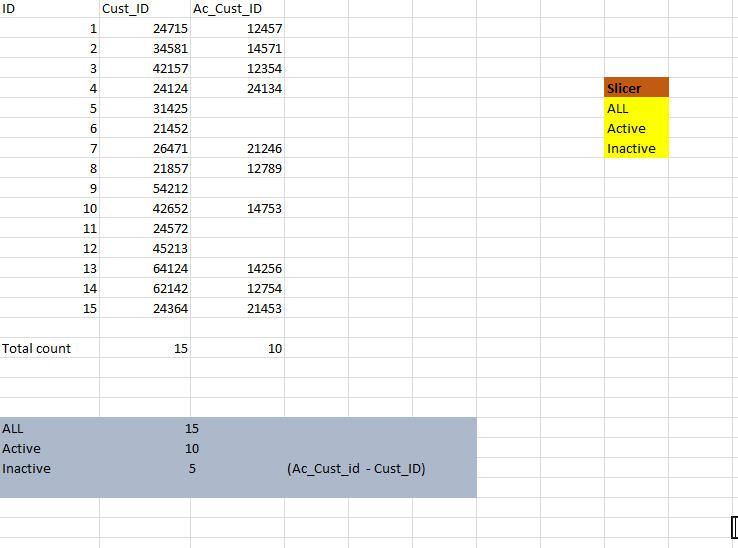
I would like to show the different measures based on the slicer selections. Please refer  the below sample .


I would like to replace the measure based on the slicer selection . let’s say ( as per below ex) if user selected the slicer as “Active ” the KPI should show only “count of Ac_Cust_ID” same way if user selected “Inactive ” excepting to display “count of Cust_ID”.   


I gone thought couple of Tech notes but seems to those are based on the Measure as a slicer.. here I would like to use slicer based on the DIM table column .


What is the best way to handle this ? 


 Sample data.jpg


1 ACCEPTED SOLUTION
Anonymous
Not applicable

Create a separate table with your SlicerSelection. This table should not be related to any other table.  Then create the measures you want to use

Active = CALCULATE( [All], Table1[Ac_Cust_ID] <> blank())

All = COUNTROWS( Table1 )

Inactive = [All] - [Active]

Then use this measure in your KPI:

Selected Value = 
SWITCH( 
    SELECTEDVALUE(SlicerSelection[Selection]),
    "Active", [Active],
    "All", [All],
    "Inactive", [Inactive],
    "Please Only Select One"
)

Switch measure.png

View solution in original post

3 REPLIES 3
Anonymous
Not applicable

Create a separate table with your SlicerSelection. This table should not be related to any other table.  Then create the measures you want to use

Active = CALCULATE( [All], Table1[Ac_Cust_ID] <> blank())

All = COUNTROWS( Table1 )

Inactive = [All] - [Active]

Then use this measure in your KPI:

Selected Value = 
SWITCH( 
    SELECTEDVALUE(SlicerSelection[Selection]),
    "Active", [Active],
    "All", [All],
    "Inactive", [Inactive],
    "Please Only Select One"
)

Switch measure.png

Anonymous
Not applicable

Can you pelase share your PBIX file if possible. 

Anonymous
Not applicable

Helpful resources

Announcements
November Power BI Update Carousel

Power BI Monthly Update - November 2025

Check out the November 2025 Power BI update to learn about new features.

Fabric Data Days Carousel

Fabric Data Days

Advance your Data & AI career with 50 days of live learning, contests, hands-on challenges, study groups & certifications and more!

FabCon Atlanta 2026 carousel

FabCon Atlanta 2026

Join us at FabCon Atlanta, March 16-20, for the ultimate Fabric, Power BI, AI and SQL community-led event. Save $200 with code FABCOMM.

Top Solution Authors
Top Kudoed Authors