cancel
Showing results for 
Search instead for 
Did you mean: 

The Power BI Data Visualization World Championships is back! Get ahead of the game and start preparing now! Learn more

Reply
danielfynes
Regular Visitor

Dynamic baseline and UOM

Hi Everybody. I'm looking for ideas/methodology for a problem we have involving a dynamic baseline and assessment period, as well as a dynamic unit of measure (UOM). To explain this further, we want to be able to define and select two different time periods (called baseline and assessment period), over which values need to be averaged/summed dynamically. Then we would also like to be able to dynamically select a UOM, which would also affect the values returned by the baseline and assessment period. The source data looks something like as follows:

Transaction Table

Date(dd/mm/yyyy) |  Value  |  UOM

01/02/2018             |    30     |    m3

02/02/2018             |    40     |    m3

03/02/2018             |    50     |    m3

04/02/2018             |    10     |    m3

05/02/2018             |    20     |    m3


UOM Table

UOM      |    BASE UOM   | Conversion factor

m3                    m3                        1

ltr                      m3                     1000


What we are looking for is to be able to select the dynamic baseline and assessment periods (from a slicer or something similar) as well as the UOM, and the resulting table would look like the following for selecting Baseline as (01/02/2018-02/02/2018)

and Assessment Period as 03/02/2018 and UOM as m3.

Baseline Average       |       Assessment Period Average  

35                              |                    50


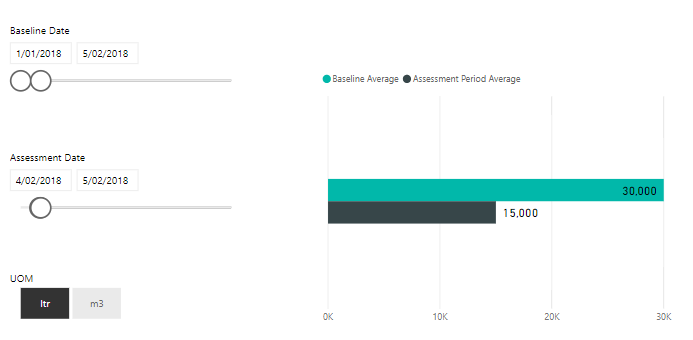
If we were to select Baseline as (01/02/2018-05/02/2018) and Assessment Period as (04/02/2018-05/02/2018) and UOM as ltr, then we would expect:

Baseline Average       |       Assessment Period Average  

30000                        |                    15000


Is something like this possible? Do we need to make any changes to the underlying data (such as adding columns)?


Thank you.

Daniel.

1 ACCEPTED SOLUTION
OwenAuger
Super User
Super User

Hi @danielfynes


I came up with this idea and just got around to posting it.

It could be overcomplicating things depending on your requirements....


Here's a link to my pbix.


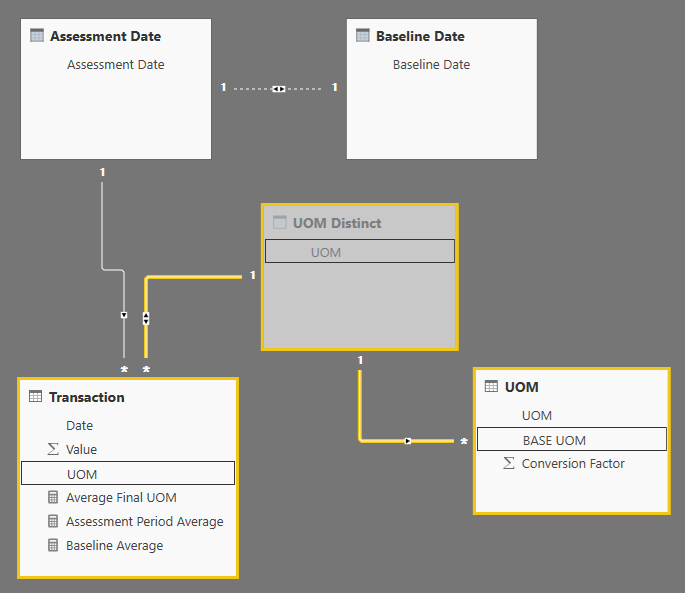
  1.  Set up the data model like this:image.png
  2. I have set up two date tables: Assessment Date and Baseline Date, following this method from SQLBI:
    https://www.sqlbi.com/articles/filtering-and-comparing-different-time-periods-with-power-bi/
  3. The setup of the tables Transaction / UOM Distinct / UOM is designed so that:
    • The user selects the desired UOM using a slicer on UOM[UOM]
    • When the average transaction value is calculated, the relationships effectively allow a lookup from Transaction[UOM] to UOM[Conversion Factor], which will be filtered to the required value based on the UOM[UOM] filter.
    • This setup allows for mixed Transaction[UOM] values, e.g. you could have some rows with ltr and some rows with m3
  4. The measures that need to be created as a result are:
    // This is the core calculation that averages Value over rows of Transaction table
    // in the selected UOM Average Final UOM = AVERAGEX ( 'Transaction', 'Transaction'[Value] * CALCULATE ( MIN ( UOM[Conversion Factor] ) ) ) // Assessment Period Average directly references Average Final UOM // Could merge this measure and previous measure into one Assessment Period Average = [Average Final UOM] // Baseline Average performs the same calculation but using with
    // Assessment Date relationship activated Baseline Average = CALCULATE ( [Average Final UOM], ALL ( 'Assessment Date' ), USERELATIONSHIP ( 'Assessment Date'[Assessment Date], 'Baseline Date'[Baseline Date] ) )

Then you can create a report page like this:image.png

Regards

Owen 


Owen Auger
Did I answer your question? Mark my post as a solution!
Blog
LinkedIn

View solution in original post

2 REPLIES 2
OwenAuger
Super User
Super User

Hi @danielfynes


I came up with this idea and just got around to posting it.

It could be overcomplicating things depending on your requirements....


Here's a link to my pbix.


  1.  Set up the data model like this:image.png
  2. I have set up two date tables: Assessment Date and Baseline Date, following this method from SQLBI:
    https://www.sqlbi.com/articles/filtering-and-comparing-different-time-periods-with-power-bi/
  3. The setup of the tables Transaction / UOM Distinct / UOM is designed so that:
    • The user selects the desired UOM using a slicer on UOM[UOM]
    • When the average transaction value is calculated, the relationships effectively allow a lookup from Transaction[UOM] to UOM[Conversion Factor], which will be filtered to the required value based on the UOM[UOM] filter.
    • This setup allows for mixed Transaction[UOM] values, e.g. you could have some rows with ltr and some rows with m3
  4. The measures that need to be created as a result are:
    // This is the core calculation that averages Value over rows of Transaction table
    // in the selected UOM Average Final UOM = AVERAGEX ( 'Transaction', 'Transaction'[Value] * CALCULATE ( MIN ( UOM[Conversion Factor] ) ) ) // Assessment Period Average directly references Average Final UOM // Could merge this measure and previous measure into one Assessment Period Average = [Average Final UOM] // Baseline Average performs the same calculation but using with
    // Assessment Date relationship activated Baseline Average = CALCULATE ( [Average Final UOM], ALL ( 'Assessment Date' ), USERELATIONSHIP ( 'Assessment Date'[Assessment Date], 'Baseline Date'[Baseline Date] ) )

Then you can create a report page like this:image.png

Regards

Owen 


Owen Auger
Did I answer your question? Mark my post as a solution!
Blog
LinkedIn
Anonymous
Not applicable

Hi @danielfynes,


It is possible to make a dynamic visual based on selection but it is impossible to create dynamic calculated column.

You can create a slicer with UOM as source column and write a measure to get selected value from UOM table, then use this measure as calculated parameter with baseline and assessment calculation.


Reference link:

Calculated Column/Table Change Dynamically According to Slicer Selection in the Report.


Regards,
Xiaoxin sheng

Helpful resources

Announcements
November Power BI Update Carousel

Power BI Monthly Update - November 2025

Check out the November 2025 Power BI update to learn about new features.

Fabric Data Days Carousel

Fabric Data Days

Advance your Data & AI career with 50 days of live learning, contests, hands-on challenges, study groups & certifications and more!

FabCon Atlanta 2026 carousel

FabCon Atlanta 2026

Join us at FabCon Atlanta, March 16-20, for the ultimate Fabric, Power BI, AI and SQL community-led event. Save $200 with code FABCOMM.

Top Solution Authors
Top Kudoed Authors