cancel
Showing results for 
Search instead for 
Did you mean: 

July 7 - July 17 | Round 2 of the Power BI Dataviz World Championships. Don't miss your chance! Learn more

Reply
garynorcrossmmc
Advocate IV
Advocate IV

Dynamic Yearly Date Ranges based on a Max Date

Hi all,

A user has requested that 3 date ranges be built into a Power BI report as a slicer - 12 Months, 24 Months and 36 Months based on the maximum date from another slicer.  The date ranges should look back 12/24/36 months before the maximum date.  How can I build this onto my date table?  I've tried 

Lookback Period =
IF(
FILTER(
'HR DIM_MONTH',
'HR DIM_MONTH'[Date (End of Month)]>=MAX('HR DIM_MONTH'[Date (End of Month)])-365 &&
'HR DIM_MONTH'[Date (End of Month)]<=MAX('HR DIM_MONTH'[Date (End of Month)])
),
"12 Months",
IF(
FILTER(
'HR DIM_MONTH',
'HR DIM_MONTH'[Date (End of Month)]>=MAX('HR DIM_MONTH'[Date (End of Month)])-730 &&
'HR DIM_MONTH'[Date (End of Month)]<=MAX('HR DIM_MONTH'[Date (End of Month)])
),
"24 Months",
IF(
FILTER(
'HR DIM_MONTH',
'HR DIM_MONTH'[Date (End of Month)]>=MAX('HR DIM_MONTH'[Date (End of Month)])-1095 &&
'HR DIM_MONTH'[Date (End of Month)]<=MAX('HR DIM_MONTH'[Date (End of Month)])
),
"36 Months",
0
)))
 
But this returned an error.  How can I achieve this?  
1 ACCEPTED SOLUTION
Anonymous
Not applicable

Hi @garynorcrossmmc ,

Please correct me if I wrongly understood your question.

I create three measures by DATESINPERIOD DAX to return the values from last 12 months ,last 24 months and last 36 months .You can put the measures in report to filter the datas meet date condition but not as a slicer.

Last 12 months = CALCULATE(SUM('Table'[ID]),DATESINPERIOD('Calendar Date'[Date],MAX('Calendar Date'[Date]),-12,MONTH ))

Last 24 months = CALCULATE(SUM('Table'[ID]),DATESINPERIOD('Calendar Date'[Date],MAX('Calendar Date'[Date]),-24,MONTH ))

Last 36 months = CALCULATE(SUM('Table'[ID]),DATESINPERIOD('Calendar Date'[Date],MAX('Calendar Date'[Date]),-36,MONTH ))


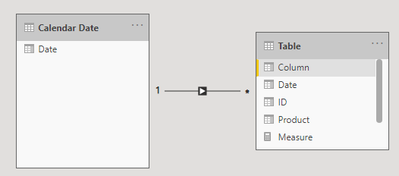
Otherwise, I create a one to many relationship between data table and calendar table.

Ailsa-msft_0-1618536298221.png

Best Regards

Community Support Team _ Ailsa Tao


If this post helps, then please consider Accept it as the solution to help the other members find it more quickly.

View solution in original post

2 REPLIES 2
Anonymous
Not applicable

Hi @garynorcrossmmc ,

Please correct me if I wrongly understood your question.

I create three measures by DATESINPERIOD DAX to return the values from last 12 months ,last 24 months and last 36 months .You can put the measures in report to filter the datas meet date condition but not as a slicer.

Last 12 months = CALCULATE(SUM('Table'[ID]),DATESINPERIOD('Calendar Date'[Date],MAX('Calendar Date'[Date]),-12,MONTH ))

Last 24 months = CALCULATE(SUM('Table'[ID]),DATESINPERIOD('Calendar Date'[Date],MAX('Calendar Date'[Date]),-24,MONTH ))

Last 36 months = CALCULATE(SUM('Table'[ID]),DATESINPERIOD('Calendar Date'[Date],MAX('Calendar Date'[Date]),-36,MONTH ))


Otherwise, I create a one to many relationship between data table and calendar table.

Ailsa-msft_0-1618536298221.png

Best Regards

Community Support Team _ Ailsa Tao


If this post helps, then please consider Accept it as the solution to help the other members find it more quickly.

lbendlin
Super User
Super User

This only seems to produce the label for the selected period, not the actual filters.  Remove the ",0"  at the end to get rid of the error. Or - describe again what you are planning to achieve.

Helpful resources

Announcements
FabCon and SQLCon Barcelona 2026

FabCon & SQLCon – Barcelona 2026

Join us in Barcelona for FabCon and SQLCon, the Fabric, Power BI, SQL, and AI community event. Save €200 with code FABCMTY200.

60 days of Data Days Carousel

Data Days 2026

Join Fabric Data Days 2026: 60 days of free live/on-demand sessions, challenges, study groups, and certification opportunities.

Power BI DataViz World Championships carousel

Power BI DataViz World Championships - June 2026

A new Power BI DataViz World Championship is coming this June! Don't miss out on submitting your entry.