Don't miss your chance to take exam DP-600 or DP-700 on us!
Request nowLearn from the best! Meet the four finalists headed to the FINALS of the Power BI Dataviz World Championships! Register now
Hi Team,
we have a requirement to create the Dynamic rank.
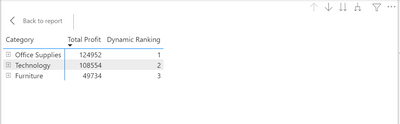
we have a data like Category and sub-Category and profit. we need to create the dynamic Ranking for Category, Sub-Category over the profit. in the high level category wise it will disply the ranking and we click on the expand button rank should be disply on the subcategory wise ranking. for your refrence attaching the data images.
High level
Low level
Please do needful
Thanks
Koushik
Solved! Go to Solution.
Hi Team
I have written the below code Some how it's working
Hi Team
I have written the below code Some how it's working
Hi @Anonymous ,
Please create a measure for Profit:
Profit =
SUM ( 'Table'[Total profit] )Then use this measure in final rank formula:
Rank Name Simple =
IF (
HASONEVALUE ( 'Table'[Category] ),
RANKX ( CALCULATETABLE('Table', REMOVEFILTERS('Table'[Sub category])), [Profit] )
)
basically, what we are doing, is removing filters from Sub category with the help of CALCULATETABLE function.
Hope it helps.
The SQL BI guys have a great article on this at https://www.daxpatterns.com/ranking/
Hi Johnt,
I'm following the same url but not getting proper result,can you please help me with code.
please find the dax code i was written.
I don't see any real difference from the code in the article. What is the definition of [Total Sales] ?
Share feedback directly with Fabric product managers, participate in targeted research studies and influence the Fabric roadmap.
Check out the February 2026 Power BI update to learn about new features.
| User | Count |
|---|---|
| 49 | |
| 40 | |
| 37 | |
| 14 | |
| 13 |
| User | Count |
|---|---|
| 85 | |
| 69 | |
| 37 | |
| 28 | |
| 27 |