Join us at FabCon Atlanta from March 16 - 20, 2026, for the ultimate Fabric, Power BI, AI and SQL community-led event. Save $200 with code FABCOMM.
Register now!The Power BI Data Visualization World Championships is back! Get ahead of the game and start preparing now! Learn more
Hi,
I need some help with creating Dynamic Ranking and extracting a rank based on a particular column as a filter. My table has the following columns
| Date | brand | brand_type | category | customer | rating |
| 01-Sep-22 | BRITANNIA | Competition | BISCUITS | Demo-Biscuits | 4.2 |
| 01-Sep-22 | BRITANNIA | Competition | BISCUITS | Demo-Biscuits | 4.2 |
| 01-Sep-22 | PARLE | Competition | BISCUITS | Demo-Biscuits | 4.2 |
| 01-Sep-22 | BRITANNIA | Competition | BISCUITS | Demo-Biscuits | 4.2 |
| 01-Sep-22 | BRITANNIA | Competition | BISCUITS | Demo-Biscuits | 4.2 |
| 01-Sep-22 | BRITANNIA | Competition | BISCUITS | Demo-Biscuits | 4.2 |
| 01-Sep-22 | BRITANNIA | Competition | BISCUITS | Demo-Biscuits | 4.2 |
| 01-Sep-22 | CADBURY | Competition | BISCUITS | Demo-Biscuits | 4.2 |
| 01-Sep-22 | BRITANNIA | Competition | BISCUITS | Demo-Biscuits | 4.2 |
| 01-Sep-22 | PARLE | Competition | BISCUITS | Demo-Biscuits | 4.2 |
| 01-Sep-22 | PARLE | Competition | BISCUITS | Demo-Biscuits | 4.2 |
| 01-Sep-22 | PARLE | Competition | BISCUITS | Demo-Biscuits | 4.2 |
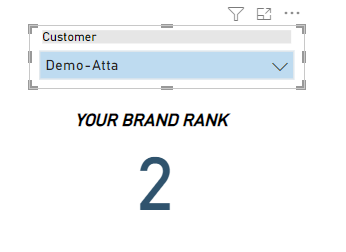
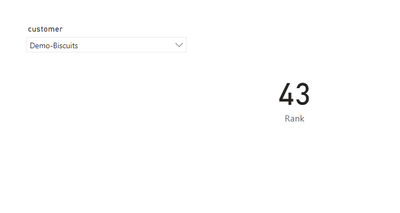
I basically need to create a measure that Ranks Each brand based on the average rating and extract the value where brand type = Own. I am trying to construct a Card visual that shows the rank for our own brands of our customers,
The hierarchy of ranking should be Customer - > Brands and I need to extract the value of brand rank where brand type = Own.
the current measure we have doesn't solve the purpose.
Thanks much!
Hi @sdrfghjkl ,
Please try:
Rank =
VAR _a =
ADDCOLUMNS (
ALL ( Customer_Feedback ),
"Rank",
RANKX (
ALL ( Customer_Feedback[brand] ),
CALCULATE (
AVERAGE ( Customer_Feedback[rating] ),
FILTER (
ALL ( 'Customer_Feedback' ),
[brand] = EARLIER ( Customer_Feedback[brand] )
)
),
,
DESC,
DENSE
)
)
RETURN
MAXX (
FILTER (
_a,
[brand_type] = "Own"
&& [customer] = SELECTEDVALUE ( Customer_Feedback[customer] )
),
[Rank]
)
Final output:
Best Regards,
Jianbo Li
If this post helps, then please consider Accept it as the solution to help the other members find it more quickly.
Sir,
The above solution doesn't work. It doesn't take the customer into account and hence it ranks the brands across all customers. So I tried to tweak the measure slightly and updated the first half of the measure in constructing the dynamic table.
But the problem is the ranking is still wrong. If you see the below picture the first two brands have differnt ratings but are still ranked as 1
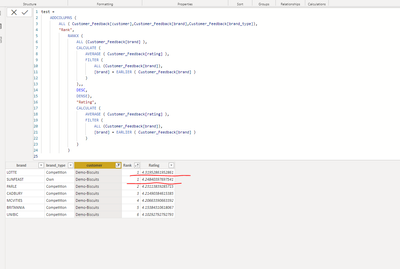
Complete measure
@jdbuchanan71 sir sorry for tagging you directly here. I did see a response from you for a similar problem statement and I used that as a reference too. Tagging to see if you can help with this
The Power BI Data Visualization World Championships is back! Get ahead of the game and start preparing now!
| User | Count |
|---|---|
| 39 | |
| 37 | |
| 33 | |
| 32 | |
| 29 |
| User | Count |
|---|---|
| 132 | |
| 88 | |
| 82 | |
| 68 | |
| 64 |