cancel
Showing results for 
Search instead for 
Did you mean: 

Get Fabric Certified for FREE during Fabric Data Days. Don't miss your chance! Request now

Reply
YellaReddy
New Member

Dynamic Chart titles from Power BI live connection and SSAS cube as the data source

Hi All,

Facing an issue with dynamic chart title names based on the filter conditions(From slicer) in the Power Bi live connection(From SSAS cube).


In the chart visualizations->General->Title->Conditional Formatting->Title-Text->Format Style(Selected as Field Value)-> What field should we base this on?.

Under this "What field should we base this on" all the options are "grid out". I could n't able to select any measure or dimension in the list.

Could some one assist on this please? Also any alternative to implement dynamic titles in the chart based on the filter selection.


I have implemented the dynamic chart title, Excel as source and it is working fine.

Thak you for your help in advance.


Regards

Yella Reddy


1 ACCEPTED SOLUTION
v-chenwuz-msft
Community Support
Community Support

Hi @YellaReddy ,


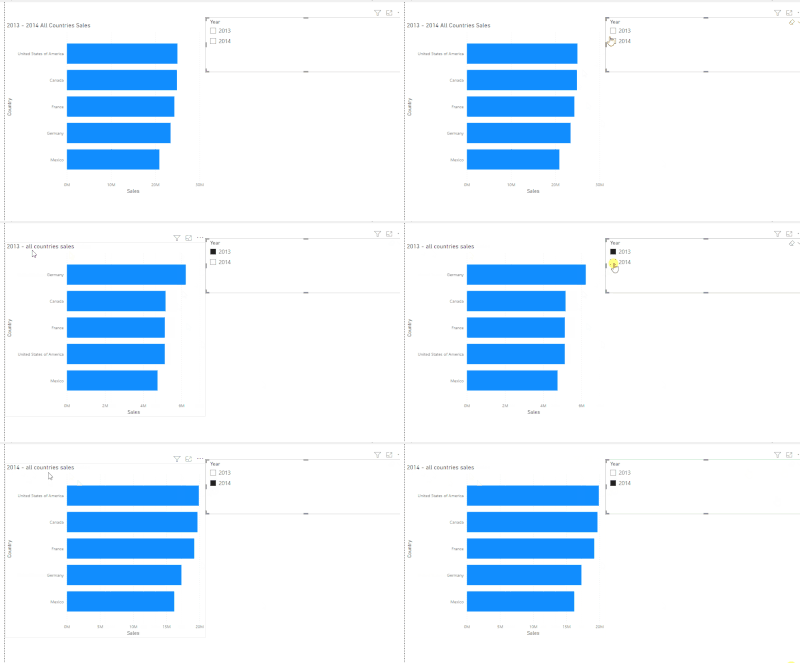
You need create a measure which returns the string as the title text.


For example

vchenwuzmsft_0-1663037645840.gif

Measure: 

SWITCH(SELECTEDVALUE(financials[Year]),2013,"2013 - all countries sales",2014," 2014 - all countries sales","2013 - 2014 All Countries Sales")


Best Regards

Community Support Team _ chenwu zhu


If this post helps, then please consider Accept it as the solution to help the other members find it more quickly.


View solution in original post

2 REPLIES 2
CracktheCode85
Helper II
Helper II

How do you create a measure on a Live Connection to Cube data that is seemingly "locked" from any type of adjustments?

v-chenwuz-msft
Community Support
Community Support

Hi @YellaReddy ,


You need create a measure which returns the string as the title text.


For example

vchenwuzmsft_0-1663037645840.gif

Measure: 

SWITCH(SELECTEDVALUE(financials[Year]),2013,"2013 - all countries sales",2014," 2014 - all countries sales","2013 - 2014 All Countries Sales")


Best Regards

Community Support Team _ chenwu zhu


If this post helps, then please consider Accept it as the solution to help the other members find it more quickly.


Helpful resources

Announcements
November Power BI Update Carousel

Power BI Monthly Update - November 2025

Check out the November 2025 Power BI update to learn about new features.

Fabric Data Days Carousel

Fabric Data Days

Advance your Data & AI career with 50 days of live learning, contests, hands-on challenges, study groups & certifications and more!

FabCon Atlanta 2026 carousel

FabCon Atlanta 2026

Join us at FabCon Atlanta, March 16-20, for the ultimate Fabric, Power BI, AI and SQL community-led event. Save $200 with code FABCOMM.

Top Solution Authors
Top Kudoed Authors