cancel
Showing results for 
Search instead for 
Did you mean: 

July 7 - July 17 | Round 2 of the Power BI Dataviz World Championships. Don't miss your chance! Learn more

Reply
siddharth3101_
New Member

Dyanmic Time Issue

Hi, 

I have a data table that gives us the ideal 'Start Time' and 'End Time' of a product's journey (common for all products) for a particular Mall (sample data below). Similarly, another data table has line wise data for each product, including product name, mall name & product collection time. 

What I need is, that if a product belonging to a particular mall was collected up untill 10mins before the 'Start Time' in Table 1, then that Start Time is recorded, otherwise we get the next Start Time. The End Time corrosponding to the given Start Time should appear next to it. Refer the tables below:


I have the following data tables imported in Power BI Desktop:

Table1

Table 2

What I want to construct is the grid in table 3


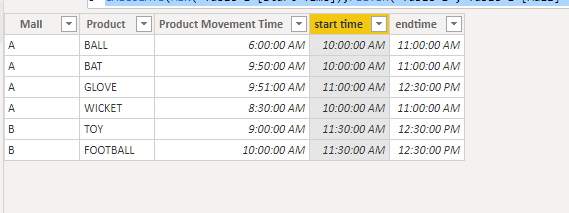
Eg. For Ball belonging to mall A, Product Collection Time was 6:00, hence Start Time 10:00:00 got recorded, to which corrosponding End Time was 11:00:00. For Glove, however, Product Collection Time was 9:51:00 (less than 10mins from the Start Time), hence we moved onto the next Time Range in Mall A (11:00 to 12:30). Similarly, I need for Mall B and so on (all in one grid).


Would be obliged if someone could help!community1.PNG

1 ACCEPTED SOLUTION
v-frfei-msft
Community Support
Community Support

Hi @siddharth3101_ ,


We can create two calcualted columns in table 2 as below.

start time = var a = 'Table 2'[Product Movement Time] + TIME(0,10,0)
return
CALCULATE(MIN('Table 1'[Start Time]),FILTER('Table 1','Table 1'[Mall] = 'Table 2'[Mall] && 'Table 1'[Start Time]>=a))
endtime = LOOKUPVALUE('Table 1'[End Time],'Table 1'[Start Time],'Table 2'[start time],'Table 1'[Mall],'Table 2'[Mall])

Capture.PNG


Pbix as attached.


Community Support Team _ Frank
If this post helps, then please consider Accept it as the solution to help the others find it more quickly.

View solution in original post

2 REPLIES 2
v-frfei-msft
Community Support
Community Support

Hi @siddharth3101_ ,


We can create two calcualted columns in table 2 as below.

start time = var a = 'Table 2'[Product Movement Time] + TIME(0,10,0)
return
CALCULATE(MIN('Table 1'[Start Time]),FILTER('Table 1','Table 1'[Mall] = 'Table 2'[Mall] && 'Table 1'[Start Time]>=a))
endtime = LOOKUPVALUE('Table 1'[End Time],'Table 1'[Start Time],'Table 2'[start time],'Table 1'[Mall],'Table 2'[Mall])

Capture.PNG


Pbix as attached.


Community Support Team _ Frank
If this post helps, then please consider Accept it as the solution to help the others find it more quickly.

Thanks, @v-frfei-msft ! 

This worked for me, much appreciated. 

Helpful resources

Announcements
FabCon and SQLCon Barcelona 2026

FabCon & SQLCon – Barcelona 2026

Join us in Barcelona for FabCon and SQLCon, the Fabric, Power BI, SQL, and AI community event. Save €200 with code FABCMTY200.

60 days of Data Days Carousel

Data Days 2026

Join Fabric Data Days 2026: 60 days of free live/on-demand sessions, challenges, study groups, and certification opportunities.

Power BI DataViz World Championships carousel

Power BI DataViz World Championships - June 2026

A new Power BI DataViz World Championship is coming this June! Don't miss out on submitting your entry.