cancel
Showing results for 
Search instead for 
Did you mean: 

The FabCon + SQLCon recap series starts April 14th at 8am Pacific. If you’re tracking where AI is going inside Fabric, this first session is a can't miss. Register now

Reply
badgerr11
Regular Visitor

Duplicating and filtering columns

I'm new to Power BI and still trying to wrap my head around it. I have a column that I'd like to duplicate and keep in the same pbix. This column holds values indicating if an account is paid, free, or niether. The goal is to show visuaizations indicating each status (like a line chart for each status and another showing paid vs free.


When I've duplicated the column when I import the data from a local SQL server and filter it, the colmuns show the same filtered value. I'm trying to get ech column to show each distinct value - One column is called Paid and shows Paid accounts, a second column is called Free and shows Free accounts, and a third colmun called Niether shows accounts that aren't paid or free. I'm not sure where to go on this one. I'm stilllearing POwer BI and DAX. Any help would be appreciated. 

6 REPLIES 6
Anonymous
Not applicable

Use ALL () function to ignore the filter on the base column.


New_Column= ALL( Table1[Column1])


Hope this helps.


Thanks

Raj

Thanks for the reply and help, I appreicaite it! Unfortunately Power BI throws an "A table of multiple values was supplied where a single value was expected." message. Even when I filter for just one value (0,1, 99) before creating the new column.

Anonymous
Not applicable

Can you post sample data or sample PBI file with expected outcome.


Thanks
Raj

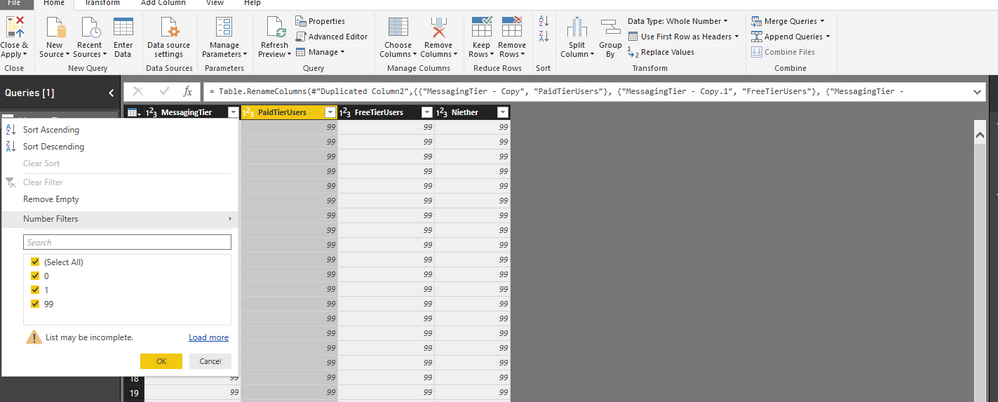
Here's an image, wasn't able to upload a pbix. Thanks


MessageTier.PNG

Anonymous
Not applicable

Oh, got it . You are doing this in Power Query and i was talking abt DAX. Obviously, if you apply filter in one column the other columns also will have the same value as its simply the copy of the original column.


If you want to have do this only in Power Query - you need to copy the source table and have 3 different sources and apply the filter in each table . So, you will have a Paid Table, Free Table and Neither Table.


If you want to handle this in DAX calculation , then you can use the ALL() and FILTER()  & CALCULATE() as needed for your requirements.


Hope this helps.


Thanks

Raj

Thanks Raj! I'll work  on figuring itout

Helpful resources

Announcements
New to Fabric survey Carousel

New to Fabric Survey

If you have recently started exploring Fabric, we'd love to hear how it's going. Your feedback can help with product improvements.

Power BI DataViz World Championships carousel

Power BI DataViz World Championships - June 2026

A new Power BI DataViz World Championship is coming this June! Don't miss out on submitting your entry.

Join our Fabric User Panel

Join our Fabric User Panel

Share feedback directly with Fabric product managers, participate in targeted research studies and influence the Fabric roadmap.

March Power BI Update Carousel

Power BI Community Update - March 2026

Check out the March 2026 Power BI update to learn about new features.