cancel
Showing results for 
Search instead for 
Did you mean: 

The Power BI Data Visualization World Championships is back! Get ahead of the game and start preparing now! Learn more

Reply
sundayDriver
Microsoft Employee
Microsoft Employee

Don't show data labels when selecting one legend

Hi,

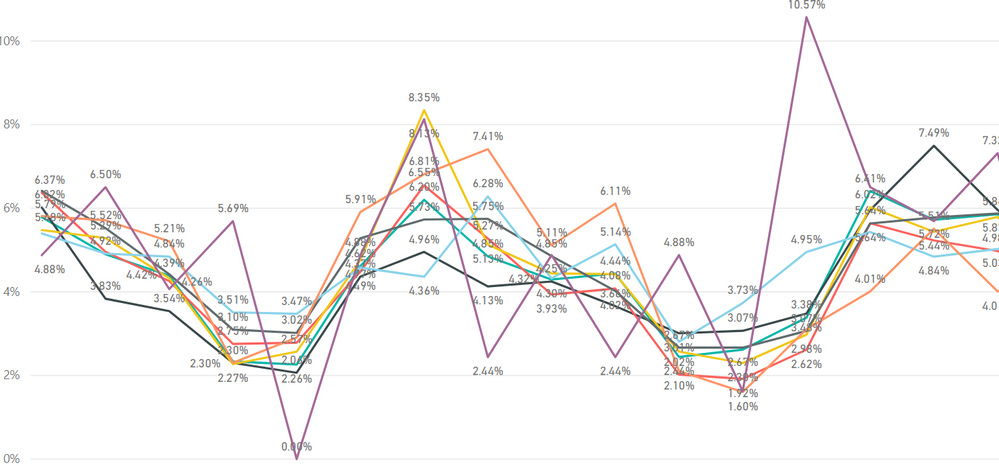
I have a line chart wih 8 legends where the data labels are displayed. The labels are very condence and it's hard to read them. Is it possible when one legend is selected to hide the rest of the data labels?

image.png


Thank you,

7 REPLIES 7
Anonymous
Not applicable

@sundayDriver,

If you create the Line chart by dragging field to Legend of the chart, and want to hide other data labels when clicking on a single Legend, I am afraid that it is not possible, you can submit a feature request here https://ideas.powerbi.com/forums/265200 .

However, when you use slicer or filters to filter the legend , only the filtered legend will display with its data label in the Line chart.

Regards,
Lydia

Thank you for the help.

FYI here is a link to the idea.


For the slicer the data are different columns so I couldn't add them there. Is there a columns data slicer?

Anonymous
Not applicable

@sundayDriver,

What do you mean "a column data slicer"? Please share sample data of your table.

Regards,
Lydia

Hi @Anonymous,

The grayed areas are the columns:

grayedoutTable.PNG

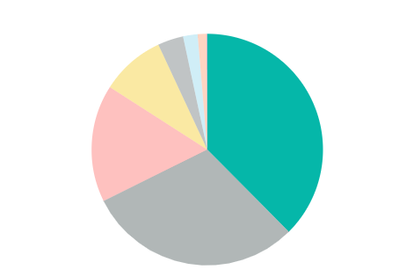
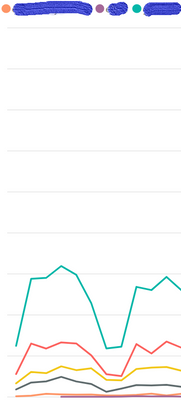
I have a pie chart that shows the percentage of each of those columns and a line chart where each column is a line. I'm trying to find a way to filter the line chart for eaxch column. Find a screenshot of the graphs below. If I select a column in the pie chart then the line chart isn't updated.PieChart.PNG

graphWithCOlumnsPowerBI.PNG


Thanks,

Anonymous
Not applicable

@sundayDriver,

Do you create the two charts using fields of a single table? If so, please check if you set interactions properly in Power BI Desktop following  the  guide in the article below.

https://docs.microsoft.com/en-us/power-bi/service-reports-visual-interactions

Regards,
Lydia

@Anonymous,

Thank you for the response 🙂 Yes I used a single table and the made sure that the interactions are appropriately formated. When I select one slice though I would expect column and not row filtering.

Anonymous
Not applicable

@sundayDriver,

Interactions has effect on rows but not columns. I am afraid that your requirement can not be achieved.

Regards,
Lydia

Helpful resources

Announcements
Power BI DataViz World Championships

Power BI Dataviz World Championships

The Power BI Data Visualization World Championships is back! Get ahead of the game and start preparing now!

December 2025 Power BI Update Carousel

Power BI Monthly Update - December 2025

Check out the December 2025 Power BI Holiday Recap!

FabCon Atlanta 2026 carousel

FabCon Atlanta 2026

Join us at FabCon Atlanta, March 16-20, for the ultimate Fabric, Power BI, AI and SQL community-led event. Save $200 with code FABCOMM.