cancel
Showing results for 
Search instead for 
Did you mean: 

Get Fabric Certified for FREE during Fabric Data Days. Don't miss your chance! Request now

Reply
Domenick
Helper IV
Helper IV

Does anyone know of a multiple card visualization solution with conditional formatting?

Does anyone know of a visualization solution that will allow me to do the following?


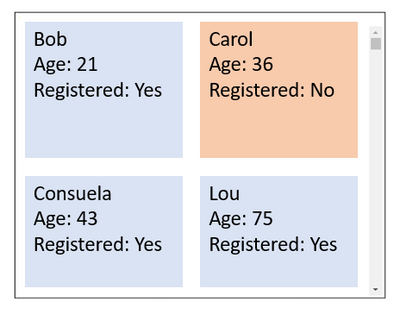
I want a visualization that organizes records as multiple cards each with multiple rows of information and has the ability to change the color of the card based on a field. Here is a sketch of what I want to acheive: 


Domenick_0-1649340710125.png

I found a visualization template called "Multi Info Cards" but it doesn't do the conditional formatting that I'm trying to acheive here.

1 ACCEPTED SOLUTION
amitchandak
Super User
Super User

@Domenick ,See if these two can help

https://appsource.microsoft.com/en-us/product/power-bi-visuals/WA104381977?tab=Overview

https://appsource.microsoft.com/en-us/product/power-bi-visuals/WA200002555?tab=Overview


Multi-row card you can have color on data number and bar. But the background is one color only.

Share with Power BI Enthusiasts: Full Power BI Video (20 Hours) YouTube
Microsoft Fabric Series 60+ Videos YouTube
Microsoft Fabric Hindi End to End YouTube

View solution in original post

4 REPLIES 4
Tahreem24
Super User
Super User

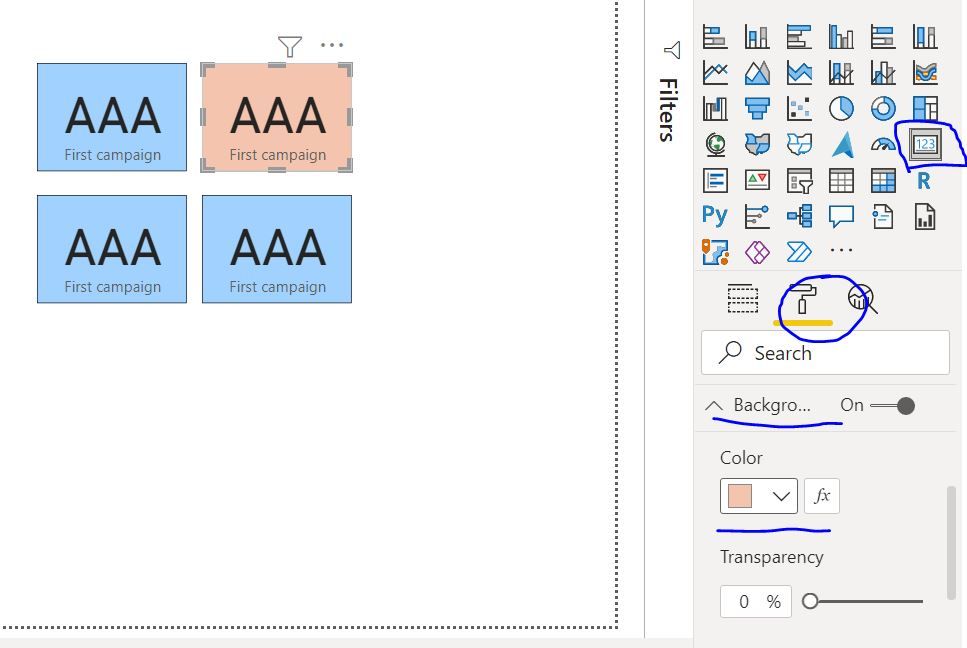
@Domenick One workaround is take 4 different cards and place like your screen shot then you can color the background of individual card as per your need. 

Capture.JPG


Don't forget to give thumbs up and accept this as a solution if it helped you!!!

Please take a quick glance at newly created dashboards : Restaurant Management Dashboard , HR Analytics Report , Hotel Management Report, Sales Analysis Report , Fortune 500 Companies Analysis , Revenue Tracking Dashboard

This would work if each card was a different field/column. I have one column of data that I want to show as cards. 

amitchandak
Super User
Super User

@Domenick ,See if these two can help

https://appsource.microsoft.com/en-us/product/power-bi-visuals/WA104381977?tab=Overview

https://appsource.microsoft.com/en-us/product/power-bi-visuals/WA200002555?tab=Overview


Multi-row card you can have color on data number and bar. But the background is one color only.

Share with Power BI Enthusiasts: Full Power BI Video (20 Hours) YouTube
Microsoft Fabric Series 60+ Videos YouTube
Microsoft Fabric Hindi End to End YouTube

Thanks. I'm adding them now and will give them a shot!

Helpful resources

Announcements
November Power BI Update Carousel

Power BI Monthly Update - November 2025

Check out the November 2025 Power BI update to learn about new features.

Fabric Data Days Carousel

Fabric Data Days

Advance your Data & AI career with 50 days of live learning, contests, hands-on challenges, study groups & certifications and more!

FabCon Atlanta 2026 carousel

FabCon Atlanta 2026

Join us at FabCon Atlanta, March 16-20, for the ultimate Fabric, Power BI, AI and SQL community-led event. Save $200 with code FABCOMM.

Top Solution Authors
Top Kudoed Authors