cancel
Showing results for 
Search instead for 
Did you mean: 

Get Fabric Certified for FREE during Fabric Data Days. Don't miss your chance! Request now

Reply
donaldo
Helper III
Helper III

Distribute Values on Months between 2 Dates (Data Attached)


Hi all,


I'm having trouble creating an efficient way of distributing multiple columns values between two dates. Data tableData tableI have the table as above. I need to be able to tell per ID how much of a given resource columns ResearchAndDevelopment, PtProduction, PortfolioMarketing, Procurement, Quality and Other has been used per month between the two dates Level 3 and Level 4. The columns aren't populated right now, I know, but will be shortly with a number.


The values are split equally on the number of months between the 2 dates. 


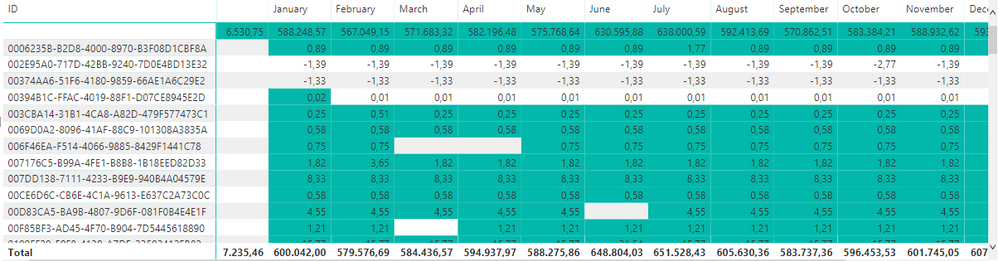
The end visual needed is akin to a matrix that looks like this. To be able to tell in what months an ID has use for what resources.distrib2.PNG


I imagine it has to extend IDs down the number of months between the two dates and have a new column with a corresponding month.


I am open to any suggestions. Please ask if I did not explain in enough detail.


Link to Dropbox for .pbix

3 REPLIES 3
Anonymous
Not applicable

@donaldo 

Good morning,

have you ever found a solution to this problem? I am currently struggling with the same problem. I only have one row for each item ID. When I try to distribute the item value across the data, the distribution only occurs within the measure. Of course, if I select a random month where the item ID is not present (for example, a date within the start and end dates), the item disappears because the realtion model does not recognize the selected month for the specific item. 

Hi,


Yes, it has been quite a while - so I am not into the context anymore. I managed to solve it and I'm just going to have to paste the solution to you - basciallyI had to create a date calendar (I probably could have used my existing datekey calendar, but I didn't know better at the time) like so:

Resource Calendar = FILTER(CALENDAR("2016-01-01","2024-12-31"),DAY([Date])=1)

And then crossjoin with my original table above:

Resource Distribution = FILTER(CROSSJOIN('Resources','Resource Calendar'),'Resource Calendar'[Date]>='Resources'[ImplementationLevel(IL3).ExpectedProgress]&&'Resource Calendar'[Date]<='Resources'[ImplementationLevel(IL4).ExpectedProgress])


Giving me a row by row distribution of the resources, my description might not be exactly accurate but it's just from glancing over a project from 4 years ago, so you might have to just go by the DAX.

Anonymous
Not applicable

Hi @donaldo,


Current power bi not support direct analysis data between multiple date columns, maybe you can consider to expand these date range to new table and create relationship to original table for analytics:

Spread revenue across period based on start and end date, slice and dase this using different dates


Regards,

Xiaoxin Sheng

Helpful resources

Announcements
November Power BI Update Carousel

Power BI Monthly Update - November 2025

Check out the November 2025 Power BI update to learn about new features.

Fabric Data Days Carousel

Fabric Data Days

Advance your Data & AI career with 50 days of live learning, contests, hands-on challenges, study groups & certifications and more!

FabCon Atlanta 2026 carousel

FabCon Atlanta 2026

Join us at FabCon Atlanta, March 16-20, for the ultimate Fabric, Power BI, AI and SQL community-led event. Save $200 with code FABCOMM.

Top Solution Authors
Top Kudoed Authors