

Join us at FabCon Atlanta from March 16 - 20, 2026, for the ultimate Fabric, Power BI, AI and SQL community-led event. Save $200 with code FABCOMM.
Register now!The Power BI Data Visualization World Championships is back! Get ahead of the game and start preparing now! Learn more
Hi w
We have an app theta takes photos of furniture and saves it in a datavese table
Image of table linked to Power BI Desktop
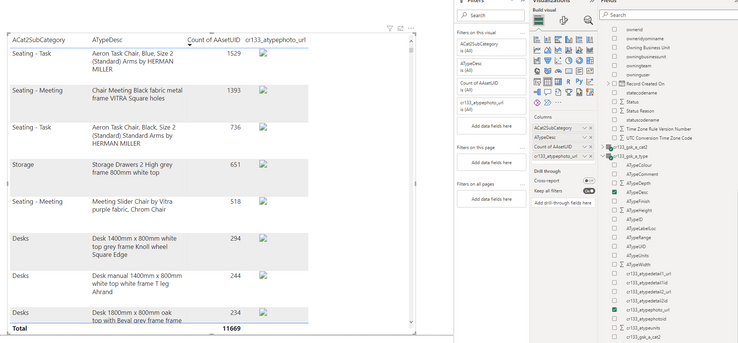
Image of report I trying to create
WHat do I need to do to get the image to display?
My Power BI knowledge is basic
Solved! Go to Solution.
@Garbo62 , You need to have full path, seem like this staring from a folder
refer:
https://powerusers.microsoft.com/t5/Building-Power-Apps/Dataverse-Image-URL/td-p/1191910
related
https://www.youtube.com/watch?v=RcJP_nDQaSE
Hi, Works but the images only display on the Published page, see https://www.youtube.com/watch?v=EowHdhy-Nio
Hi, Thanks getting there but not quiet.
If is set ithe column to Web URL the line works
Bit if I set it to Image URL nothing is displayed
i'm also facing this. Web URL is working but image URL is not working . Anyone can help me with this.
@Garbo62 , You need to have full path, seem like this staring from a folder
refer:
https://powerusers.microsoft.com/t5/Building-Power-Apps/Dataverse-Image-URL/td-p/1191910
related
The Power BI Data Visualization World Championships is back! Get ahead of the game and start preparing now!
| User | Count |
|---|---|
| 38 | |
| 36 | |
| 33 | |
| 30 | |
| 28 |
| User | Count |
|---|---|
| 128 | |
| 88 | |
| 79 | |
| 67 | |
| 62 |