cancel
Showing results for 
Search instead for 
Did you mean: 

The Power BI Data Visualization World Championships is back! Get ahead of the game and start preparing now! Learn more

Reply
MiekeV
Frequent Visitor

Display/Sort Months Chronologically

Hello, 


I am having difficulties sorting my months in order for my graphs as well as my slicers.


I read that you can have  a column for the month number the go to Modelling>"Sort by Column" however, it is not working for me.


I wrote some DAX to generate my month number column called "Fiscal Period Number" since there are far too many rows to type them individually (see image below)


FPN DAX.png


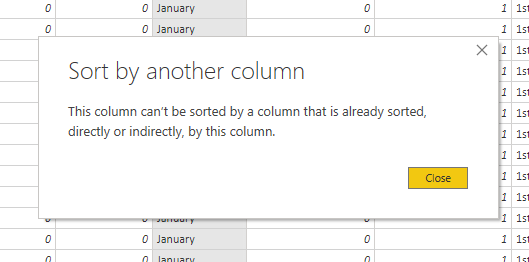
Then I went to Modelling>Sort By Column>Fiscal Period Number while the Fiscal Period Column was selected. This notification pops up:


Sorry, I have tried to add it 3 times but it's not posting. It says:


"Sort by another Column

This column can't be sorted by a column that is already sorted, directly or indirectly, by this column"


In the table, they seem to match up:
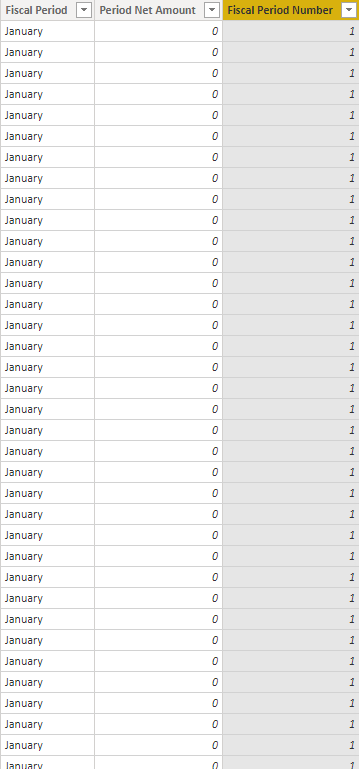
 

Table.png


I tried changing the column type to numbers but the same notification pops up. Is this because I created the month number column based on the month column through DAX?


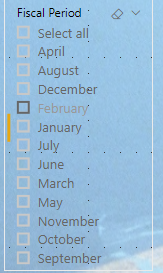
Here Are some examples of my slicers and figures listing the months in alphabetical order:

 

Chart.pngSlicer.png


1 ACCEPTED SOLUTION
v-xicai
Community Support
Community Support

Hi @MiekeV ,


You can refer to following similar case to know how to create a custom order column in Query Editor to enable sort by column feature:


Sort by another column error


You can also create a related sort table, see more: Custom Sorting in Power BI .


Best Regards,

Amy


If this post helps, then please consider Accept it as the solution to help the other members find it more quickly.

View solution in original post

3 REPLIES 3
v-xicai
Community Support
Community Support

Hi @MiekeV ,


You can refer to following similar case to know how to create a custom order column in Query Editor to enable sort by column feature:


Sort by another column error


You can also create a related sort table, see more: Custom Sorting in Power BI .


Best Regards,

Amy


If this post helps, then please consider Accept it as the solution to help the other members find it more quickly.

Nathaniel_C
Community Champion
Community Champion

Hi @MiekeV ,
You don't show what notification pops up.
Nathaniel


Did I answer your question? Mark my post as a solution!

Proud to be a Super User!


Sorry about that!

Notification.png

Helpful resources

Announcements
Power BI DataViz World Championships

Power BI Dataviz World Championships

The Power BI Data Visualization World Championships is back! Get ahead of the game and start preparing now!

December 2025 Power BI Update Carousel

Power BI Monthly Update - December 2025

Check out the December 2025 Power BI Holiday Recap!

FabCon Atlanta 2026 carousel

FabCon Atlanta 2026

Join us at FabCon Atlanta, March 16-20, for the ultimate Fabric, Power BI, AI and SQL community-led event. Save $200 with code FABCOMM.