cancel
Showing results for 
Search instead for 
Did you mean: 

Vote for your favorite vizzies from the Power BI Dataviz World Championship submissions. Vote now!

Reply
Anonymous
Not applicable

Display HH:MM in Y axis

Greetings,


I am new to PowerBI and would like to get some assistance. Thank you in advance.


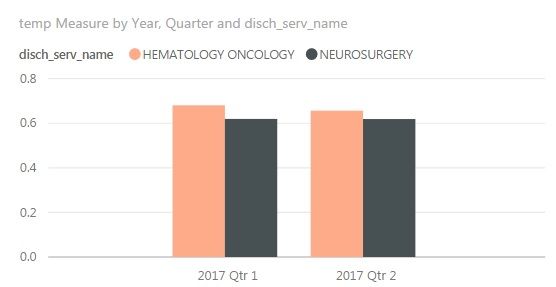
I have a table w/ a time stamp.  I am able to display those values into HH:MM by adding format; however, as trying to plot them into a bar chart, only the decimal numbers appear.


Is there a way to format those decimal numbers into hh:mm or is there a custom visual that I can use to make this happen? 


1.jpg

1 REPLY 1
v-qiuyu-msft
Community Support
Community Support

Hi @Anonymous,


It's not supported to display HH:MM format in Y-axis use built-in visuals, as Y-axis used to be displaying aggregated values, generally it's number data type.


Also based on my research, existing custom visuals can't display HH:MM format in Y-axis as well.


Best Regards,
Qiuyun Yu

Community Support Team _ Qiuyun Yu
If this post helps, then please consider Accept it as the solution to help the other members find it more quickly.

Helpful resources

Announcements
Power BI DataViz World Championships

Power BI Dataviz World Championships

Vote for your favorite vizzies from the Power BI World Championship submissions!

Sticker Challenge 2026 Carousel

Join our Community Sticker Challenge 2026

If you love stickers, then you will definitely want to check out our Community Sticker Challenge!

January Power BI Update Carousel

Power BI Monthly Update - January 2026

Check out the January 2026 Power BI update to learn about new features.

FabCon Atlanta 2026 carousel

FabCon Atlanta 2026

Join us at FabCon Atlanta, March 16-20, for the ultimate Fabric, Power BI, AI and SQL community-led event. Save $200 with code FABCOMM.