
Join us at FabCon Atlanta from March 16 - 20, 2026, for the ultimate Fabric, Power BI, AI and SQL community-led event. Save $200 with code FABCOMM.
Register now!Learn from the best! Meet the four finalists headed to the FINALS of the Power BI Dataviz World Championships! Register now
Hi,
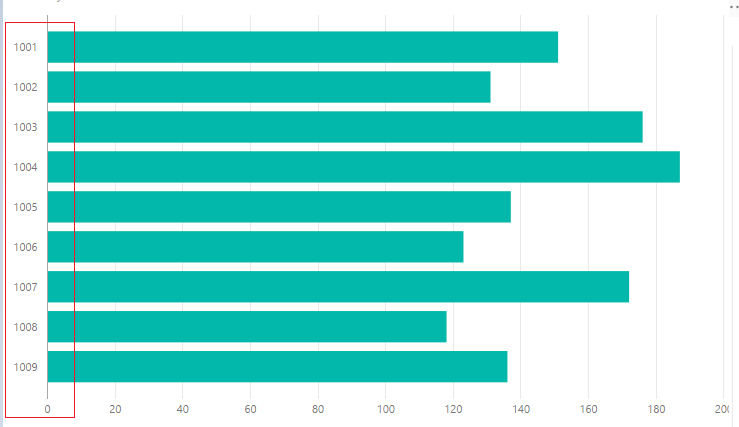
I have to order the bar chart with a particular field but the bottom Sort By Column is disable and in the chart doesn't present.
How i can do?
Thank you.
Marco
Solved! Go to Solution.
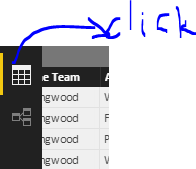
Go to Middle Side Tab -- Click Modelling. It should be active
Hi Marco,
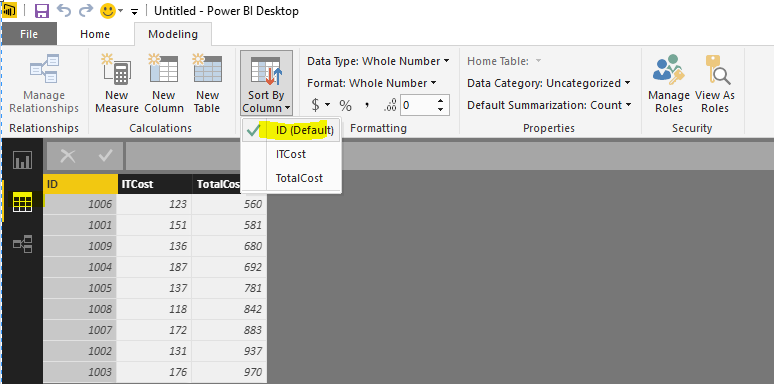
See the attached screen shot.
Thanks & Regards,
Bhavesh
Hi @marcobaciga,
In the data table, click the column you need to sort, and then click Sort By Column.
Regards,
Charlie Liao
Hi @marcobaciga,
In the data table, click the column you need to sort, and then click Sort By Column.
Regards,
Charlie Liao
Go to Middle Side Tab -- Click Modelling. It should be active
Hi Marco,
See the attached screen shot.
Thanks & Regards,
Bhavesh
Share feedback directly with Fabric product managers, participate in targeted research studies and influence the Fabric roadmap.
Check out the February 2026 Power BI update to learn about new features.
| User | Count |
|---|---|
| 61 | |
| 58 | |
| 42 | |
| 18 | |
| 15 |
| User | Count |
|---|---|
| 105 | |
| 99 | |
| 38 | |
| 29 | |
| 29 |