Fabric Data Days starts November 4th!
Advance your Data & AI career with 50 days of live learning, dataviz contests, hands-on challenges, study groups & certifications and more!
Get registered- Power BI forums
- Get Help with Power BI
- Desktop
- Service
- Report Server
- Power Query
- Mobile Apps
- Developer
- DAX Commands and Tips
- Custom Visuals Development Discussion
- Health and Life Sciences
- Power BI Spanish forums
- Translated Spanish Desktop
- Training and Consulting
- Instructor Led Training
- Dashboard in a Day for Women, by Women
- Galleries
- Data Stories Gallery
- Themes Gallery
- Contests Gallery
- Quick Measures Gallery
- Visual Calculations Gallery
- Notebook Gallery
- Translytical Task Flow Gallery
- TMDL Gallery
- R Script Showcase
- Webinars and Video Gallery
- Ideas
- Custom Visuals Ideas (read-only)
- Issues
- Issues
- Events
- Upcoming Events
Join us at FabCon Atlanta from March 16 - 20, 2026, for the ultimate Fabric, Power BI, AI and SQL community-led event. Save $200 with code FABCOMM. Register now.
- Power BI forums
- Forums
- Get Help with Power BI
- Desktop
- Re: DirectQuery workaround maximum allowed size wi...
- Subscribe to RSS Feed
- Mark Topic as New
- Mark Topic as Read
- Float this Topic for Current User
- Bookmark
- Subscribe
- Printer Friendly Page

- Mark as New
- Bookmark
- Subscribe
- Mute
- Subscribe to RSS Feed
- Permalink
- Report Inappropriate Content
DirectQuery workaround maximum allowed size with Top records
Hi,
using SQL Server Direct Query
I have a standard fact table visualised as 'Table' and dimension tables as 'Slicers'
the fact table has 100 mil records, so depending on the filters, the amount of records returned can breach the Direct Query limits:
"The resultset of a query to external data source has exceeded the maximum allowed size of '1000000' rows"
Is it possible to work around this limitation by simply telling the table to only load TOP N records, after the (optionally selected) filters?
Note that I cannot apply Top N in modelling, since that would first limit the records and then apply (selected slicers) filter. What I need is first apply the filters and then, the selected ordering (Table headers), and only then the record count limit
Any thoughts how to do this?
Kind regards,
Stefan


- Mark as New
- Bookmark
- Subscribe
- Mute
- Subscribe to RSS Feed
- Permalink
- Report Inappropriate Content
So what you are basically asking for is to change the 1 Mil error into a (silent) abort ? Feel free to raise an idea about that.
Currently it is not possible to influence the Direct Query queries generated by the user filter interactions. That might be another idea worth putting forward.
- Mark as New
- Bookmark
- Subscribe
- Mute
- Subscribe to RSS Feed
- Permalink
- Report Inappropriate Content
Not (silent) abort, just limit the amount of records loaded to a small number that the user is actually looking at.
There is little sense in loading 1 mil records into a Table in one go, the user can only ever see a handful at a time. So table could use (standard) virtual scrolling/paging to avoid unnecessary big queries.
The problem is even worse after publishing to web, which is further limiting the amount of data in one request.
Is that not an existing feature that can be turned on, or achieved with DAX?
- Mark as New
- Bookmark
- Subscribe
- Mute
- Subscribe to RSS Feed
- Permalink
- Report Inappropriate Content
Yes and no. If you look at the performance analyzer for the DAX query you will see that a TOP x limiter is included but it is pretty big, in the 500k range I think.
What you can do is add a Top N visual filter that should technically override the automatic one.
- Mark as New
- Bookmark
- Subscribe
- Mute
- Subscribe to RSS Feed
- Permalink
- Report Inappropriate Content
Yes it's the max limit:
// SQL Query
SELECT
TOP (1000001)
...
Adding a Top N "Filter on this visual" (table) seems to be doing something more complicated - joins to another SQL statement which is selecting Top N records by specific column, rather then just overrinding Top (1000001) and hence obeying the selected table sort order
- Mark as New
- Bookmark
- Subscribe
- Mute
- Subscribe to RSS Feed
- Permalink
- Report Inappropriate Content
Raise an idea at ideas.powerbi.com
- Mark as New
- Bookmark
- Subscribe
- Mute
- Subscribe to RSS Feed
- Permalink
- Report Inappropriate Content
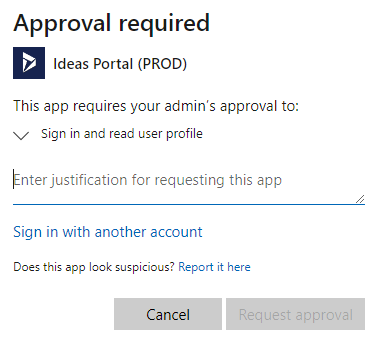
I can't even do that, thanks to (excellent!) the PowerBi account restrictions/changes. Took me ages to be able to post on this forum, this is ridiculous to be honest (nothing to do with this issue apologies)


- Mark as New
- Bookmark
- Subscribe
- Mute
- Subscribe to RSS Feed
- Permalink
- Report Inappropriate Content
Hi, @Anonymous
Have you checked this similar thread to create a mesure ,the apply it to the visual filter pane.
best regards,
Community Support Team_ Eason
- Mark as New
- Bookmark
- Subscribe
- Mute
- Subscribe to RSS Feed
- Permalink
- Report Inappropriate Content
not sure how to combine RANKX with selected filters, is it possible?
Tried following this but I can't work out how to apply to my example
Helpful resources

Fabric Data Days
Advance your Data & AI career with 50 days of live learning, contests, hands-on challenges, study groups & certifications and more!

Power BI Monthly Update - October 2025
Check out the October 2025 Power BI update to learn about new features.

FabCon Atlanta 2026
Join us at FabCon Atlanta, March 16-20, for the ultimate Fabric, Power BI, AI and SQL community-led event. Save $200 with code FABCOMM.


| User | Count |
|---|---|
| 78 | |
| 46 | |
| 37 | |
| 31 | |
| 26 |


