Join us at FabCon Atlanta from March 16 - 20, 2026, for the ultimate Fabric, Power BI, AI and SQL community-led event. Save $200 with code FABCOMM.
Register now!View all the Fabric Data Days sessions on demand. View schedule
Hi,
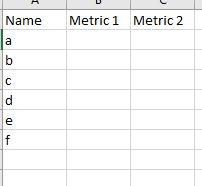
I want to apply different date slicer for different column in my grid.
eg:
Here, I want to compare metric 1 (for a specified date range) to metric 2 (for a different specified date range.
Please Help!
@Anonymous
One way of doing it:
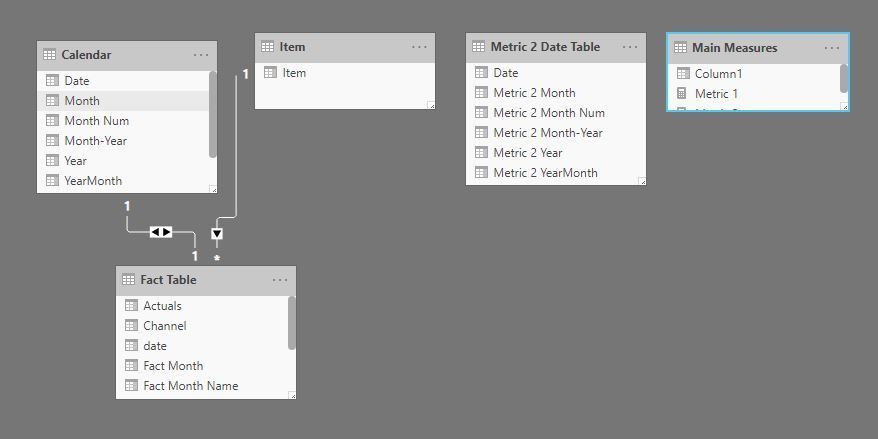
1) create a duplicate of your date table, with no relationship with your fact table
2) create measure for your metric 1
3) create a metric measure which filters your date table based on the selection in your second date table (Metric 2 Date table):
Metric 2 = CALCULATE(SUM('Fact Table'[Target]);
TREATAS(VALUES('Metric 2 Date Table'[Metric 2 Month-Year]);'Calendar'[Month-Year]))
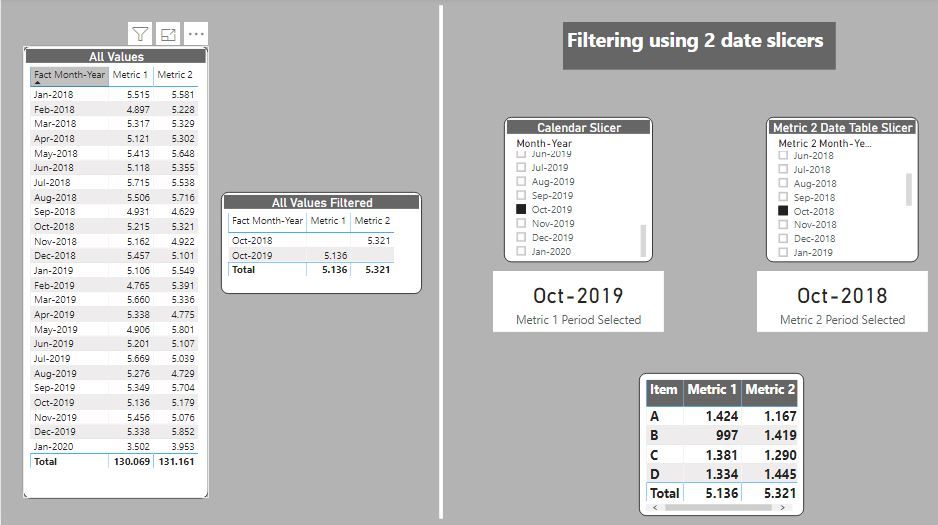
and you get this:
Proud to be a Super User!
Paul on Linkedin.
Please refer my blog, hope that can help
Comparing-Data-Across-Date-Ranges
Appreciate your Kudos. In case, this is the solution you are looking for, mark it as the Solution. In case it does not help, please provide additional information and mark me with @
Thanks. My Recent Blog -
Winner-Topper-on-Map-How-to-Color-States-on-a-Map-with-Winners , HR-Analytics-Active-Employee-Hire-and-Termination-trend
Power-BI-Working-with-Non-Standard-Time-Periods And Comparing-Data-Across-Date-Ranges
Connect on Linkedin
Check out the November 2025 Power BI update to learn about new features.
Advance your Data & AI career with 50 days of live learning, contests, hands-on challenges, study groups & certifications and more!