Forum Discussion
Anonymous
6 years agoNot applicable
Detect changed value in a column compared to previous row
Hi, I need to filter my visual to only show rows where there has been a change in "Attribute" compared to the previous row. We start with our dataset: Index Attribute 1 A 2 A ...
- Anonymous6 years ago
Anonymous
Column = VAR _prevattr = CALCULATE(MAX('Table'[Attribute]),FILTER('Table','Table'[Index]<EARLIER('Table'[Index]))) RETURN IF('Table'[Attribute]<>_prevattr,1,0)
Please use this formula to track status change. However one thing I didn't get for index 4 changed value column value is 1 I think it should be 0. Let me know if you have question - 6 years ago
Thanks for providing a dataset that could be copied and pasted.
Here's the measure I wrote
Changed =VAR currentIndex =MAX ( Attributes[Index] )VAR previousIndex =IF ( currentIndex = 1, 1, CurrentIndex - 1 )VAR currentValue =MAX ( Attributes[Attribute] )VAR previousValue =CALCULATE ( MAX ( Attributes[Attribute] ), Attributes[Index] = previousIndex )RETURNpreviousValue = currentValueThe trick to get "previous" values in DAX is to use an idex (which you already had). There is a function named EARLIER, but it does NOT mean the previous row. It refers to the outer filter context and is not appropriate here.
This is a measure, so in several places you cannot just refer to a column directly, but have to wrap your reference in MAX(). The measure will run in a row context, where there will only be one value available. So MAX will return that value.
Here are my resultsThanks for posting, it was a fun problem.Every time I answer a question I learn something
kentyler
Solution Sage
6 years agoThanks for providing a dataset that could be copied and pasted.
Here's the measure I wrote
Changed =
VAR currentIndex =
MAX ( Attributes[Index] )
VAR previousIndex =
IF ( currentIndex = 1, 1, CurrentIndex - 1 )
VAR currentValue =
MAX ( Attributes[Attribute] )
VAR previousValue =
CALCULATE ( MAX ( Attributes[Attribute] ), Attributes[Index] = previousIndex )
RETURN
previousValue = currentValue
The trick to get "previous" values in DAX is to use an idex (which you already had). There is a function named EARLIER, but it does NOT mean the previous row. It refers to the outer filter context and is not appropriate here.
This is a measure, so in several places you cannot just refer to a column directly, but have to wrap your reference in MAX(). The measure will run in a row context, where there will only be one value available. So MAX will return that value.
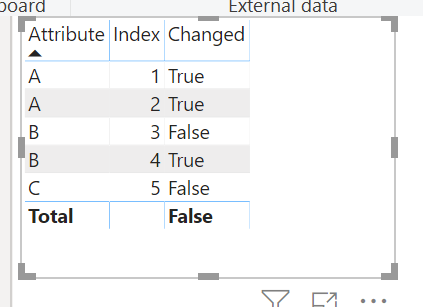
Here are my results
This is a measure, so in several places you cannot just refer to a column directly, but have to wrap your reference in MAX(). The measure will run in a row context, where there will only be one value available. So MAX will return that value.
Here are my results
Thanks for posting, it was a fun problem.
Every time I answer a question I learn something