Join us at FabCon Atlanta from March 16 - 20, 2026, for the ultimate Fabric, Power BI, AI and SQL community-led event. Save $200 with code FABCOMM.
Register now!The Power BI Data Visualization World Championships is back! Get ahead of the game and start preparing now! Learn more
In their data entry forms, users can select either a single country or a region consisting of multiple countries (e.g. Scandinavia = Denmark, Norway, Sweden). The values in the Location column therefore include both countries and regions. For example, in a dataset with only 5 records the Location column might contain these values:
Norway
Sweden
Sweden
Scandinavia
Denmark
In PowerBI, if the record for Scandinavia is selected, I want the map to fill all three countries.
Is this possible by grouping? Or can I define a region and relate that to the Location column (sounds unlikely to me)?
The map is based on an imported shape file, so not Bing or Esri.
Many thanks for any advice!
Thank you all for your advice - it is very helpful. I am continuing to work with this and will post a conclusion if I find a solution.
Hi @CJDK
Could you tell me if your problem has been solved? If it is, kindly Accept it as the solution. More people will benefit from it. Or you are still confused about it, please provide me with more details about your table and your problem or share me with your pbix file from your Onedrive for Business.
Best Regards,
Rico Zhou
Hi @Anonymous - I am still working with this and at present have a technical problem with Power BI Desktop. I will return to this as soon as I have finalized my problems, but in the meantime I cannot say this is a solution. Thanks again for your support!
Hi @CJDK
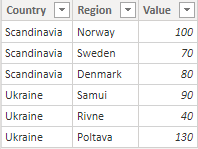
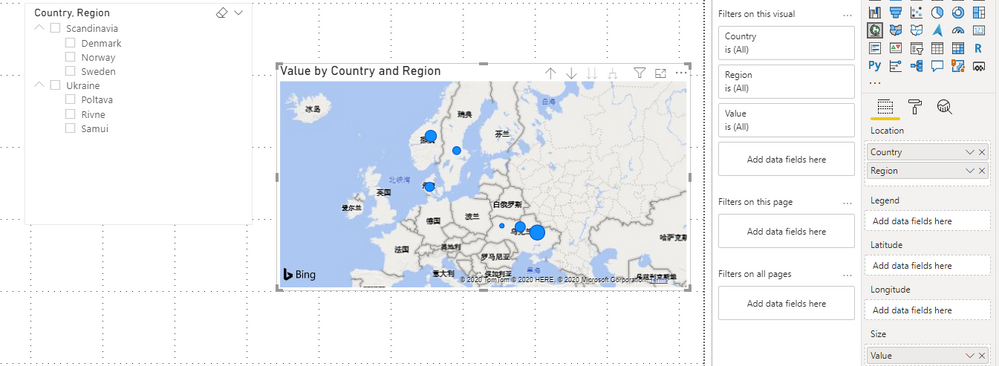
I think you have to transform your data model as below and build a hierachy slicer to achieve your goal.
Result:
Best Regards,
Rico Zhou
If this post helps, then please consider Accept it as the solution to help the other members find it more quickly.
Hi @CJDK ,
can you provide a sample file?
Marcus Wegener works as Full Stack Power BI Engineer at BI or DIE.
His mission is clear: "Get the most out of data, with Power BI."
twitter - LinkedIn - YouTube - website - podcast - Power BI Tutorials
The Power BI Data Visualization World Championships is back! Get ahead of the game and start preparing now!
Check out the November 2025 Power BI update to learn about new features.
| User | Count |
|---|---|
| 59 | |
| 43 | |
| 42 | |
| 23 | |
| 17 |
| User | Count |
|---|---|
| 190 | |
| 122 | |
| 96 | |
| 66 | |
| 47 |