FabCon is coming to Atlanta
Join us at FabCon Atlanta from March 16 - 20, 2026, for the ultimate Fabric, Power BI, AI and SQL community-led event. Save $200 with code FABCOMM.
Register now!- Power BI forums
- Get Help with Power BI
- Desktop
- Service
- Report Server
- Power Query
- Mobile Apps
- Developer
- DAX Commands and Tips
- Custom Visuals Development Discussion
- Health and Life Sciences
- Power BI Spanish forums
- Translated Spanish Desktop
- Training and Consulting
- Instructor Led Training
- Dashboard in a Day for Women, by Women
- Galleries
- Data Stories Gallery
- Themes Gallery
- Contests Gallery
- QuickViz Gallery
- Quick Measures Gallery
- Visual Calculations Gallery
- Notebook Gallery
- Translytical Task Flow Gallery
- TMDL Gallery
- R Script Showcase
- Webinars and Video Gallery
- Ideas
- Custom Visuals Ideas (read-only)
- Issues
- Issues
- Events
- Upcoming Events
The Power BI Data Visualization World Championships is back! Get ahead of the game and start preparing now! Learn more
- Power BI forums
- Forums
- Get Help with Power BI
- Desktop
- Day number of year
- Subscribe to RSS Feed
- Mark Topic as New
- Mark Topic as Read
- Float this Topic for Current User
- Bookmark
- Subscribe
- Printer Friendly Page

- Mark as New
- Bookmark
- Subscribe
- Mute
- Subscribe to RSS Feed
- Permalink
- Report Inappropriate Content
Day number of year
Trying to find the syntax for to return a numer out of 1-365 for what number of day in year it is vs just knowing the number in the month
Solved! Go to Solution.


- Mark as New
- Bookmark
- Subscribe
- Mute
- Subscribe to RSS Feed
- Permalink
- Report Inappropriate Content
@Anonymous
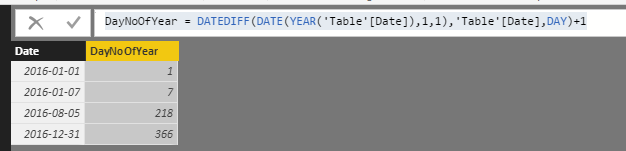
You can also add a calcualted column in DAX.
DayNoOfYear =
DATEDIFF ( DATE ( YEAR ( 'Table'[Date] ), 1, 1 ), 'Table'[Date], DAY ) + 1

- Mark as New
- Bookmark
- Subscribe
- Mute
- Subscribe to RSS Feed
- Permalink
- Report Inappropriate Content
Not seeing Date.Dayofyear coming up in any function within BI


- Mark as New
- Bookmark
- Subscribe
- Mute
- Subscribe to RSS Feed
- Permalink
- Report Inappropriate Content
Just use DAX


- Mark as New
- Bookmark
- Subscribe
- Mute
- Subscribe to RSS Feed
- Permalink
- Report Inappropriate Content
Why should we have to creeate a DAX function for something so simple as Day of the Year?
God I hate PBI more and more every day I use it.


- Mark as New
- Bookmark
- Subscribe
- Mute
- Subscribe to RSS Feed
- Permalink
- Report Inappropriate Content
Just an additional application: I need to create a day number for a harvest year from 1-Jul till 30-Jun. Using solution from this query I did the following:
HarvYearDay = IF(
            MONTH( DateTable[Date] ) > 6,
                DATEDIFF( DATE ( YEAR ( DateTable[Date] ), 7, 1 ), DateTable[Date], DAY ) + 1,
                DATEDIFF( DATE ( YEAR ( DateTable[Date] ), 1, 1 ), DateTable[Date], DAY ) + 185
            )
This is just to share if someone needs to do the same.

- Mark as New
- Bookmark
- Subscribe
- Mute
- Subscribe to RSS Feed
- Permalink
- Report Inappropriate Content
Check out the Date.DayOfYear formula. You would use this in the query editor to add a new column, either as a custom column using the formula, or the simple way through the UI: select your date column, then to go the Add Column tab in the ribbon and use the drop-down on Date to select Day > Day of Year.
- Mark as New
- Bookmark
- Subscribe
- Mute
- Subscribe to RSS Feed
- Permalink
- Report Inappropriate Content
@Anonymous
You can also add a calcualted column in DAX.
DayNoOfYear =
DATEDIFF ( DATE ( YEAR ( 'Table'[Date] ), 1, 1 ), 'Table'[Date], DAY ) + 1
- Mark as New
- Bookmark
- Subscribe
- Mute
- Subscribe to RSS Feed
- Permalink
- Report Inappropriate Content
OMG - does PBI really suck this much that this is what MS suggests? Makes me miss the overly complicated SSRS.
And the probably correct way for the day of the year is
- Mark as New
- Bookmark
- Subscribe
- Mute
- Subscribe to RSS Feed
- Permalink
- Report Inappropriate Content
OMG - is this really the way to calculate the day of the year? I hate power bi more and more every day.
- Mark as New
- Bookmark
- Subscribe
- Mute
- Subscribe to RSS Feed
- Permalink
- Report Inappropriate Content
Ha 🙂 I just had the EXACT same reaction. Really?!?? If you can do it in M Query, why not replicate in Dax?
But then, you can't numerically set column widths, either. Or easily replicate a filter set up for HALF the visuals on a page (so NOT page level, NOT report level). Or dynamically name measures, or format all columns at once, or....
I miss VBA. But I also miss Fortran and Pascal, so guess I am a dinasour... 🐱🐉

- Mark as New
- Bookmark
- Subscribe
- Mute
- Subscribe to RSS Feed
- Permalink
- Report Inappropriate Content
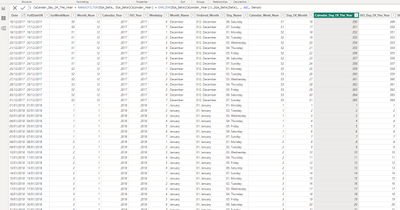
If you have a date table that has all the dates between 2 periods you can also use this method

- Mark as New
- Bookmark
- Subscribe
- Mute
- Subscribe to RSS Feed
- Permalink
- Report Inappropriate Content
Hello,
I was able to use this solution to calculate the day number of the year. I was wondering if anybody had any ideas on how to calculate this for a fiscal year and account for the leap year?
My organizations fiscal year starts in October. I was able to use the DAX formula below to calculate the fiscal day number of the year but when leap years occur the formula does not calculate correctly.
FiscalDayoftheYear = IF('Date'[DayofhtheYear]>273,'Date'[DayofhtheYear]-273,'Date'[DayofhtheYear]+92)
If anyone has any ideas that would be great! Thanks!
- Mark as New
- Bookmark
- Subscribe
- Mute
- Subscribe to RSS Feed
- Permalink
- Report Inappropriate Content
Did you ever digure it out? Got the same problem.
- Mark as New
- Bookmark
- Subscribe
- Mute
- Subscribe to RSS Feed
- Permalink
- Report Inappropriate Content
I have to calculate Day number of Quarter and Day number of Month help me please.
Helpful resources

Power BI Dataviz World Championships
The Power BI Data Visualization World Championships is back! Get ahead of the game and start preparing now!

Power BI Monthly Update - December 2025
Check out the December 2025 Power BI Holiday Recap!

FabCon Atlanta 2026
Join us at FabCon Atlanta, March 16-20, for the ultimate Fabric, Power BI, AI and SQL community-led event. Save $200 with code FABCOMM.

| User | Count |
|---|---|
| 41 | |
| 38 | |
| 36 | |
| 30 | |
| 28 |


| User | Count |
|---|---|
| 128 | |
| 88 | |
| 79 | |
| 67 | |
| 62 |


