Join us at FabCon Atlanta from March 16 - 20, 2026, for the ultimate Fabric, Power BI, AI and SQL community-led event. Save $200 with code FABCOMM.
Register now!The Power BI Data Visualization World Championships is back! Get ahead of the game and start preparing now! Learn more
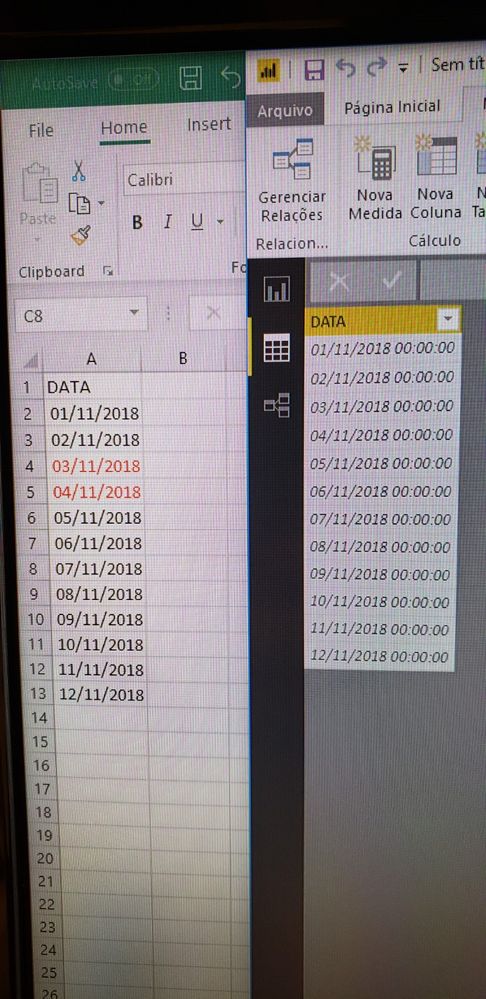
Last weekend started here in Brazil the Day Light Saving Time, and since then my reports dont show the date 04/11/2018, instead, appears 03/11/2018 23:00:00, even the datasource does not having time. I don't want that time or timezone be considerated in this field, only the date part, but even using some M function like DateTimeZone.RemoveZone when i try show the field in some visualization the problem still happens. Below I'll try ilustrate my problem.
In the left side are the dates in Excel, I the right side you can see the date 04/11/2018 imported.
And now when I try to put the date field in some visualization, the 04/11/2018 disappears and shows up 03/11/2018 23:00:00.
Solved! Go to Solution.
Hi @valariobr,
I'd like to suggest you refer to following blogs told about how to handle daylight saving time issue:
Daylight Saving Time And Time Zones In M
Solving DAX Time Zone Issue in Power BI
Regards,
Xiaoxin Sheng
Hi @valariobr,
I'd like to suggest you refer to following blogs told about how to handle daylight saving time issue:
Daylight Saving Time And Time Zones In M
Solving DAX Time Zone Issue in Power BI
Regards,
Xiaoxin Sheng
The Power BI Data Visualization World Championships is back! Get ahead of the game and start preparing now!
| User | Count |
|---|---|
| 38 | |
| 36 | |
| 33 | |
| 33 | |
| 29 |
| User | Count |
|---|---|
| 134 | |
| 96 | |
| 78 | |
| 67 | |
| 65 |