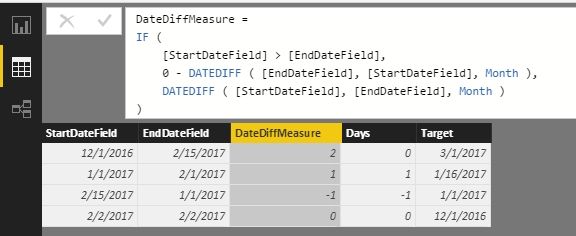
Hi, I've thoroughly reviewed the other posts on this topic and none of them have a solution that works for my situation. I need to calculate the months difference between two dates, and in some cases, the start date is greater than the end date. I cannot just subtract the dates because I need the Months, not the Days. I've tried to modify the following solutions from previous posts but I get the same error each time:
1)
DateDiffMeasure :=
IF (
    [StartDateField] > [EndDateField],
    0 - DATEDIFF ( [EndDateField], [StartDateField], Month ),
    DATEDIFF ( [StartDateField], [EndDateField], Month )
)
2)
Days =
SWITCH (
    TRUE (),
    [StartDateField] > [EndDateField], -1 * DATEDIFF ( [EndDateField], [StartDateField], Month ),
    [EndDateField] > 'Table'[Target], DATEDIFF ( [StartDateField], [EndDateField], Month ),
    0
)
I get the same Datediff error (start date cannot be greater than the end date) regardless of what option I try from previous posts on this topic.