Forum Discussion

Date displays incorrectly from Excel
I see someone else posting this same issue but no responses...
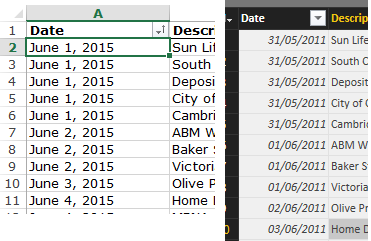
I'm trying to pull in an excel file to play with Power BI and having trouble with something pretty basic. The Date column in my data isn't displaying correctly in the query. All of the dates show as 2011 and 1 day prior to what the date field in Excel shows.
Pic attached shows my data source and what it looks like in Power BI. I'm formatting my dates various ways in excel but dd/mm/yyyy is the default and that is what the default shows in Power BI too. (for the screen shot I had formatted it
I'm stumped.
6 Replies
 ALeefResolver II
I would check your date formatting in excel is actually of "date" type. Lots of times, excel will make it a custom format to match your inputted formatting. Excel stores dates in a "number" format, so its often hard to translate properly when pulling into PowerBI. I'd bet that the one day prior is based on your Excel date having a non time-zone compatible stamp, and PowerBI interpreting it as 12 midnight on June 1st, with a time zone adjustment of negative ___ hours, thus showing a day earlier.
Try formatting your date in Excel as one of the date types with an * in front of it, making sure they translate correctly in excel, and then reimporting to PowerBI, again formatting it as a Date (not Date/Time) field, that has the * in front of it.
I'm not 100% on it, but it might help.
 RJResolver II
Out of interest if the dates in both excel and Power BI and converted to numbers. What happens
Do you get the same dates?
 koeniecomRegular Visitor
I think it's not the source (Excel) that causes the problem: I have the same. Source = SharePoint Online. Alle dates are one day before the date in the source...
 enakoNew Member
I am facing the same issue. Did anyone founded a workaround or fix for this. I am on the last version of Power BI
- enakoNew Member
I am facing the same issue. Did anyone founded a workaround or fix for this. I am on the last version of Power BI
 Brian_MContinued Contributor
Are you able to copy out just the date column into a new excel file and replicate the issue? If so, could you share the Excel file up on OneDrive / dropbox so we can take a look?
I've tried manually entering the data in your screenshot but can't replicate what you see.