cancel
Showing results for 
Search instead for 
Did you mean: 

View all the Fabric Data Days sessions on demand. View schedule

Reply
tbalci
New Member

Date Table - Slicer not updating visuals

Hello,


I have a setup with two tables:


[1] Case Data: As the name hints, it contains data for support cases. It has the fields case ID (unique), product, severity, date created etc.
[2] Date: It is a calendar/date table and has the following columns:

  • Date: Date = CALENDAR(DATE(2015;01;01);DATE(2020;12;31))
  • Year: Year = YEAR('Date'[Date])
  • Month: Month = MONTH('Date'[Date])
  • Quarter: Quarter = VALUE ( FORMAT ('Date'[Date]; "Q" ) )


The two tables are linked as Date (Date table) - Date Created (Case Data) table as follows. The relationship is one-to-many because on one day more than one case can be created:
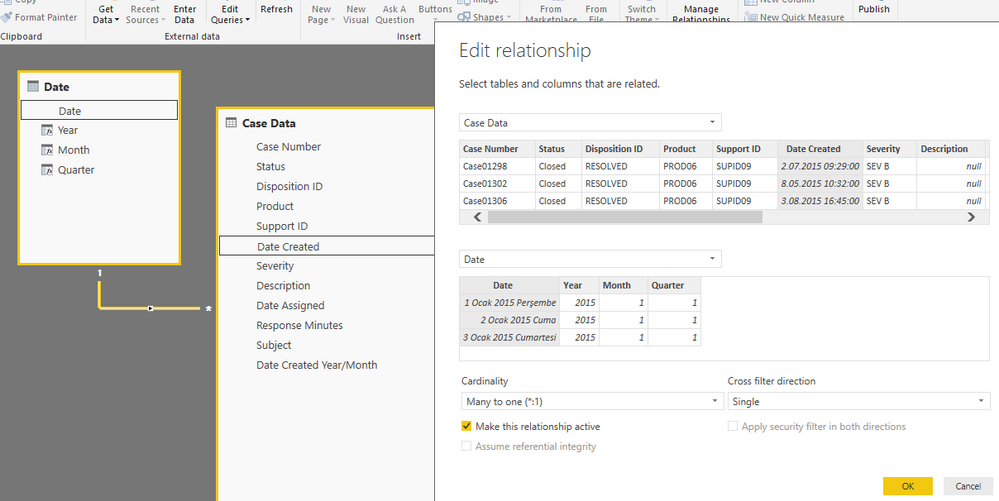
 

Relationship.PNG


In the report view, I created a slicer with Year and had a visual to show count of case number for that year and a matrix to show the number of cases logged for a specific product for each severity level. I checked the interactions and see that the slicer is connected to both the visual and the matrix.


The issue is, when I change the slider, the visual and the matrix is not updated. Both show only the total values no matter how the slider changes.


Can you help me see what I am doing wrong?


Thank you.


PBIX file: https://www.dropbox.com/s/sgin5h5xmtkqrp1/Case%20Data.pbix?dl=0


1 ACCEPTED SOLUTION
Zubair_Muhammad
Community Champion
Community Champion

@tbalci


Actually your Datecreated column is formatted as DateTime   while CalendarDate is a Date

Please see your revised file attached

Now it works


I created a new column and used this for relationship with Calendar Table


Date for relationship = TRUNC([Date Created],0)


View solution in original post

2 REPLIES 2
Zubair_Muhammad
Community Champion
Community Champion

@tbalci


Actually your Datecreated column is formatted as DateTime   while CalendarDate is a Date

Please see your revised file attached

Now it works


I created a new column and used this for relationship with Calendar Table


Date for relationship = TRUNC([Date Created],0)


Hi Zubair,


Thank you very much. I am testing this on my internal setup and it is working.


Just wanted to let you know that the key element in your solution is the TRUNC function. Even if I make the two columns the same format, the slicer does not work. Once I use the TRUNC function and connect the two tables, then it works.


Thank you once again.


Regards,

Tolga

Helpful resources

Announcements
November Power BI Update Carousel

Power BI Monthly Update - November 2025

Check out the November 2025 Power BI update to learn about new features.

Fabric Data Days Carousel

Fabric Data Days

Advance your Data & AI career with 50 days of live learning, contests, hands-on challenges, study groups & certifications and more!

FabCon Atlanta 2026 carousel

FabCon Atlanta 2026

Join us at FabCon Atlanta, March 16-20, for the ultimate Fabric, Power BI, AI and SQL community-led event. Save $200 with code FABCOMM.

Top Solution Authors
Top Kudoed Authors