cancel
Showing results for 
Search instead for 
Did you mean: 

View all the Fabric Data Days sessions on demand. View schedule

Reply
AaronJarboe
Regular Visitor

Date Slicer Filtering Two Date Fields

Hello,


I have a "requests" dataset which includes both a StartDate and an EndDate column.  I need to create a slicer that will filter in any records where either the StartDate or EndDate falls within a date range as defined by the slicer.  Is this possible, or will I be required to have individual slicers for StartDate and EndDate?

3 REPLIES 3
OwenAuger
Super User
Super User

@AaronJarboe

Here is one way of handling it (pbix file here😞

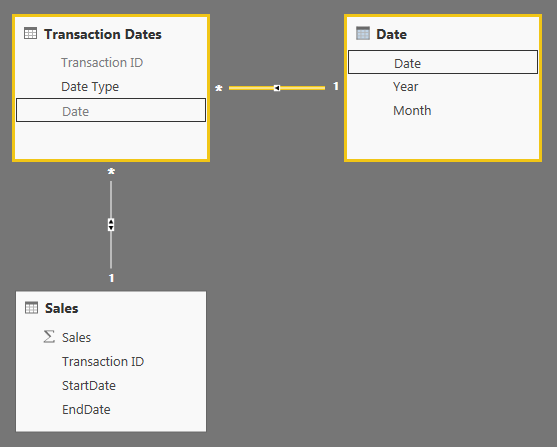
  1. Set up the data model with these tables/relationships:image.png


  2. Date is a standard date table 

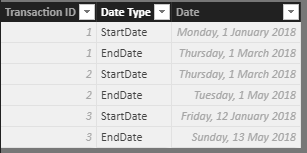
  3. Transaction Dates looks like this, providing the relationship between each "transaction" and StartDate and EndDate. Note the bidirectional relationship with Sales.image.png

With this model, you can now apply filters on the Date table and the Sales table will be filtered to rows where either StartDate or EndDate meets the filter criteria.

Also, you could filter on Date Type if you wanted the Date filter to apply to StartDate or EndDate only.


Regards,

Owen


Owen Auger
Did I answer your question? Mark my post as a solution!
Blog
LinkedIn

Hi @AaronJarboe,


Does that make sense? If so, kindly mark the answer as solution to close the case.


Regards,
Frank

Community Support Team _ Frank
If this post helps, then please consider Accept it as the solution to help the others find it more quickly.
v-frfei-msft
Community Support
Community Support

Hi @AaronJarboe,


I made one sample for your reference.


1. Create the relationship between tables as below.


Capture.PNG


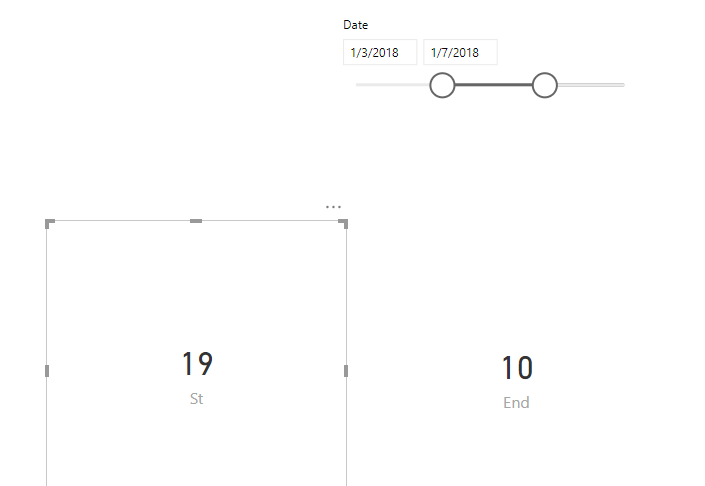
2. Create the measures.


End = CALCULATE(SUM(Table1[sales]),USERELATIONSHIP('CALENDAR'[Date],Table1[End date]))
St = CALCULATE(SUM(Table1[sales]))

2.PNG

For more details, please check the pbix as attached.


Regards,

Frank

Community Support Team _ Frank
If this post helps, then please consider Accept it as the solution to help the others find it more quickly.

Helpful resources

Announcements
November Power BI Update Carousel

Power BI Monthly Update - November 2025

Check out the November 2025 Power BI update to learn about new features.

Fabric Data Days Carousel

Fabric Data Days

Advance your Data & AI career with 50 days of live learning, contests, hands-on challenges, study groups & certifications and more!

FabCon Atlanta 2026 carousel

FabCon Atlanta 2026

Join us at FabCon Atlanta, March 16-20, for the ultimate Fabric, Power BI, AI and SQL community-led event. Save $200 with code FABCOMM.

Top Solution Authors
Top Kudoed Authors