Join us at FabCon Atlanta from March 16 - 20, 2026, for the ultimate Fabric, Power BI, AI and SQL community-led event. Save $200 with code FABCOMM.
Register now!Get Fabric Certified for FREE during Fabric Data Days. Don't miss your chance! Request now
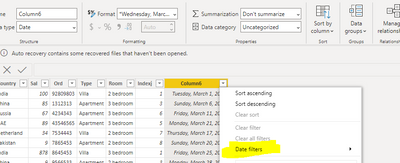
CountrySalOrdTypeRoomIndexjColumn6
| India | 100 | 92809803 | Villa | 2 bedroom | 1 | Tuesday, March 1, 2022 |
| China | 85 | 1312313 | Apartment | 3 bedroom | 3 | Sunday, March 6, 2022 |
| Russia | 67 | 4234343 | Apartment | 3 bedroom | 6 | Friday, March 11, 2022 |
| UAE | 89 | 43546565 | Apartment | 3 bedroom | 5 | Monday, March 21, 2022 |
| Netherland | 34 | 7534443 | Villa | 2 bedroom | 7 | Thursday, March 17, 2022 |
| Pakistan | 9 | 7865453 | Apartment | 2 bedroom | 8 | Sunday, March 20, 2022 |
| India | 878 | 8645453 | Villa | 3 bedroom | 1 | Friday, March 25, 2022 |
| China | 9 | 9566533 | Apartment | 2 bedroom | 3 | Monday, March 28, 2022 |
In the above data I am trying to filter date like below:
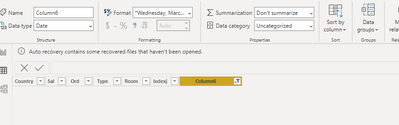
But is returning nothing
Is there something wrong with the latest version or am I doing something wrong?!
Solved! Go to Solution.
Hi @Antmkjr ,
This is a bug, will be fixed as soon as possible. It takes a while to wait, thanks for your understanding!
Best Regards,
Winniz
Hi @Antmkjr ,
I have reported the issue internally (ICM: 316060848). If there are any updates, I will post here, please be patient.
Best Regards,
Winniz
Yes i selected from calender pop up as shown, till last week it was working fine, so is it a problem with the latest version that im not able to filter dates
Hi @Antmkjr ,
This is a bug, will be fixed as soon as possible. It takes a while to wait, thanks for your understanding!
Best Regards,
Winniz
Check out the November 2025 Power BI update to learn about new features.
Advance your Data & AI career with 50 days of live learning, contests, hands-on challenges, study groups & certifications and more!