Join us at FabCon Atlanta from March 16 - 20, 2026, for the ultimate Fabric, Power BI, AI and SQL community-led event. Save $200 with code FABCOMM.
Register now!The Power BI Data Visualization World Championships is back! Get ahead of the game and start preparing now! Learn more
Hello.
I'm having a problem with the "Actual Date". I created a filter with this aspect : XX-XX-XXX to Actual Date (Example: 01-01-2017 to 29-09-2020 (today's date))
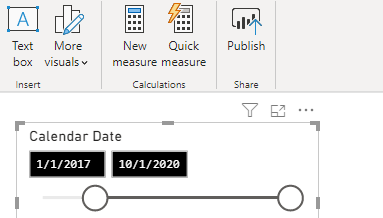
In my Power BI desktop project, everything works good, like this:
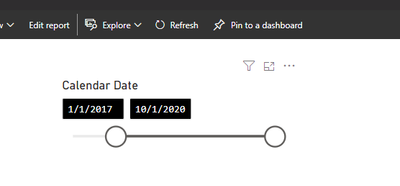
But when I publish this project, the Actual Date shows another date, like this:
(This is the SAME PROJECT; BUT NOW PUBLISHED!)
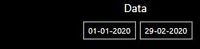
What I have is this:
Any help, please?
Hi @Kermithefrog ,
Based on your description, seems that I could not reproduce it in my environment. When I set the date filter in power bi desktop, after publishing to power bi service, it is the same as in desktop.
Have a couple of problems that want to know to help you better:
Best Regards,
Yingjie Li
If this post helps then please consider Accept it as the solution to help the other members find it more quickly.
The Power BI Data Visualization World Championships is back! Get ahead of the game and start preparing now!
Check out the November 2025 Power BI update to learn about new features.
| User | Count |
|---|---|
| 59 | |
| 46 | |
| 42 | |
| 23 | |
| 17 |
| User | Count |
|---|---|
| 190 | |
| 122 | |
| 96 | |
| 66 | |
| 47 |