Join us at FabCon Atlanta from March 16 - 20, 2026, for the ultimate Fabric, Power BI, AI and SQL community-led event. Save $200 with code FABCOMM.
Register now!Learn from the best! Meet the four finalists headed to the FINALS of the Power BI Dataviz World Championships! Register now
Hello,
I am creating a dashboard on Power BI that reads data from many excel sheets available in a SharePoint site.
I understand that the data in the excel sheet should have a specific form/layouts, so the Power BI can recognize them (Data should be in columns, no merged cells, etc) .
The problem is the excel sheets that I use which created by colleagues or extracted form tools, have different forms/layouts that the Power BI can't recognize. (Such as Merged cells or horizontal columns)
What do you usually do in this case?
Create a new sheet that reflects the same data in the required layouts, then link the new sheet to the Power BI?
But sometimes this way doesn’t work!
Or, you have different suggestions?
Thanks in advance
Solved! Go to Solution.
Hello @Hadill ,
You could try to work on it and shape it in power query, check this link to learnabout pivot and unpivot https://databear.com/power-bi-pivot-and-unpivot-columns/
If I answered your question, please mark my post as solution so it would appeare to others, Appreciate your Kudos 👍
Proud to be a Super User! | |
Thank you @Idrissshatila for your helping.
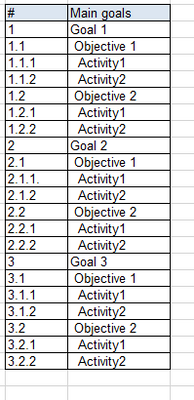
I have diffrent kind of data sorting that the pivot table doesnt work with, could you please help me in this too?
below screenshot.
Thanks again
Hello @Hadill ,
You could try to work on it and shape it in power query, check this link to learnabout pivot and unpivot https://databear.com/power-bi-pivot-and-unpivot-columns/
If I answered your question, please mark my post as solution so it would appeare to others, Appreciate your Kudos 👍
Proud to be a Super User! | |
Share feedback directly with Fabric product managers, participate in targeted research studies and influence the Fabric roadmap.
Check out the February 2026 Power BI update to learn about new features.
| User | Count |
|---|---|
| 63 | |
| 55 | |
| 41 | |
| 16 | |
| 14 |
| User | Count |
|---|---|
| 98 | |
| 80 | |
| 35 | |
| 29 | |
| 25 |