FabCon is coming to Atlanta
Join us at FabCon Atlanta from March 16 - 20, 2026, for the ultimate Fabric, Power BI, AI and SQL community-led event. Save $200 with code FABCOMM.
Register now!- Power BI forums
- Get Help with Power BI
- Desktop
- Service
- Report Server
- Power Query
- Mobile Apps
- Developer
- DAX Commands and Tips
- Custom Visuals Development Discussion
- Health and Life Sciences
- Power BI Spanish forums
- Translated Spanish Desktop
- Training and Consulting
- Instructor Led Training
- Dashboard in a Day for Women, by Women
- Galleries
- Data Stories Gallery
- Themes Gallery
- Contests Gallery
- QuickViz Gallery
- Quick Measures Gallery
- Visual Calculations Gallery
- Notebook Gallery
- Translytical Task Flow Gallery
- TMDL Gallery
- R Script Showcase
- Webinars and Video Gallery
- Ideas
- Custom Visuals Ideas (read-only)
- Issues
- Issues
- Events
- Upcoming Events
Get Fabric Certified for FREE during Fabric Data Days. Don't miss your chance! Request now
- Power BI forums
- Forums
- Get Help with Power BI
- Desktop
- Re: Daily Incremental Refresh with Delta Capture a...
- Subscribe to RSS Feed
- Mark Topic as New
- Mark Topic as Read
- Float this Topic for Current User
- Bookmark
- Subscribe
- Printer Friendly Page


- Mark as New
- Bookmark
- Subscribe
- Mute
- Subscribe to RSS Feed
- Permalink
- Report Inappropriate Content
Daily Incremental Refresh with Delta Capture and Reporting
Hey folks,
I need to design a process that stages and appends a daily CSV file that is a snapshot of a table in a database (no direct connection allowed). This process needs to identify if any records that changed between each day, and then make that information available to the team.
For example, if on Monday, record 1 changed valueA from "Low" to "High" then that record needs to be flagged for review in a sub-process that uses the output of this report as an input. I.e., if a record shows up on this report, then it gets manually entered into a tracking tool to investigate.
I was thinking of staging this data in a folder in SharePoint, having the dba automate an e-mail delivery of the CSV daily an then having PowerAutomate save the file into the target folder with a file name DD-MM-YYYY.CSV. And then using the PowerBI server to do an incremental refresh.
I think I can figure out the incremental refresh, but I'm not sure how I would identify and flag records that changed from day to day. Do you have any suggestions?
Day 1 Snapshot - Export table example
| ID | Monitored_Field |
| 1 | Low |
| 2 | Moderate |
| 3 | High |
The change happens in real life and ID1 escalates to "Moderate" and ID2 escalates to "High" or even "High to "Low". Items moving to High or from High are the ones I'd want to have further investigated.
Day 2 Snapshot - Export table example
| ID | Monitored_Field |
| 1 | Moderate |
| 2 | High |
| 3 | Low |
So the output report would show Record 2 and Record 3 and if it's possible to show what the original value was and what it changed to that would be awesome. I just cannot figure out how to do it.
Solved! Go to Solution.


- Mark as New
- Bookmark
- Subscribe
- Mute
- Subscribe to RSS Feed
- Permalink
- Report Inappropriate Content
- Mark as New
- Bookmark
- Subscribe
- Mute
- Subscribe to RSS Feed
- Permalink
- Report Inappropriate Content
Welcome to the world of Nyquist and Shannon. That's why I prefer event based reporting over snapshots.
- Mark as New
- Bookmark
- Subscribe
- Mute
- Subscribe to RSS Feed
- Permalink
- Report Inappropriate Content
Nyquist and Shannon - theory of signal detection. I didn't get that far in my psychophysics/acoustics classes 😉 Is there any work around given my constraints of snapshot reporting? I'm still investigating with the DBAs and system admin to see if there is a 'lastupdated' or 'lastmodified' field on my source tables I could use. I assume this is the event based reporting you mean?
Either way, I'd be stuck with daily snapshots but if I had confidence that I could capture only valid changed records each day, it would limit the size of my snapshots and it would make the manual review easier.
- Mark as New
- Bookmark
- Subscribe
- Mute
- Subscribe to RSS Feed
- Permalink
- Report Inappropriate Content
Not so much signal detection but more sampling rate discussion. According to Nyquist and Shannon you need to sample at a rate at least twice as high as your change rate. So let's say you have weekly snapshots - that means you will be blind to any changes that happen to your data within the week. If you need better quality you need to increase the sampling rate (for example to twice a day)
If you want to be cute you can post-process your snapshots to throw away all rows that have not changed.
- Mark as New
- Bookmark
- Subscribe
- Mute
- Subscribe to RSS Feed
- Permalink
- Report Inappropriate Content
This isn't a large scale application. We're talking about less-than 100k records in each table. Some of them only change once a year, some once a month. Some may change daily but those are definitely smaller data sets.
It turns out I was able to get Date Created and Last Updated fields exposed in the reporting layer. So I can include those fields now if needed. Do you think that might help improve the code? I could only bring records that changed between Day A and Date B?
- Mark as New
- Bookmark
- Subscribe
- Mute
- Subscribe to RSS Feed
- Permalink
- Report Inappropriate Content
Some of them only change once a year, some once a month. Some may change daily but those are definitely smaller data sets.That data is unsuitable for incremental refresh. Incremental refresh only works with immutable data.
You will need to implement your own partition management, up to and including periodic full refreshes across all partitions.
- Mark as New
- Bookmark
- Subscribe
- Mute
- Subscribe to RSS Feed
- Permalink
- Report Inappropriate Content
Based on your original message, I assumed I didn't actually need to use incremental refresh in the Service. Rather, because the records are so small, that continuously appending new files to the folder should be okay because PBI will be able to just look at the MAX file date and the next "max" file date (today v. yesterday) to keep the refreshes tidy.
- Mark as New
- Bookmark
- Subscribe
- Mute
- Subscribe to RSS Feed
- Permalink
- Report Inappropriate Content
Frankly, if your data volume is low, don't bother with Incremental Refresh. Do a brute force flush and fill.
- Mark as New
- Bookmark
- Subscribe
- Mute
- Subscribe to RSS Feed
- Permalink
- Report Inappropriate Content
Appreciate your patience and time on this 🙂 Yea, brute force refresh is good. Can you think of any way to deal with the problem of a record changing on a given day and then changing again in a few days? Am I simply stuck with this issue in the fantastic code you wrote for me because of the Nyquist/Shannon sampling issue you described?
I'm just wondering if the Last Updated field could be of any help?
- Mark as New
- Bookmark
- Subscribe
- Mute
- Subscribe to RSS Feed
- Permalink
- Report Inappropriate Content
Your only other option would be switch to CDC and event based reporting. In its simplest form that is a reference table with all changes to all fields being recorded one by one. It's a bit more computation, but requires dramatically less storage, and allows you to recreate the state of each transaction for any point in time you choose. You can then also do things like jitter analysis and sankey flow diagrams etc.
- Mark as New
- Bookmark
- Subscribe
- Mute
- Subscribe to RSS Feed
- Permalink
- Report Inappropriate Content
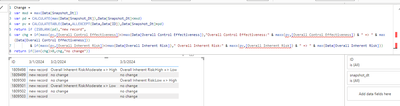
So weird, I went away for the weekend and came back and now it's not working. It's no longer converting changes in Overall Inherent Risk or Overall Control Effectiveness and displaying their changes. It's just calling them new records. The only thing I've changed since Friday was that I deleted the physical column "snapshot_dt" from each file as I had that in there for testing purposes. But in the Transform Steps in PowerQuery I added in a column "snapshot_dt" which was derived from the file name, which was imported from PowerQuery. So, really no change at all. All the same columns are present when the calculations occur as far as I can tell. I'm not sure why it's no longer work.
Edit: Now I see a difference. In the Friday screenshot the column "Overall Inherent Risk" doesn't even exist in this structure but for some reason it was computing the change in Overall Inherent Risk, or at least it seemed to be doing that. In the image from today 4/15 that column is present but no changes are computed except to call existing records that have changed " New Records".
Edit2: I see another difference. You're using a Matrix in your PBIT and I'm using a Table visual. Is there a way to use a Table instead of Matrix?
Question:
[1] Can I use a table instead of a matrix visual? It would be nice to be able to see all of the details side-by-side. Although, the grouping on date of the Matrix is appealing!
[2] If I want to add other columns to monitor for change (e.g., Some other value changes from Standard to Intense), does it just involve adding additional AND IF clauses to the 'var chg' expression?
[3] How can I get count values out of this returned table of changes? Is there a way to count the number of changes or the total number of new records per day from this method?
Screenshot from This Morning (4/15)

Screenshot from Friday (4/12)


Helpful resources

Power BI Monthly Update - November 2025
Check out the November 2025 Power BI update to learn about new features.

Fabric Data Days
Advance your Data & AI career with 50 days of live learning, contests, hands-on challenges, study groups & certifications and more!

FabCon Atlanta 2026
Join us at FabCon Atlanta, March 16-20, for the ultimate Fabric, Power BI, AI and SQL community-led event. Save $200 with code FABCOMM.


