cancel
Showing results for 
Search instead for 
Did you mean: 

July 7 - July 17 | Round 2 of the Power BI Dataviz World Championships. Don't miss your chance! Learn more

Reply
Anonymous
Not applicable

DAX

Hello,

I am new to Power BI, and for the moment trying DAX. 

I was able do calculate a measure for the Year to Date sum of  a value with following formula:


Somme YTD  = TOTALYTD(SUM(Sheet1[ETP Mensuel]);Sheet1[Date deb mois].[Date])


So I thoughtt that it would be easy to simply use the same formula but replace SUM by AVERAGE. But this didn't work.

Moyenne YTD = TOTALYTD(AVERAGE(Sheet1[ETP Mensuel]);Sheet1[Date deb mois].[Date])     does not work


Finally I was able to do it like this:


Moyenne YTD  = DIVIDE(TOTALYTD(SUM(Sheet1[ETP Mensuel]);Sheet1[Date deb mois].[Date]); MAX( Sheet1[Date deb mois].[NoMois] ) ;0)   


This worked fine, but I find it not very elegant, and I would like to understand why it didn't work with TOTALYTD and AVERAGE functions.

Maybe I didn't get right what DAX does "behind the scene"...

A great thank you if anybody has an idea,


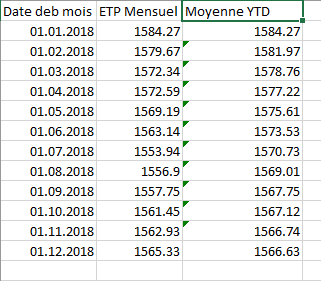
An extract of my data is below:


Data.PNG


5 REPLIES 5
v-juanli-msft
Community Support
Community Support

Hi @Anonymous 

If the screenshot shows the correct Moyenne YTD,

create a measure

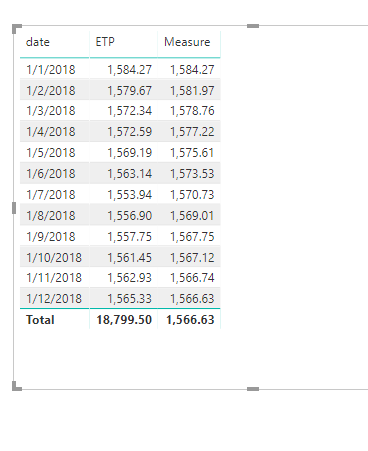
Measure = CALCULATE(AVERAGE(Sheet4[ETP]),DATESYTD(Sheet4[date]))

7.png

You could learn more about DAX functions here.


Best Regards
Maggie


Community Support Team _ Maggie Li
If this post helps, then please consider Accept it as the solution to help the other members find it more quickly.

Anonymous
Not applicable

Hi Maggie, I tried this also, but it doesn't work.

Both 


Somme YTD 1 = TOTALYTD(SUM(Sheet1[ETP Mensuel]);Sheet1[Date deb mois].[Date])
Somme YTD 2 = CALCULATE(SUM(Sheet1[ETP Mensuel]);DATESYTD(Sheet1[Date deb mois].[Date]))
 
work fine as long as I do a SUM, but if I replace SUM by AVERAGE, it does a wrong calculation:
Both 
 
Moyenne YTD 1 = TOTALYTD(AVERAGE(Sheet1[ETP Mensuel]);Sheet1[Date deb mois].[Date])
Moyenne YTD 2 = CALCULATE(AVERAGE(Sheet1[ETP Mensuel]);DATESYTD(Sheet1[Date deb mois].[Date]))
 
give values like 142, 150, and so on, instead of the correct YTD means which are about 1570.
I see that in your example there is not the .[Date] after the date field, but this doesn't change the result.
 
But anyway thank you for your help, I will try to see why your solution and what I tried doesn't work.
Have a nice day,
Best regards,
Barbara

Hi @Anonymous 

Is this problem sloved? 

If it is sloved, could you kindly accept it as a solution to close this case?

If not, please let me know.


Best Regards

Maggie

Hi @Anonymous 

I figure out why my solution doesn't fit on your side.


i think date format is mm.dd.yyyy.

But it seems your format should be dd.mm.yy.

Aslo, I test with a dataset including continuous date.


If your format is dd.mm.yy, and your table has discontinuous date, please create a new table

calendar = ADDCOLUMNS(CALENDARAUTO(),"year/month",FORMAT([Date],"yyyymm"))

Connect it to your table (create relationship between two tables)

Then create a measure in your table

Measure = CALCULATE(AVERAGE(Sheet4[ETP]),DATESYTD('calendar'[Date]))

5.png

You don't need to use [date].[date] format in your formula.

It may lead some errors.


Best Regards
Maggie


Community Support Team _ Maggie Li
If this post helps, then please consider Accept it as the solution to help the other members find it more quickly.

Anonymous
Not applicable

Hi Maggie,


sorry to answer late, I was busy with other things and had no time to check this solution. 


I checked it just now and it does not work, but I think this is due to my data which is more complex (I gave only an aggregate sample in my post because I can't give the whole). 


But I think that you pointed out the right problem which is surely related to date format.

I will try to work this out and I will let you know as soon as possible.


Thank you very much for this hint,


Best regards,

Barbara


Helpful resources

Announcements
FabCon and SQLCon Barcelona 2026

FabCon & SQLCon – Barcelona 2026

Join us in Barcelona for FabCon and SQLCon, the Fabric, Power BI, SQL, and AI community event. Save €200 with code FABCMTY200.

60 days of Data Days Carousel

Data Days 2026

Join Data Days 2026: 60 days of free live/on-demand sessions, challenges, study groups, and certification opportunities.

Power BI DataViz World Championships carousel

Power BI DataViz World Championships - June 2026

A new Power BI DataViz World Championship is coming this June! Don't miss out on submitting your entry.

Top Solution Authors