FabCon is coming to Atlanta
Join us at FabCon Atlanta from March 16 - 20, 2026, for the ultimate Fabric, Power BI, AI and SQL community-led event. Save $200 with code FABCOMM.
Register now!- Power BI forums
- Get Help with Power BI
- Desktop
- Service
- Report Server
- Power Query
- Mobile Apps
- Developer
- DAX Commands and Tips
- Custom Visuals Development Discussion
- Health and Life Sciences
- Power BI Spanish forums
- Translated Spanish Desktop
- Training and Consulting
- Instructor Led Training
- Dashboard in a Day for Women, by Women
- Galleries
- Data Stories Gallery
- Themes Gallery
- Contests Gallery
- QuickViz Gallery
- Quick Measures Gallery
- Visual Calculations Gallery
- Notebook Gallery
- Translytical Task Flow Gallery
- TMDL Gallery
- R Script Showcase
- Webinars and Video Gallery
- Ideas
- Custom Visuals Ideas (read-only)
- Issues
- Issues
- Events
- Upcoming Events
Get Fabric Certified for FREE during Fabric Data Days. Don't miss your chance! Request now
- Power BI forums
- Forums
- Get Help with Power BI
- Desktop
- DAX to Filter on the same field with different con...
- Subscribe to RSS Feed
- Mark Topic as New
- Mark Topic as Read
- Float this Topic for Current User
- Bookmark
- Subscribe
- Printer Friendly Page


- Mark as New
- Bookmark
- Subscribe
- Mute
- Subscribe to RSS Feed
- Permalink
- Report Inappropriate Content
DAX to Filter on the same field with different conditions
This is a sample data table. My requirement is to calculate:
How may People who are from Marketing in 2018 were part of 2017 Sales? Answer is : 4 (C,D,E & F)
I am not sure if this has a simple trick to calculate in dax but I am not able to answer .
| Name | Year | Program |
| A | 2017 | Sales |
| B | 2017 | Sales |
| C | 2017 | Sales |
| D | 2017 | Sales |
| E | 2017 | Sales |
| F | 2017 | Sales |
| G | 2017 | Sales |
| A | 2017 | Marketing |
| B | 2017 | Marketing |
| C | 2017 | Marketing |
| H | 2018 | Sales |
| I | 2018 | Sales |
| J | 2018 | Sales |
| K | 2018 | Sales |
| L | 2018 | Sales |
| C | 2018 | Marketing |
| D | 2018 | Marketing |
| E | 2018 | Marketing |
| F | 2018 | Marketing |
Solved! Go to Solution.

- Mark as New
- Bookmark
- Subscribe
- Mute
- Subscribe to RSS Feed
- Permalink
- Report Inappropriate Content
@Sabarikumar7579,
if you are looking to count the number of rows, create a measure like this:
Count of Name =
VAR t1 = NATURALINNERJOIN (
    SELECTCOLUMNS (
        FILTER ( Table1, Table1[Year] = 2018 && Table1[Program] = "Marketing" ),
        "Name", [Name]
    ),
    SELECTCOLUMNS (
        FILTER ( Table1, Table1[Year] = 2017 && Table1[Program] = "Sales" ),
        "Name", [Name]
    )
)
RETURN COUNTROWS(t1)
Otherwise, if you are looking for a list, use this instead:
List of Name =
VAR t1 = NATURALINNERJOIN (
    SELECTCOLUMNS (
        FILTER ( Table1, Table1[Year] = 2018 && Table1[Program] = "Marketing" ),
        "Name", [Name]
    ),
    SELECTCOLUMNS (
        FILTER ( Table1, Table1[Year] = 2017 && Table1[Program] = "Sales" ),
        "Name", [Name]
    )
)
RETURN CONCATENATEX(t1, [Name], ", ")


- Mark as New
- Bookmark
- Subscribe
- Mute
- Subscribe to RSS Feed
- Permalink
- Report Inappropriate Content
Hi,
You may download my PBI file from here.
Hope this helps.
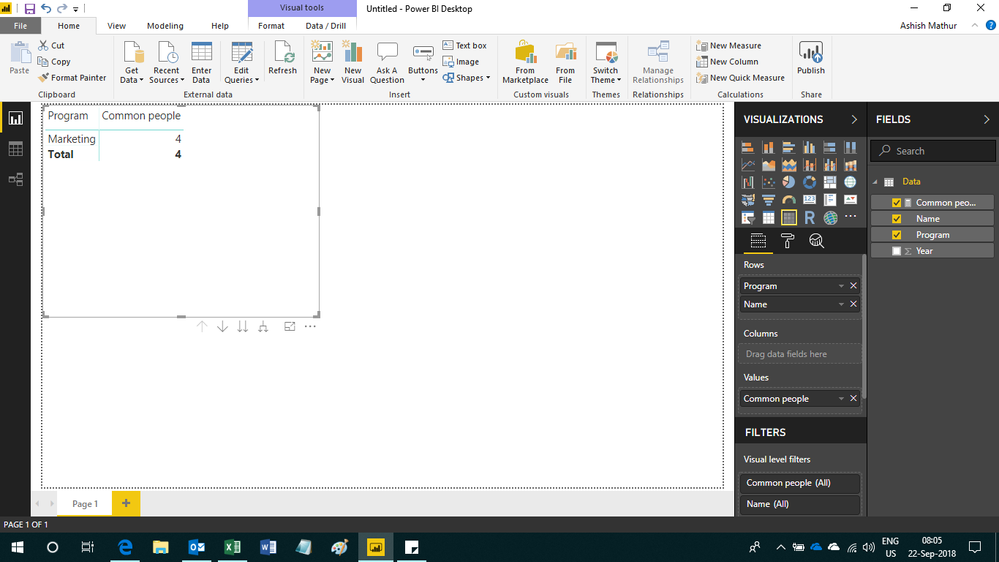
Regards,
Ashish Mathur
http://www.ashishmathur.com
https://www.linkedin.com/in/excelenthusiasts/
- Mark as New
- Bookmark
- Subscribe
- Mute
- Subscribe to RSS Feed
- Permalink
- Report Inappropriate Content
Hi,
You may download my PBI file from here.
Hope this helps.
Regards,
Ashish Mathur
http://www.ashishmathur.com
https://www.linkedin.com/in/excelenthusiasts/
- Mark as New
- Bookmark
- Subscribe
- Mute
- Subscribe to RSS Feed
- Permalink
- Report Inappropriate Content
- Mark as New
- Bookmark
- Subscribe
- Mute
- Subscribe to RSS Feed
- Permalink
- Report Inappropriate Content
You are welcome.
Regards,
Ashish Mathur
http://www.ashishmathur.com
https://www.linkedin.com/in/excelenthusiasts/
- Mark as New
- Bookmark
- Subscribe
- Mute
- Subscribe to RSS Feed
- Permalink
- Report Inappropriate Content
@Sabarikumar7579,
if you are looking to count the number of rows, create a measure like this:
Count of Name =
VAR t1 = NATURALINNERJOIN (
    SELECTCOLUMNS (
        FILTER ( Table1, Table1[Year] = 2018 && Table1[Program] = "Marketing" ),
        "Name", [Name]
    ),
    SELECTCOLUMNS (
        FILTER ( Table1, Table1[Year] = 2017 && Table1[Program] = "Sales" ),
        "Name", [Name]
    )
)
RETURN COUNTROWS(t1)
Otherwise, if you are looking for a list, use this instead:
List of Name =
VAR t1 = NATURALINNERJOIN (
    SELECTCOLUMNS (
        FILTER ( Table1, Table1[Year] = 2018 && Table1[Program] = "Marketing" ),
        "Name", [Name]
    ),
    SELECTCOLUMNS (
        FILTER ( Table1, Table1[Year] = 2017 && Table1[Program] = "Sales" ),
        "Name", [Name]
    )
)
RETURN CONCATENATEX(t1, [Name], ", ")


- Mark as New
- Bookmark
- Subscribe
- Mute
- Subscribe to RSS Feed
- Permalink
- Report Inappropriate Content
Hmm, that's some pretty ugly data. I think to do this correctly, you would need something to determine the last status of 2017.
Follow on LinkedIn
@ me in replies or I'll lose your thread!!!
Instead of a Kudo, please vote for this idea
Become an expert!: Enterprise DNA
External Tools: MSHGQM
YouTube Channel!: Microsoft Hates Greg
Latest book!: DAX For Humans
DAX is easy, CALCULATE makes DAX hard...
Helpful resources

Power BI Monthly Update - November 2025
Check out the November 2025 Power BI update to learn about new features.

Fabric Data Days
Advance your Data & AI career with 50 days of live learning, contests, hands-on challenges, study groups & certifications and more!

FabCon Atlanta 2026
Join us at FabCon Atlanta, March 16-20, for the ultimate Fabric, Power BI, AI and SQL community-led event. Save $200 with code FABCOMM.


