- Power BI forums
- Updates
- News & Announcements
- Get Help with Power BI
- Desktop
- Service
- Report Server
- Power Query
- Mobile Apps
- Developer
- DAX Commands and Tips
- Custom Visuals Development Discussion
- Health and Life Sciences
- Power BI Spanish forums
- Translated Spanish Desktop
- Power Platform Integration - Better Together!
- Power Platform Integrations (Read-only)
- Power Platform and Dynamics 365 Integrations (Read-only)
- Training and Consulting
- Instructor Led Training
- Dashboard in a Day for Women, by Women
- Galleries
- Community Connections & How-To Videos
- COVID-19 Data Stories Gallery
- Themes Gallery
- Data Stories Gallery
- R Script Showcase
- Webinars and Video Gallery
- Quick Measures Gallery
- 2021 MSBizAppsSummit Gallery
- 2020 MSBizAppsSummit Gallery
- 2019 MSBizAppsSummit Gallery
- Events
- Ideas
- Custom Visuals Ideas
- Issues
- Issues
- Events
- Upcoming Events
- Community Blog
- Power BI Community Blog
- Custom Visuals Community Blog
- Community Support
- Community Accounts & Registration
- Using the Community
- Community Feedback
Register now to learn Fabric in free live sessions led by the best Microsoft experts. From Apr 16 to May 9, in English and Spanish.
- Power BI forums
- Forums
- Get Help with Power BI
- Desktop
- Re: DAX to Convert days to Years,months & days
- Subscribe to RSS Feed
- Mark Topic as New
- Mark Topic as Read
- Float this Topic for Current User
- Bookmark
- Subscribe
- Printer Friendly Page

- Mark as New
- Bookmark
- Subscribe
- Mute
- Subscribe to RSS Feed
- Permalink
- Report Inappropriate Content
DAX to Convert days to Years,months & days
Hi Community,
I want to know the DAX to to convert days (a calculated column for difference between two dates) to Years,months & days. For example :
91 days = 3 months 1day
367 days = 1 year 2days
450 days = 1year 2month 26days
I can do it in excel, can't get it right in DAX.
Many thanks🙂
Solved! Go to Solution.


- Mark as New
- Bookmark
- Subscribe
- Mute
- Subscribe to RSS Feed
- Permalink
- Report Inappropriate Content
Hi @Anonymous
You can use this DAX to create calculated column:
Converted = QUOTIENT('Table'[Days], 365) & " years " & QUOTIENT(MOD('Table'[Days],365),30) & " months " & MOD(MOD('Table'[Days],365),30) & " days"
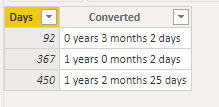
You have to adjust the values you divide by. I don't know if you consider 365 days per year or 366 days. Whether 31 days per month or 30.
_______________
If I helped, please accept the solution and give kudos! 😀

- Mark as New
- Bookmark
- Subscribe
- Mute
- Subscribe to RSS Feed
- Permalink
- Report Inappropriate Content
I really like the solution with QUOTIENT, but considering I have the following dates, the result is incorrect
Stard Date: 2020-07-01
End Date: 2023-06-30
Retult: 2 year, 12 months and 4 days
The result should be: 2 year, 11 months and 29 days
- Mark as New
- Bookmark
- Subscribe
- Mute
- Subscribe to RSS Feed
- Permalink
- Report Inappropriate Content
Hi @Anonymous how did you solve this question?


- Mark as New
- Bookmark
- Subscribe
- Mute
- Subscribe to RSS Feed
- Permalink
- Report Inappropriate Content
@Anonymous , Try like a column like
 Switch ( true() ,
		  [days] < 365 = quotient([Days],30) & " Months " & mod([Days],30) & " days " ,
		  quotient([Days],3365) & " Months " & mod([Days],365) & " days " ,
		  [days] & "days"
		  )
Microsoft Power BI Learning Resources, 2023 !!
Learn Power BI - Full Course with Dec-2022, with Window, Index, Offset, 100+ Topics !!
Did I answer your question? Mark my post as a solution! Appreciate your Kudos !! Proud to be a Super User! !!
- Mark as New
- Bookmark
- Subscribe
- Mute
- Subscribe to RSS Feed
- Permalink
- Report Inappropriate Content
Hi @amitchandak is there a way to take day of a year (365/364) into consideration when doing this calculation? I am counting the milestone date and that would make a differnece.
- Mark as New
- Bookmark
- Subscribe
- Mute
- Subscribe to RSS Feed
- Permalink
- Report Inappropriate Content
Hi @Anonymous
You can use this DAX to create calculated column:
Converted = QUOTIENT('Table'[Days], 365) & " years " & QUOTIENT(MOD('Table'[Days],365),30) & " months " & MOD(MOD('Table'[Days],365),30) & " days"
You have to adjust the values you divide by. I don't know if you consider 365 days per year or 366 days. Whether 31 days per month or 30.
_______________
If I helped, please accept the solution and give kudos! 😀

- Mark as New
- Bookmark
- Subscribe
- Mute
- Subscribe to RSS Feed
- Permalink
- Report Inappropriate Content
This looks like exactly what I need but it is throwing the error, "cannot convert value '30days' of type Text to type Number. TIA!
- Mark as New
- Bookmark
- Subscribe
- Mute
- Subscribe to RSS Feed
- Permalink
- Report Inappropriate Content
Hi @lkalawski is there a way to take day of a year (365/364) into consideration when doing this calculation? I am counting the milestone date and that would make a differnece.
Helpful resources

Microsoft Fabric Learn Together
Covering the world! 9:00-10:30 AM Sydney, 4:00-5:30 PM CET (Paris/Berlin), 7:00-8:30 PM Mexico City

Power BI Monthly Update - April 2024
Check out the April 2024 Power BI update to learn about new features.

Fabric Community Update - April 2024
Find out what's new and trending in the Fabric Community.

| User | Count |
|---|---|
| 109 | |
| 98 | |
| 80 | |
| 64 | |
| 57 |


| User | Count |
|---|---|
| 145 | |
| 111 | |
| 92 | |
| 84 | |
| 66 |


